

Configure Ranger for Spark on Kubernetes using CLI
Prerequisites
-
An ADPS cluster (2.0.0 or later) is installed and running.
-
An ADH cluster (4.2.0 or later) is installed and running.
-
Spark operator is deployed in Kubernetes according to the instruction.
Step 1. Create a service in Ranger
This guide describes how to create a service via Ranger REST API. Alternatively, you can create a service in the Ranger web UI.
-
Define a service in a JSON file:
ranger-spark-k8s.json{ "isEnabled": true, "type": "hive", "name": "spark_k8s", (1) "displayName": "spark_k8s", "description": "Service for Kubernetes Spark", "configs": { "username": "spark", (2) "password": "bigdata", (3) "ranger.plugin.audit.filters": "[ {'accessResult': 'DENIED', 'isAudited': true}, {'actions':['METADATA OPERATION'], 'isAudited': false}, {'users':['hive','hue'],'actions':['SHOW_ROLES'],'isAudited':false} ]", "jdbc.driverClassName": "org.apache.hive.jdbc.HiveDriver", "jdbc.url": "jdbc:hive2://tsn-adh-k8s-2.ru-central1.internal:10002" (4) } }1 A name of the Spark service in Ranger. Must be unique. 2 A username for the service. 3 A password for the service. 4 A JDBC string for connecting to HiveServer2. -
Push the defined service to Ranger:
$ curl -u admin:<admin_pwd> -H "Content-Type: application/json" -X POST -d @ranger-spark-k8s.json http://<ranger-admin>:6080/service/public/v2/api/service
Step 2. Submit a Spark application
-
Prepare the hadoop_conf.yaml Hadoop configuration file (required only if the application accesses data managed by these services; for a self-contained JAR the
hadoopblock can be omitted):hadoop_conf.yamlsites: core: fs.defaultFS: hdfs://adh hadoop.security.authentication: simple dfs.client.failover.proxy.provider.adh: org.apache.hadoop.hdfs.server.namenode.ha.ObserverReadProxyProvider dfs.ha.namenodes.adh: nn_tsn-adh-k8s-1,nn_tsn-adh-k8s-3 dfs.namenode.rpc-address.adh.nn_tsn-adh-k8s-1: tsn-adh-k8s-1.ru-central1.internal:8020 dfs.namenode.rpc-address.adh.nn_tsn-adh-k8s-3: tsn-adh-k8s-3.ru-central1.internal:8020 dfs.nameservices: adh hdfs: dfs.client.read.shortcircuit: false ozone: ozone.om.address.adh.om_tsn-adh-k8s-1: tsn-adh-k8s-1.ru-central1.internal:9862 ozone.om.address.adh.om_tsn-adh-k8s-2: tsn-adh-k8s-2.ru-central1.internal:9862 ozone.om.address.adh.om_tsn-adh-k8s-3: tsn-adh-k8s-3.ru-central1.internal:9862 ozone.om.nodes.adh: om_tsn-adh-k8s-1,om_tsn-adh-k8s-2,om_tsn-adh-k8s-3 ozone.om.service.ids: adhom hive: hive.metastore.sasl.enabled: false hive.metastore.uris: thrift://tsn-adh-k8s-1.ru-central1.internal:9083 metastore.use.SSL: false -
Initialize a Spark application:
$ ./adc init --spark-application --hadoop-file=hadoop_conf.yaml -o spark-application.yamlThis operation creates the spark-application.yaml file with a configuration template.
-
Edit the configuration file to your needs:
spark-application.yamlapiVersion: adc.arenadata.io/v1alpha1 kind: SparkApplication metadata: name: spark-application namespace: spark-applications (1) spec: image: hub.arenadata.io/adc-enterprise/spark3:<tag> (2) ## Image pull secret for a private registry. ## Set 'externalSecretName' to reference an existing Secret, ## or set 'credentials' and optionally 'secretName' to let the CLI create one. #imagePullSecret: # # Use a Secret managed outside ADC. # externalSecretName: existing-registry-secret # # ## Or let ADC create the Secret. # #secretName: custom-registry-secret # # #credentials: # # registry: registry.example.com # # username: user # # password: pass hadoop: (3) core: dfs.client.failover.proxy.provider.adh: org.apache.hadoop.hdfs.server.namenode.ha.ObserverReadProxyProvider dfs.ha.namenodes.adh: nn_tsn-adh-k8s-1,nn_tsn-adh-k8s-3 dfs.namenode.rpc-address.adh.nn_tsn-adh-k8s-1: tsn-adh-k8s-1.ru-central1.internal:8020 dfs.namenode.rpc-address.adh.nn_tsn-adh-k8s-3: tsn-adh-k8s-3.ru-central1.internal:8020 dfs.nameservices: adh fs.defaultFS: hdfs://adh hadoop.security.authentication: simple hdfs: dfs.client.read.shortcircuit: "false" hive: hive.metastore.sasl.enabled: "false" hive.metastore.uris: thrift://tsn-adh-k8s-1.ru-central1.internal:9083 metastore.use.SSL: "false" ozone: ozone.om.address.adh.om_tsn-adh-k8s-1: tsn-adh-k8s-1.ru-central1.internal:9862 ozone.om.address.adh.om_tsn-adh-k8s-2: tsn-adh-k8s-2.ru-central1.internal:9862 ozone.om.address.adh.om_tsn-adh-k8s-3: tsn-adh-k8s-3.ru-central1.internal:9862 ozone.om.nodes.adh: om_tsn-adh-k8s-1,om_tsn-adh-k8s-2,om_tsn-adh-k8s-3 ozone.om.service.ids: adhom ## Kerberos configuration for authentication. #kerberos: # principal: user@EXAMPLE.COM # # # CLI reads the local files and creates the kerberos-ccache Secret on 'adc apply'. # # Alternative - keytab mode: replace this block with: # # keytab: # # secretName: <name-of-existing-keytab-secret> # ticketCache: # #secretName: custom-ticket-cache # externalSecretName: existing-ticket-cache # #ticketPath: /tmp/krb5cc_1000 # #krb5ConfPath: /etc/krb5.conf ## Ranger plugin configuration. ## Uncomment and fill the lines below. adc apply derives the rest. ranger: (4) # # fill ranger.plugin.spark.policy.rest.url below with Ranger endpoint, e.g. https://adps-adc.ru-central1.internal:6182 # # fill ranger.plugin.spark.service.name below with Ranger service name you want to use for product, e.g. adc_spark_id_1 security: ranger.plugin.spark.policy.rest.url: "http://tsn-adps-2.ru-central1.internal:6080" ranger.plugin.spark.service.name: "spark_k8s" ranger.plugin.spark.use.rangerGroups: "True" ranger.plugin.spark.use.only.rangerGroups: "True" # # # fill xasecure.audit.destination.solr.zookeepers below with Zookeepers endpoints to resolve solr service, e.g. adps-adc.ru-central1.internal:2181/Arenadata.Hadoop-2.solr.server audit: xasecure.audit.destination.solr.zookeepers: "tsn-adps-2.ru-central1.internal:2181/Arenadata.Hadoop-40.solr.server" # # # Local Ranger files 'adc apply' writes into the configs Secret. # # Relative paths are resolved against the config file. # files: # jceksStorePath: /path/to/ranger.jceks ## Java KeyStore/TrustStore certificate configuration. ## Set externalSecretName to reference an existing Secret, ## or set files and optional secretName to have ADC create it. #ssl: # ## Name of the Secret containing Java keystores. # #secretName: custom-ssl-secret # externalSecretName: existing-ssl-secret # # # Key in the Secret containing the truststore file. # trustStoreKey: truststore.jks # # ## Password for the truststore (optional). # #trustStorePassword: bigdata # # ## Key in the Secret containing the keystore file (optional). # #keyStoreKey: keystore.jks # # ## Password for the keystore (optional). # #keyStorePassword: bigdata # # ## Local files 'adc apply' puts into the Secret named by ssl.secretName. # ## Relative paths are resolved against the config file. # #files: # # trustStorePath: /path/to/truststore.jks # # #keyStorePath: /path/to/keystore.jks ## Use an external Hadoop configs Secret instead of the one rendered by ADC. #hadoopConfigsSecret: # # Use a Secret managed outside ADC. # externalSecretName: existing-spark-hadoop-configs # # ## Or let ADC create the Secret. # #secretName: custom-spark-hadoop-configs ## Use an external Ranger configs Secret instead of the one rendered by ADC. #rangerConfigsSecret: # # Use a Secret managed outside ADC. # externalSecretName: existing-spark-ranger-configs # # ## Or let ADC create the Secret. # #secretName: custom-spark-ranger-configs # Spark application main resource (e.g. local:///opt/spark/examples/jars/spark-examples.jar). mainApplicationFile: "local:///opt/spark/examples/jars/spark-examples.jar" (5) ## HDFS or local directory for the Spark event log. ## When set, the CLI adds spark.eventLog.enabled=true, spark.eventLog.dir, ## spark.eventLog.rolling.enabled=true and spark.eventLog.rolling.interval=30s to sparkConf. #eventLogDir: "" ## Fully-qualified main class name. Required for Java/Scala applications. mainClass: "org.apache.spark.examples.sql.SparkSQLExample" (6) # ServiceAccount used by the Spark driver, also injected into # spark.kubernetes.authenticate.driver.serviceAccountName. The CLI creates it, plus a Role # and RoleBinding for Spark pods, by default (create: true). Set create: false to skip that # and only reference a ServiceAccount managed elsewhere. # The Role rules are managed by the CLI and cannot be customized. serviceAccount: (7) create: true name: spark-application job: (8) ## true (default) deletes the spark-submit Job pod after it finishes; set false to keep it for debugging. deleteOnTermination: false #resources: # limits: # cpu: "1" # memory: 512Mi # requests: # cpu: 500m # memory: 64Mi ## Component arguments. Key-value pairs passed to the component configuration. #args: # executor-memory: 1g # num-executors: "2" ## Application arguments appended after mainApplicationFile. args: - "100" # Spark configuration entries (spark.*). sparkConf: (9) spark.artifactory.dir.path: /tmp/artifacts spark.jars.ivy: /tmp/ivy spark.local.dir: /tmp/data spark.sql.catalog.spark_catalog: org.apache.iceberg.spark.SparkSessionCatalog spark.sql.extensions: org.apache.iceberg.spark.extensions.IcebergSparkSessionExtensions,org.apache.kyuubi.plugin.spark.authz.ranger.RangerSparkExtension spark.sql.security.confblacklist: spark.sql.extensions ## Seconds after the application finishes (Succeeded, or Failed with no ## retries left) before the SparkApplication is deleted. Omit to keep it ## until explicit deletion. #ttlSecondsAfterFinished: 3600 (10) ## Celeborn remote shuffle service for Spark. ## tiers mirror the cluster's storage.tiers: local (SSD/HDD) and MEMORY advertise their name only, ## remote (S3/HDFS) also set dir (and, for S3, credentials). Ozone is an HDFS tier with an ofs:// dir. #celeborn: # # Storage tiers mirroring the cluster's storage.tiers so the client advertises the same layers. # # type: SSD, HDD, S3, HDFS, MEMORY. SSD/HDD and MEMORY are advertise-only here (no dir; worker-only # # fields ignored); remote S3/HDFS set dir (s3a:// for S3; hdfs:// or ofs:// for Ozone on HDFS). Example: # # - type: MEMORY # cache tier; pair with a durable tier below, no dir # # - type: SSD # advertise-only on the client, no dir needed # # - dir: s3a://bucket/celeborn # # s3: { endpoint: https://s3:9878, region: us-east-1 } # # type: S3 # # - dir: hdfs://nn/celeborn # or ofs://om/volume/bucket/celeborn for Ozone # # type: HDFS # tiers: # - dir: s3a://shuffle/my-cluster # s3: # accessKey: <access-key> # endpoint: https://s3.endpoint:443 # pathStyleAccess: true # region: <region> # secretKey: <secret-key> # type: S3 # masterEndpoint: "" # extraSparkConf: # spark.sql.adaptive.enabled: "true" # # # Enable TLS on the client's RPC connection to the Celeborn cluster. # # When true the CLI renders spark.celeborn.ssl.* into the Spark conf # # and requires the ssl section with trustStoreKey. # rpcEncryption: false # # # Enable TLS on the client's data module, which carries shuffle push/fetch # # traffic between executors and workers. Requires the ssl section with trustStoreKey. # dataEncryption: false ## YuniKorn scheduler configuration for queue selection and Gang scheduling. ## Uncomment the block to route the Spark job into a YuniKorn queue; the CLI renders the ## scheduler name, queue labels and gang annotations into sparkConf. #yunikorn: # queue: root.analytics # taskGroups: # - minMember: 1 # minResource: # cpu: "1" # memory: 1433Mi # name: spark-driver # - minMember: 2 # minResource: # cpu: "1" # memory: 1433Mi # name: spark-executor ## Monitoring configuration. #monitoring: # # Enables Prometheus metrics export from this product's pods. # exportMetrics: true1 Namespace that the Spark application will use. 2 URL to the Spark image in your repository. 3 Hadoop settings. Required only if the application accesses data managed by the Hadoop services. 4 Ranger settings. 5 URL to the application job file (JAR or .py). 6 Main class name for Java/Scala applications. 7 Service account settings. 8 Job settings. Once the job is completed, the application pods are deleted by default. To keep the job and driver pods for debugging after the execution ends (e.g. to inspect logs), set the deleteOnTerminationparameter tofalse. To keep the executor pods accessible, set thedeleteOnTerminationparameter tofalseinside thespark.executorblock — it’s not included in the generated minimal configuration, so you need to add it manually.9 Spark configuration. 10 Amount of time after which the Spark application deployment is deleted regardless of the execution result. -
You can check the configuration about to be applied by running the
applycommand with the--dry-runoption:$ ./adc apply -f spark-application.yaml --dry-run > spark-application-render.yamlspark-application-render.yaml--- apiVersion: v1 kind: Secret metadata: name: spark-application-configs namespace: spark-applications stringData: core-site.xml: |- <configuration> <property> <name>dfs.client.failover.proxy.provider.adh</name> <value>org.apache.hadoop.hdfs.server.namenode.ha.ObserverReadProxyProvider</value> </property> <property> <name>dfs.client.read.shortcircuit</name> <value>false</value> </property> <property> <name>dfs.ha.namenodes.adh</name> <value>nn_tsn-adh-k8s-1,nn_tsn-adh-k8s-3</value> </property> <property> <name>dfs.namenode.rpc-address.adh.nn_tsn-adh-k8s-1</name> <value>tsn-adh-k8s-1.ru-central1.internal:8020</value> </property> <property> <name>dfs.namenode.rpc-address.adh.nn_tsn-adh-k8s-3</name> <value>tsn-adh-k8s-3.ru-central1.internal:8020</value> </property> <property> <name>dfs.nameservices</name> <value>adh</value> </property> <property> <name>fs.defaultFS</name> <value>hdfs://adh</value> </property> <property> <name>hadoop.security.authentication</name> <value>simple</value> </property> <property> <name>ozone.om.address.adh.om_tsn-adh-k8s-1</name> <value>tsn-adh-k8s-1.ru-central1.internal:9862</value> </property> <property> <name>ozone.om.address.adh.om_tsn-adh-k8s-2</name> <value>tsn-adh-k8s-2.ru-central1.internal:9862</value> </property> <property> <name>ozone.om.address.adh.om_tsn-adh-k8s-3</name> <value>tsn-adh-k8s-3.ru-central1.internal:9862</value> </property> <property> <name>ozone.om.nodes.adh</name> <value>om_tsn-adh-k8s-1,om_tsn-adh-k8s-2,om_tsn-adh-k8s-3</value> </property> <property> <name>ozone.om.service.ids</name> <value>adhom</value> </property> </configuration> hive-site.xml: |- <configuration> <property> <name>hive.metastore.sasl.enabled</name> <value>false</value> </property> <property> <name>hive.metastore.uris</name> <value>thrift://tsn-adh-k8s-1.ru-central1.internal:9083</value> </property> <property> <name>metastore.use.SSL</name> <value>false</value> </property> </configuration> type: Opaque --- apiVersion: v1 kind: Secret metadata: name: spark-application-configs-ranger namespace: spark-applications stringData: ranger-spark-audit.xml: |- <configuration> <property> <name>xasecure.audit.destination.solr</name> <value>true</value> </property> <property> <name>xasecure.audit.destination.solr.batch.filespool.dir</name> <value>/tmp/ranger/spark_plugin/audit_solr_spool</value> </property> <property> <name>xasecure.audit.destination.solr.zookeepers</name> <value>tsn-adps-2.ru-central1.internal:2181/Arenadata.Hadoop-40.solr.server</value> </property> <property> <name>xasecure.audit.is.enabled</name> <value>True</value> </property> </configuration> ranger-spark-security.xml: |- <configuration> <property> <name>ranger.plugin.spark.enable.implicit.userstore.enricher</name> <value>True</value> </property> <property> <name>ranger.plugin.spark.policy.cache.dir</name> <value>/tmp/ranger/spark/policycache</value> </property> <property> <name>ranger.plugin.spark.policy.rest.url</name> <value>http://tsn-adps-2.ru-central1.internal:6080</value> </property> <property> <name>ranger.plugin.spark.policy.source.impl</name> <value>org.apache.ranger.admin.client.RangerAdminRESTClient</value> </property> <property> <name>ranger.plugin.spark.service.name</name> <value>spark_k8s</value> </property> <property> <name>ranger.plugin.spark.use.only.rangerGroups</name> <value>True</value> </property> <property> <name>ranger.plugin.spark.use.rangerGroups</name> <value>True</value> </property> </configuration> type: Opaque --- apiVersion: v1 kind: ServiceAccount metadata: name: spark-application namespace: spark-applications --- apiVersion: rbac.authorization.k8s.io/v1 kind: Role metadata: name: spark-application namespace: spark-applications rules: - apiGroups: - "" resources: - pods - configmaps - persistentvolumeclaims - services - secrets verbs: - get - list - watch - create - update - patch - delete - deletecollection - apiGroups: - networking.k8s.io resources: - networkpolicies verbs: - get - list - watch - create - update - patch - delete - apiGroups: - events.k8s.io resources: - events verbs: - create - patch - update --- apiVersion: rbac.authorization.k8s.io/v1 kind: RoleBinding metadata: name: spark-application namespace: spark-applications roleRef: apiGroup: rbac.authorization.k8s.io kind: Role name: spark-application subjects: - kind: ServiceAccount name: spark-application namespace: spark-applications --- apiVersion: spark.arenadata.io/v1alpha1 kind: SparkApplication metadata: name: spark-application namespace: spark-applications spec: args: - "100" driver: metadata: {} spec: image: hub.arenadata.io/adc-enterprise/spark3:<tag> imagePullPolicy: Always executor: metadata: {} spec: image: hub.arenadata.io/adc-enterprise/spark3:<tag> imagePullPolicy: Always hadoopConfigsSecretName: spark-application-configs job: deleteOnTermination: false metadata: {} spec: image: hub.arenadata.io/adc-enterprise/spark3:<tag> imagePullPolicy: Always mainApplicationFile: local:///opt/spark/examples/jars/spark-examples.jar mainClass: org.apache.spark.examples.sql.SparkSQLExample serviceAccountName: spark-application sparkConf: spark.artifactory.dir.path: /tmp/artifacts spark.jars.ivy: /tmp/ivy spark.kubernetes.authenticate.driver.serviceAccountName: spark-application spark.kubernetes.namespace: spark-applications spark.local.dir: /tmp/data spark.sql.catalog.spark_catalog: org.apache.iceberg.spark.SparkSessionCatalog spark.sql.extensions: org.apache.iceberg.spark.extensions.IcebergSparkSessionExtensions,org.apache.kyuubi.plugin.spark.authz.ranger.RangerSparkExtension spark.sql.security.confblacklist: spark.sql.extensions sparkConfigsSecretName: spark-application-configs-ranger status: {} -
If the manifest is correct, submit the Spark application:
$ ./adc apply -f spark-application.yamlThe expected output contains a confirmation of success:
time="20260826112450UTC" level="info" msg="cluster spark-application applied to namespace spark-applications"
-
Verify that the Spark application pods are running:
$ kubectl get pods -n spark-applicationsThe expected output is:
NAME                                              READY   STATUS    RESTARTS   AGE
spark-application-815a0ca03dd0dd38-driver         1/1     Running   0          9s
spark-application-mfq6f                           1/1     Running   0          13s
spark-sql-basic-example-d532f1a03dd0ee78-exec-1   1/1     Running   0          5s
spark-sql-basic-example-d532f1a03dd0ee78-exec-2   1/1     Running   0          4s
Once the job finishes, the executor pods are deleted and the status of the application pods changes to
Completed:NAME READY STATUS RESTARTS AGE spark-application-815a0ca03dd0dd38-driver 0/1 Completed 0 6m59s spark-application-mfq6f 0/1 Completed 0 7m3s
-
Inspect the output in the logs of the driver pod:
$ kubectl logs spark-application-815a0ca03dd0dd38-driver -n spark-applicationsThe logs should contain lines regarding the job.
-
Inspect the Audit page in Ranger Admin web UI.
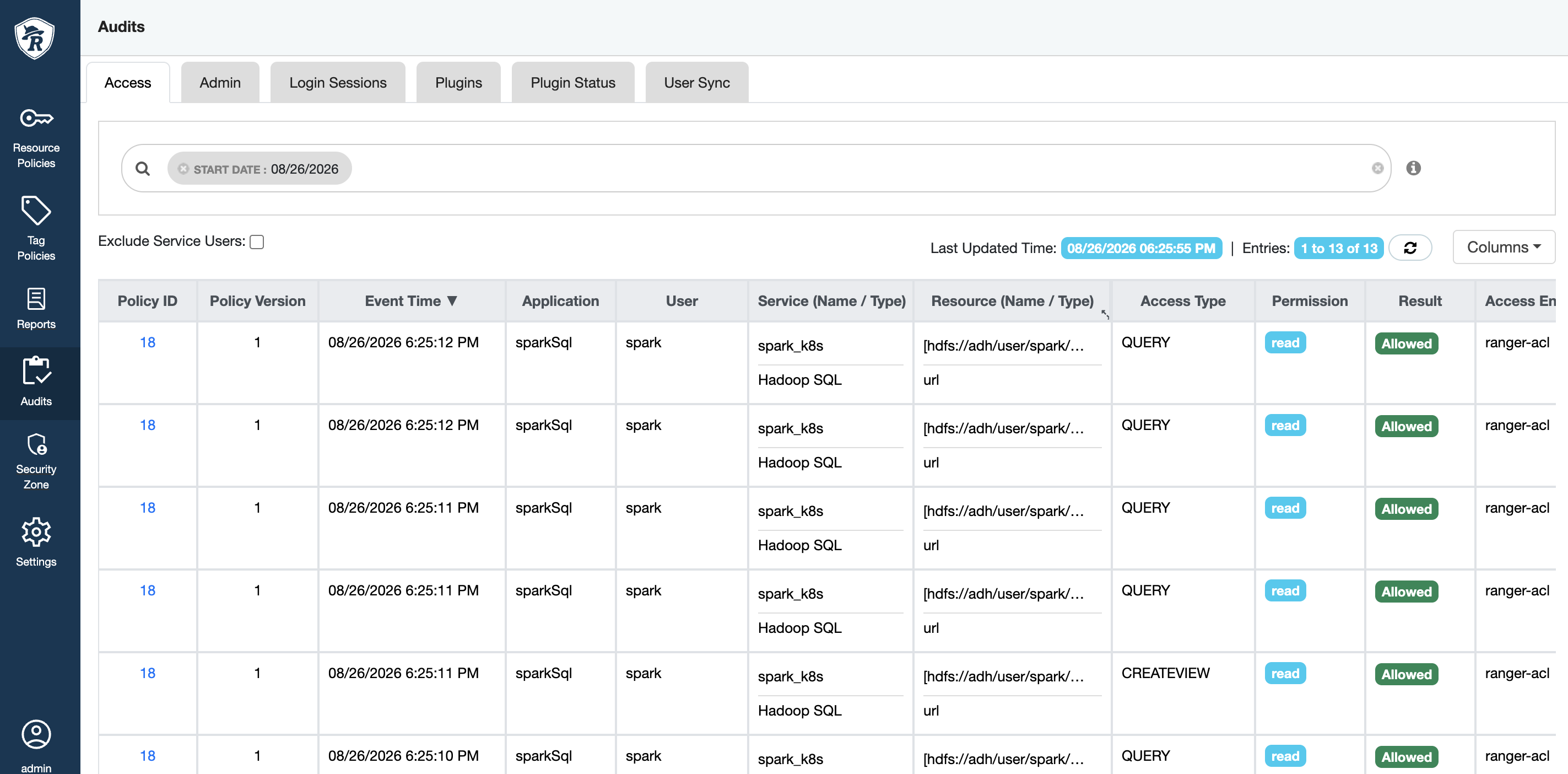 Ranger audit
 Ranger audit