

Install Trino on Kubernetes using CLI
This article covers how to deploy Trino in Kubernetes using the adc CLI tool.
Security configurations for Trino on Kubernetes are covered in separate articles:
Prerequisites
To deploy Trino on Kubernetes via CLI, you need:
-
A Kubernetes cluster (1.32 or later) with access configured through
kubectl. -
The CLI tool that is unpacked from your offline pack.
-
The following images that are unpacked and pushed to your repository:
-
hub.arenadata.io/adc-enterprise/trino-operator:<version>
-
hub.arenadata.io/adh-enterprise/trino-docker:<version>
These artifacts can be found in the offline packages, which can be requested from the Arenadata support team.
-
Further prerequisites depend on the storage being used:
A compatible version of an ADH cluster with the following services is up and running:
-
Core configuration
-
ADPG
-
Zookeeper
-
HDFS
-
YARN
-
Hive
-
Hive Metastore (you can optionally use your own catalog, but there’s no compatibility guarantee).
-
S3-compatible storage.
If you use ADH HMS, perform the following steps:
-
In ADCM, configure the Core configuration service by setting the following parameters in the core-site.xml group:
-
fs.defaultFS —
s3://demo-s3 -
fs.s3a.endpoint —
<s3_host> -
fs.s3a.access.key —
<access_key> -
fs.s3a.secret.key —
<secret_key> -
fs.s3a.path.style.access —
true
-
-
Configure the Hive service by setting the following parameter in the hive-site.xml group:
-
hive.metastore.warehouse.dir —
s3a://demo-s3/apps/hive/warehouse
-
Step 1. Install Trino operator
-
Initiate the Trino operator:
$ ./adc init --trino-operator -o trino-operator.yamlThis operation creates the trino-operator.yaml file with a configuration template.
-
Edit the configuration file to your needs:
trino-operator.yamlapiVersion: adc.arenadata.io/v1alpha1 kind: TrinoOperator metadata: name: trino-operator namespace: trino-operator (1) spec: image: hub.arenadata.io/adc-enterprise/trino-operator:<tag> (2) # Number of replicas # replicas: 1 resources: limits: cpu: 500m memory: 256Mi # Operator ServiceAccount. create: true (default) also creates the manager and per-payload-namespace Role/RoleBinding bound to it; create: false skips all three - name then refers to a ServiceAccount (and RBAC) managed entirely outside the CLI. serviceAccount: (3) create: true name: "trino-operator" # Whether the CLI creates the product namespace. # The namespace name is set in metadata.namespace. namespace: create: true # Create namespaces to run the payload. createPayloadNamespaces: true # List of namespaces to run the payload in. payloadNamespaces: (4) - trino ## Image pull secret for a private registry. ## Set 'externalSecretName' to reference an existing Secret, ## or set 'credentials' and optionally 'secretName' to let the CLI create one. #imagePullSecret: # # Use a Secret managed outside ADC. # externalSecretName: existing-registry-secret # # ## Or let ADC create the Secret. # #secretName: custom-registry-secret # # #credentials: # # registry: registry.example.com # # username: user # # password: pass ## Operator monitoring configuration. Supports product-specific metrics export and optional vmagent delivery to an external ADM. #monitoring: # # Renders a namespace-scoped vmagent that sends metrics to an external ADM. # vmagent: # remoteWrite: # url: http://vminsert.example.com/insert/0/prometheus/api/v1/write # scrapeInterval: 15s # image: hub.arenadata.io/adm-enterprise/vmagent:1.136.0-adm-5.0.0-x86_64 # # ## HTTPS settings used by vmagent when scraping product metrics. # #tls: # # ## CA certificate source used to verify the metrics endpoint. # # #ca: # # # # Use a Secret managed outside ADC. # # # externalSecretName: existing-product-metrics-ca # # # # # # ## Or let ADC create the Secret. # # # #secretName: product-metrics-ca # # # # # # # Key containing the CA certificate in the referenced Secret. # # # certificateKey: ca.crt # # # # # # ## Local CA certificate read by ADC to create the configured Secret. # # # #files: # # # # certificatePath: /path/to/ca.crt # # # # ## Server name used to verify the metrics endpoint certificate hostname. # # #serverName: metrics.example.com # # # # # Skip verification of the metrics endpoint certificate. Do not use together with ca. # # insecureSkipVerify: true1 Namespace settings. 2 URL to the Trino operator image in your repository. 3 Service account settings. 4 Payload namespace settings. The listed namespaces will be available to the Trino operator instance. -
You can check the configuration about to be applied by running the
applycommand with the--dry-runoption:$ ./adc apply -f trino-operator.yaml --dry-run > trino-operator-render.yamltrino-operator-render.yaml--- apiVersion: v1 kind: Namespace metadata: name: trino-operator spec: {} status: {} --- apiVersion: v1 kind: Namespace metadata: name: trino spec: {} status: {} --- apiVersion: v1 kind: ServiceAccount metadata: name: trino-operator namespace: trino-operator --- apiVersion: rbac.authorization.k8s.io/v1 kind: Role metadata: name: trino-operator-trino-operator-manager namespace: trino-operator rules: - apiGroups: - events.k8s.io resources: - events verbs: - create - patch - apiGroups: - coordination.k8s.io resources: - leases verbs: - create - delete - get - list - patch - update - watch - apiGroups: - trino.arenadata.io resources: - clusters verbs: - get - list - watch - apiGroups: - trino.arenadata.io resources: - clusters/status verbs: - get - patch - update --- apiVersion: rbac.authorization.k8s.io/v1 kind: RoleBinding metadata: name: trino-operator-trino-operator-manager namespace: trino-operator roleRef: apiGroup: rbac.authorization.k8s.io kind: Role name: trino-operator-trino-operator-manager subjects: - kind: ServiceAccount name: trino-operator namespace: trino-operator --- apiVersion: rbac.authorization.k8s.io/v1 kind: Role metadata: name: trino-operator-trino-operator-payload namespace: trino rules: - apiGroups: - events.k8s.io resources: - events verbs: - create - patch - apiGroups: - "" resources: - secrets - services verbs: - create - delete - get - list - patch - update - watch - apiGroups: - apps resources: - deployments - statefulsets verbs: - create - delete - get - list - patch - update - watch - apiGroups: - trino.arenadata.io resources: - clusters verbs: - get - list - watch - apiGroups: - trino.arenadata.io resources: - clusters/status verbs: - get - patch - update --- apiVersion: rbac.authorization.k8s.io/v1 kind: RoleBinding metadata: name: trino-operator-trino-operator-payload namespace: trino roleRef: apiGroup: rbac.authorization.k8s.io kind: Role name: trino-operator-trino-operator-payload subjects: - kind: ServiceAccount name: trino-operator namespace: trino-operator --- apiVersion: apps/v1 kind: Deployment metadata: labels: app.kubernetes.io/component: operator app.kubernetes.io/managed-by: adc-cli arenadata.io/operator-type: trino name: trino-operator-trino-operator namespace: trino-operator spec: selector: matchLabels: app.kubernetes.io/component: operator app.kubernetes.io/managed-by: adc-cli app.kubernetes.io/name: trino-operator-trino-operator strategy: {} template: metadata: labels: app.kubernetes.io/component: operator app.kubernetes.io/managed-by: adc-cli app.kubernetes.io/name: trino-operator-trino-operator spec: containers: - args: - -ns=trino image: hub.arenadata.io/adc-enterprise/trino-operator:<tag> imagePullPolicy: Always livenessProbe: httpGet: path: /healthz port: 8081 initialDelaySeconds: 5 periodSeconds: 10 name: app readinessProbe: httpGet: path: /readyz port: 8081 initialDelaySeconds: 5 periodSeconds: 10 resources: limits: cpu: 500m memory: 256Mi requests: cpu: 500m memory: 256Mi securityContext: allowPrivilegeEscalation: false capabilities: drop: - ALL readOnlyRootFilesystem: true runAsGroup: 10001 runAsNonRoot: true runAsUser: 10001 securityContext: fsGroup: 10001 runAsGroup: 10001 runAsNonRoot: true runAsUser: 10001 serviceAccountName: trino-operator terminationGracePeriodSeconds: 10 status: {} -
If the manifest is correct, apply the configuration and deploy Trino operator:
$ ./adc apply -f trino-operator.yamlThe expected output contains the confirmation of success:
time="20260724055215UTC" level="info" msg="operator trino/trino applied to namespace trino-operator"
-
Verify the Trino operator:
$ kubectl get pods -n trino-operatorThe expected output should be similar to:
NAME                               READY   STATUS    RESTARTS      AGE
trino-operator-trino-operator-69ccd6f665-cbk6z      1/1     Running   0          5s
Step 2. Install Trino cluster
-
Prepare the hadoop_conf.yaml Hadoop configuration file:
hadoop_conf.yamlsites: core: fs.defaultFS: hdfs://adh hadoop.security.authentication: simple dfs.client.failover.proxy.provider.adh: org.apache.hadoop.hdfs.server.namenode.ha.ObserverReadProxyProvider dfs.ha.namenodes.adh: nn_tsn-adh-k8s-1,nn_tsn-adh-k8s-3 dfs.namenode.rpc-address.adh.nn_tsn-adh-k8s-1: tsn-adh-k8s-1.ru-central1.internal:8020 dfs.namenode.rpc-address.adh.nn_tsn-adh-k8s-3: tsn-adh-k8s-3.ru-central1.internal:8020 dfs.nameservices: adh hdfs: dfs.client.read.shortcircuit: false ozone: ozone.om.address.adh.om_tsn-adh-k8s-1: tsn-adh-k8s-1.ru-central1.internal:9862 ozone.om.address.adh.om_tsn-adh-k8s-2: tsn-adh-k8s-2.ru-central1.internal:9862 ozone.om.address.adh.om_tsn-adh-k8s-3: tsn-adh-k8s-3.ru-central1.internal:9862 ozone.om.nodes.adh: om_tsn-adh-k8s-1,om_tsn-adh-k8s-2,om_tsn-adh-k8s-3 ozone.om.service.ids: adhom hive: hive.metastore.sasl.enabled: false hive.metastore.uris: thrift://tsn-adh-k8s-1.ru-central1.internal:9083 metastore.use.SSL: falsesites: core: fs.defaultFS: s3a://demo-s3 fs.s3a.impl: org.apache.hadoop.fs.s3a.S3AFileSystem fs.s3a.access.key: p.petrov@RU-CENTRAL1.INTERNAL fs.s3a.secret.key: 3ab197f82fac43374519b4ad3015a76c778acf51897cf73f409ecba827e64255 hive: hive.metastore.uris: thrift://hms-adh-nia-01.ru-central1.internal:9083 metastore.use.SSL: false fs.s3a.endpoint: http://adh-ctrl-nia-02.ru-central1.internal:9878 fs.s3a.path.style.access: true hive.metastore.warehouse.dir: s3a://demo-s3/apps/hive/warehouse -
Initialize the Trino cluster:
$ ./adc init --trino-cluster --hadoop-file hadoop_conf.yaml -o trino-cluster.yamlThis operation creates the trino-cluster.yaml file with a configuration template.
-
Edit the configuration file to your needs:
trino-cluster.yamlapiVersion: adc.arenadata.io/v1alpha1 kind: TrinoCluster metadata: name: trino namespace: trino (1) spec: image: hub.arenadata.io/adc-enterprise/trino:<tag> (2) ## Image pull secret for a private registry. ## Set 'externalSecretName' to reference an existing Secret, ## or set 'credentials' and optionally 'secretName' to let the CLI create one. #imagePullSecret: # # Use a Secret managed outside ADC. # externalSecretName: existing-registry-secret # # ## Or let ADC create the Secret. # #secretName: custom-registry-secret # # #credentials: # # registry: registry.example.com # # username: user # # password: pass hadoop: (3) core: dfs.client.failover.proxy.provider.adh: org.apache.hadoop.hdfs.server.namenode.ha.ObserverReadProxyProvider dfs.ha.namenodes.adh: nn_tsn-adh-k8s-1,nn_tsn-adh-k8s-3 dfs.namenode.rpc-address.adh.nn_tsn-adh-k8s-1: tsn-adh-k8s-1.ru-central1.internal:8020 dfs.namenode.rpc-address.adh.nn_tsn-adh-k8s-3: tsn-adh-k8s-3.ru-central1.internal:8020 dfs.nameservices: adh fs.defaultFS: hdfs://adh fs.s3a.aws.credentials.provider: org.apache.hadoop.fs.s3a.SimpleAWSCredentialsProvider hadoop.proxyuser.trino.groups: '*' hadoop.proxyuser.trino.hosts: '*' hadoop.security.authentication: simple hdfs: dfs.client.read.shortcircuit: "false" hive: hive.metastore.sasl.enabled: "false" hive.metastore.uris: thrift://tsn-adh-k8s-1.ru-central1.internal:9083 metastore.use.SSL: "false" ozone: ozone.om.address.adh.om_tsn-adh-k8s-1: tsn-adh-k8s-1.ru-central1.internal:9862 ozone.om.address.adh.om_tsn-adh-k8s-2: tsn-adh-k8s-2.ru-central1.internal:9862 ozone.om.address.adh.om_tsn-adh-k8s-3: tsn-adh-k8s-3.ru-central1.internal:9862 ozone.om.nodes.adh: om_tsn-adh-k8s-1,om_tsn-adh-k8s-2,om_tsn-adh-k8s-3 ozone.om.service.ids: adhom ## Kerberos configuration for authentication. #kerberos: # realm: EXAMPLE.COM # # # Service name in the Kerberos principal. Defaults to the product name. # service: trino # # # Hostname in the Kerberos principal. # # Required for a fixed service principal; leave it empty only to derive one principal per pod from the cluster domain. # hostname: kerberos.example.com # keytab: # # true - kerberos-operator creates the keytab Secret. # # false (default) - reference an existing keytab Secret with name keytab.secretName. # create: false # # # Name of the keytab Secret. # # Optional when create: true - names the generated Secret (default: <name>-keytab). # # Required when create: false - must reference an existing Secret. # secretName: kerberos-secret # # # Label selector for the Pod that generates the keytab. # # Required when create: true; ignored when create: false. # labelSelector: # env: prod # #additionalPrincipals: # # - HTTP/kerberos.example.com # # rotation: # interval: 24h # checkInterval: 1h ## LDAP authentication configuration. ## Uncomment and fill url and userBindPattern. ## For ldaps:// URLs the ssl: or ca: section must also be configured (depends on product) #ldap: # # LDAP service url. # url: ldaps://ldap.example.com:636 # # # LDAP user Bind pattern. # userBindPattern: uid=${USER},cn=users,dc=example,dc=com ## Ranger plugin configuration. ## Uncomment and fill the lines below. adc apply derives the rest. #ranger: # # fill ranger.plugin.trino.policy.rest.url below with Ranger endpoint, e.g. https://adps-adc.ru-central1.internal:6182 # # fill ranger.plugin.trino.service.name below with Ranger service name you want to use for product, e.g. adc_trino_id_1 # security: # ranger.plugin.trino.policy.rest.url: "" # ranger.plugin.trino.service.name: "" # # # fill xasecure.audit.destination.solr.zookeepers below with Zookeepers endpoints to resolve solr service, e.g. adps-adc.ru-central1.internal:2181/Arenadata.Hadoop-2.solr.server # audit: # xasecure.audit.destination.solr.zookeepers: "" # # # Local Ranger files 'adc apply' writes into the configs Secret. # # Relative paths are resolved against the config file. # files: # jceksStorePath: /path/to/ranger.jceks ## Java KeyStore/TrustStore certificate configuration. ## Set externalSecretName to reference an existing Secret, ## or set files and optional secretName to have ADC create it. #ssl: # ## Name of the Secret containing Java keystores. # #secretName: custom-ssl-secret # externalSecretName: existing-ssl-secret # # # Key in the Secret containing the truststore file. # trustStoreKey: truststore.jks # # ## Password for the truststore (optional). # #trustStorePassword: bigdata # # ## Key in the Secret containing the keystore file (optional). # #keyStoreKey: keystore.jks # # ## Password for the keystore (optional). # #keyStorePassword: bigdata # # ## Alias of the key entry inside the keystore. Required by the Trino JMX exporter when scrape TLS is enabled. # #keyStoreAlias: trino # # ## Local files 'adc apply' puts into the Secret named by ssl.secretName. # ## Relative paths are resolved against the config file. # #files: # # trustStorePath: /path/to/truststore.jks # # #keyStorePath: /path/to/keystore.jks ## Use an external complete configs Secret instead of the one rendered by ADC. #configsSecret: # # Use a Secret managed outside ADC. # externalSecretName: existing-trino-configs # # ## Or let ADC create the Secret. # #secretName: custom-trino-configs coordinator: replicas: 1 #resources: # limits: # cpu: 500m # memory: 4Gi # requests: # cpu: 250m # memory: 512Mi ## Component arguments. Key-value pairs passed to the component configuration. #args: # http-server.http.port: "8080" ## Environment variables passed to the component container. #envs: # - name: JAVA_TOOL_OPTIONS # value: |- # -Djavax.net.ssl.trustStore=/etc/ssl/truststore.jks # -Djavax.net.ssl.trustStorePassword=bigdata worker: replicas: 1 #resources: # limits: # cpu: 500m # memory: 4Gi # requests: # cpu: 250m # memory: 512Mi ## Component arguments. Key-value pairs passed to the component configuration. #args: # http-server.http.port: "8080" ## Environment variables passed to the component container. #envs: # - name: JAVA_TOOL_OPTIONS # value: |- # -Djavax.net.ssl.trustStore=/etc/ssl/truststore.jks # -Djavax.net.ssl.trustStorePassword=bigdata ## Trino catalogs (one entry per .properties file). ## adc apply derives Kerberos/SSL fields for iceberg catalogs from the surrounding cluster config. catalogs: (4) iceberg.properties: connector.name: iceberg fs.hadoop.enabled: "true" hive.config.resources: /opt/trino-server/etc/catalog/core-site.xml hive.hdfs.impersonation.enabled: "true" hive.metastore.thrift.impersonation.enabled: "true" hive.metastore.uri: thrift://tsn-adh-k8s-1.ru-central1.internal:9083 ## Monitoring configuration. #monitoring: # # Enables Prometheus metrics export from this product's pods. # exportMetrics: true ## HTTPS on the Trino coordinator web endpoint. ## Set externalSecretName to reference a keystore Secret, ## or set files and optional secretName to have ADC create it. #webTLS: # #secretName: custom-trino-web-tls # externalSecretName: existing-trino-web-tls # keystoreKey: keystore.p12 # #keystorePassword: changeit # # ## Local keystore 'adc apply' puts into the Secret named by webTLS.secretName. # ## A relative path is resolved against the config file. # #files: # # keystorePath: ./keystore.p12 ## Controls whether Secret/ConfigMap changes restart pods. ## Set enabled: false to update referenced Secrets without restarting ## the workload; pods keep running the previous configuration until ## the policy is re-enabled. Defaults to enabled. #configurationRollout: # enabled: false1 Namespace that the Trino cluster will use. 2 Settings for pulling the Trino cluster image. 3 Hadoop settings that were taken from the previously created hadoop_conf.yaml. 4 Iceberg catalog settings. apiVersion: adc.arenadata.io/v1alpha1 kind: TrinoCluster metadata: name: trino namespace: trino (1) spec: image: hub.arenadata.io/adc-enterprise/trino:<tag> (2) ## Image pull secret for a private registry. ## Set 'externalSecretName' to reference an existing Secret, ## or set 'credentials' and optionally 'secretName' to let the CLI create one. #imagePullSecret: # # Use a Secret managed outside ADC. # externalSecretName: existing-registry-secret # # ## Or let ADC create the Secret. # #secretName: custom-registry-secret # # #credentials: # # registry: registry.example.com # # username: user # # password: pass hadoop: (3) core: fs.defaultFS: s3a://demo-s3 fs.s3a.access.key: p.petrov@RU-CENTRAL1.INTERNAL fs.s3a.aws.credentials.provider: org.apache.hadoop.fs.s3a.SimpleAWSCredentialsProvider fs.s3a.impl: org.apache.hadoop.fs.s3a.S3AFileSystem fs.s3a.secret.key: 3ab197f82fac43374519b4ad3015a76c778acf51897cf73f409ecba827e64255 hadoop.proxyuser.trino.groups: '*' hadoop.proxyuser.trino.hosts: '*' hive: fs.s3a.endpoint: http://adh-ctrl-nia-02.ru-central1.internal:9878 fs.s3a.path.style.access: "true" hive.metastore.uris: thrift://hms-adh-nia-01.ru-central1.internal:9083 hive.metastore.warehouse.dir: s3a://demo-s3/apps/hive/warehouse metastore.use.SSL: "false" ## Kerberos configuration for authentication. #kerberos: # realm: EXAMPLE.COM # # # Service name in the Kerberos principal. Defaults to the product name. # service: trino # # # Hostname in the Kerberos principal. # # Required for a fixed service principal; leave it empty only to derive one principal per pod from the cluster domain. # hostname: kerberos.example.com # keytab: # # true - kerberos-operator creates the keytab Secret. # # false (default) - reference an existing keytab Secret with name keytab.secretName. # create: false # # # Name of the keytab Secret. # # Optional when create: true - names the generated Secret (default: <name>-keytab). # # Required when create: false - must reference an existing Secret. # secretName: kerberos-secret # # # Label selector for the Pod that generates the keytab. # # Required when create: true; ignored when create: false. # labelSelector: # env: prod # #additionalPrincipals: # # - HTTP/kerberos.example.com # # rotation: # interval: 24h # checkInterval: 1h ## LDAP authentication configuration. ## Uncomment and fill url and userBindPattern. ## For ldaps:// URLs the ssl: or ca: section must also be configured (depends on product) #ldap: # # LDAP service url. # url: ldaps://ldap.example.com:636 # # # LDAP user Bind pattern. # userBindPattern: uid=${USER},cn=users,dc=example,dc=com ## Ranger plugin configuration. ## Uncomment and fill the lines below. adc apply derives the rest. #ranger: # # fill ranger.plugin.trino.policy.rest.url below with Ranger endpoint, e.g. https://adps-adc.ru-central1.internal:6182 # # fill ranger.plugin.trino.service.name below with Ranger service name you want to use for product, e.g. adc_trino_id_1 # security: # ranger.plugin.trino.policy.rest.url: "" # ranger.plugin.trino.service.name: "" # # # fill xasecure.audit.destination.solr.zookeepers below with Zookeepers endpoints to resolve solr service, e.g. adps-adc.ru-central1.internal:2181/Arenadata.Hadoop-2.solr.server # audit: # xasecure.audit.destination.solr.zookeepers: "" # # # Local Ranger files 'adc apply' writes into the configs Secret. # # Relative paths are resolved against the config file. # files: # jceksStorePath: /path/to/ranger.jceks ## Java KeyStore/TrustStore certificate configuration. ## Set externalSecretName to reference an existing Secret, ## or set files and optional secretName to have ADC create it. #ssl: # ## Name of the Secret containing Java keystores. # #secretName: custom-ssl-secret # externalSecretName: existing-ssl-secret # # # Key in the Secret containing the truststore file. # trustStoreKey: truststore.jks # # ## Password for the truststore (optional). # #trustStorePassword: bigdata # # ## Key in the Secret containing the keystore file (optional). # #keyStoreKey: keystore.jks # # ## Password for the keystore (optional). # #keyStorePassword: bigdata # # ## Alias of the key entry inside the keystore. Required by the Trino JMX exporter when scrape TLS is enabled. # #keyStoreAlias: trino # # ## Local files 'adc apply' puts into the Secret named by ssl.secretName. # ## Relative paths are resolved against the config file. # #files: # # trustStorePath: /path/to/truststore.jks # # #keyStorePath: /path/to/keystore.jks ## Use an external complete configs Secret instead of the one rendered by ADC. #configsSecret: # # Use a Secret managed outside ADC. # externalSecretName: existing-trino-configs # # ## Or let ADC create the Secret. # #secretName: custom-trino-configs coordinator: replicas: 1 #resources: # limits: # cpu: 500m # memory: 4Gi # requests: # cpu: 250m # memory: 512Mi ## Component arguments. Key-value pairs passed to the component configuration. #args: # http-server.http.port: "8080" ## Environment variables passed to the component container. #envs: # - name: JAVA_TOOL_OPTIONS # value: |- # -Djavax.net.ssl.trustStore=/etc/ssl/truststore.jks # -Djavax.net.ssl.trustStorePassword=bigdata worker: replicas: 1 #resources: # limits: # cpu: 500m # memory: 4Gi # requests: # cpu: 250m # memory: 512Mi ## Component arguments. Key-value pairs passed to the component configuration. #args: # http-server.http.port: "8080" ## Environment variables passed to the component container. #envs: # - name: JAVA_TOOL_OPTIONS # value: |- # -Djavax.net.ssl.trustStore=/etc/ssl/truststore.jks # -Djavax.net.ssl.trustStorePassword=bigdata ## Trino catalogs (one entry per .properties file). ## adc apply derives Kerberos/SSL fields for iceberg catalogs from the surrounding cluster config. catalogs: (4) iceberg.properties: connector.name: iceberg fs.hadoop.enabled: "true" hive.config.resources: /opt/trino-server/etc/catalog/core-site.xml hive.hdfs.impersonation.enabled: "true" hive.metastore.thrift.impersonation.enabled: "true" hive.metastore.uri: thrift://hms-adh-nia-01.ru-central1.internal:9083 ## Monitoring configuration. #monitoring: # # Enables Prometheus metrics export from this product's pods. # exportMetrics: true ## HTTPS on the Trino coordinator web endpoint. ## Set externalSecretName to reference a keystore Secret, ## or set files and optional secretName to have ADC create it. #webTLS: # #secretName: custom-trino-web-tls # externalSecretName: existing-trino-web-tls # keystoreKey: keystore.p12 # #keystorePassword: changeit # # ## Local keystore 'adc apply' puts into the Secret named by webTLS.secretName. # ## A relative path is resolved against the config file. # #files: # # keystorePath: ./keystore.p12 ## Controls whether Secret/ConfigMap changes restart pods. ## Set enabled: false to update referenced Secrets without restarting ## the workload; pods keep running the previous configuration until ## the policy is re-enabled. Defaults to enabled. #configurationRollout: # enabled: false1 Namespace that the Trino cluster will use. 2 Settings for pulling the Trino cluster image. 3 Hadoop settings that were taken from the previously created hadoop_conf.yaml. 4 Iceberg catalog settings. -
You can check the configuration about to be applied by running the
applycommand with the--dry-runoption:$ ./adc apply -f trino-cluster.yaml --dry-run > trino-cluster-render.yamltrino-cluster-render.yaml--- apiVersion: v1 kind: Secret metadata: name: trino-configs namespace: trino stringData: core-site.xml: |- <configuration> <property> <name>dfs.client.failover.proxy.provider.adh</name> <value>org.apache.hadoop.hdfs.server.namenode.ha.ObserverReadProxyProvider</value> </property> <property> <name>dfs.client.read.shortcircuit</name> <value>false</value> </property> <property> <name>dfs.ha.namenodes.adh</name> <value>nn_tsn-adh-k8s-1,nn_tsn-adh-k8s-3</value> </property> <property> <name>dfs.namenode.rpc-address.adh.nn_tsn-adh-k8s-1</name> <value>tsn-adh-k8s-1.ru-central1.internal:8020</value> </property> <property> <name>dfs.namenode.rpc-address.adh.nn_tsn-adh-k8s-3</name> <value>tsn-adh-k8s-3.ru-central1.internal:8020</value> </property> <property> <name>dfs.nameservices</name> <value>adh</value> </property> <property> <name>fs.defaultFS</name> <value>hdfs://adh</value> </property> <property> <name>fs.s3a.aws.credentials.provider</name> <value>org.apache.hadoop.fs.s3a.SimpleAWSCredentialsProvider</value> </property> <property> <name>hadoop.proxyuser.trino.groups</name> <value>*</value> </property> <property> <name>hadoop.proxyuser.trino.hosts</name> <value>*</value> </property> <property> <name>hadoop.security.authentication</name> <value>simple</value> </property> <property> <name>ozone.om.address.adh.om_tsn-adh-k8s-1</name> <value>tsn-adh-k8s-1.ru-central1.internal:9862</value> </property> <property> <name>ozone.om.address.adh.om_tsn-adh-k8s-2</name> <value>tsn-adh-k8s-2.ru-central1.internal:9862</value> </property> <property> <name>ozone.om.address.adh.om_tsn-adh-k8s-3</name> <value>tsn-adh-k8s-3.ru-central1.internal:9862</value> </property> <property> <name>ozone.om.nodes.adh</name> <value>om_tsn-adh-k8s-1,om_tsn-adh-k8s-2,om_tsn-adh-k8s-3</value> </property> <property> <name>ozone.om.service.ids</name> <value>adhom</value> </property> </configuration> iceberg.properties: | connector.name=iceberg fs.hadoop.enabled=true hive.config.resources=/opt/trino-server/etc/catalog/core-site.xml hive.hdfs.impersonation.enabled=true hive.metastore.thrift.impersonation.enabled=true hive.metastore.uri=thrift://tsn-adh-k8s-1.ru-central1.internal:9083 type: Opaque --- apiVersion: trino.arenadata.io/v1alpha1 kind: Cluster metadata: name: trino namespace: trino spec: configsSecretName: trino-configs coordinator: metadata: {} replicas: 1 spec: image: hub.arenadata.io/adc-enterprise/trino:<tag> imagePullPolicy: Always worker: metadata: {} replicas: 1 spec: image: hub.arenadata.io/adc-enterprise/trino:<tag> imagePullPolicy: Always status: {} -
If the manifest is correct, apply the configuration and deploy the Trino cluster:
$ ./adc apply -f trino-cluster.yamlThe expected output contains a confirmation of success:
time="20260518133858UTC" level="info" msg="cluster trino applied to namespace trino"
-
Verify the Trino cluster pods:
$ kubectl get pods -n trinoThe expected output is:
trino-cluster-coordinator-0   1/1     Running   0          4m49s
trino-cluster-worker-0        1/1     Running   0          4m49s
Step 3. Allow JDBC connections to Trino
For external JDBC access to Trino, you need to expose the service using one of the supported publication methods, for example, through a load balancer or Ingress controller.
All configurations related to exposing a service, including DNS, annotations, Ingress settings, load balancing rules, and other platform-specific settings, must be specified according to your Kubernetes environment.
-
Get the external IP address of your Ingress controller or load balancer. For example:
trino-lb LoadBalancer 10.96.231.158 10.92.42.144 21050:32154/TCP,26000:30753/TCP,24000:32645/TCP 25h
-
Add the following entry to your /etc/hosts file:
<lb_ip> trino-cloud.ru-central1.internalwhere
<lb_ip>is the external IP exposed by your load balancer. In this example, it is10.92.42.144. -
Connect to the Trino cluster over JDBC, for example, using DBeaver. For this, the JDBC connection string looks as follows:
jdbc:trino://trino-cloud.ru-central1.internal/default
-
Once connected, verify the Trino cluster operability:
SHOW CATALOGS;The expected output:
Catalog   |
----------+
iceberg   |
system    |
Step 4. Provide access to Trino web UI
To access Trino web interface, you need to expose the service using one of the supported publication methods, for example, through a load balancer or Ingress controller. All configurations related to exposing a service, including DNS, annotations, Ingress settings, load balancing rules, and other platform-specific settings, must be specified according to your Kubernetes environment.
-
Get the external IP address of your load balancer or Ingress controller. For example:
NAME             CLASS   HOSTS                               ADDRESS       PORTS   AGE
trino-ingress   nginx   trino-cloud.ru-central1.internal   10.92.41.95   80      8m45s
-
Add the following entry to your /etc/hosts file:
<ingress_ip> trino-cloud.ru-central1.internalwhere
<ingress_ip>is the external IP exposed by Ingress. In this example, it is10.92.41.95. -
Open Trino web UI in your browser, using the URL: http://trino-cloud.ru-central1.internal (change the protocol to
httpsif you use Kerberos and SSL).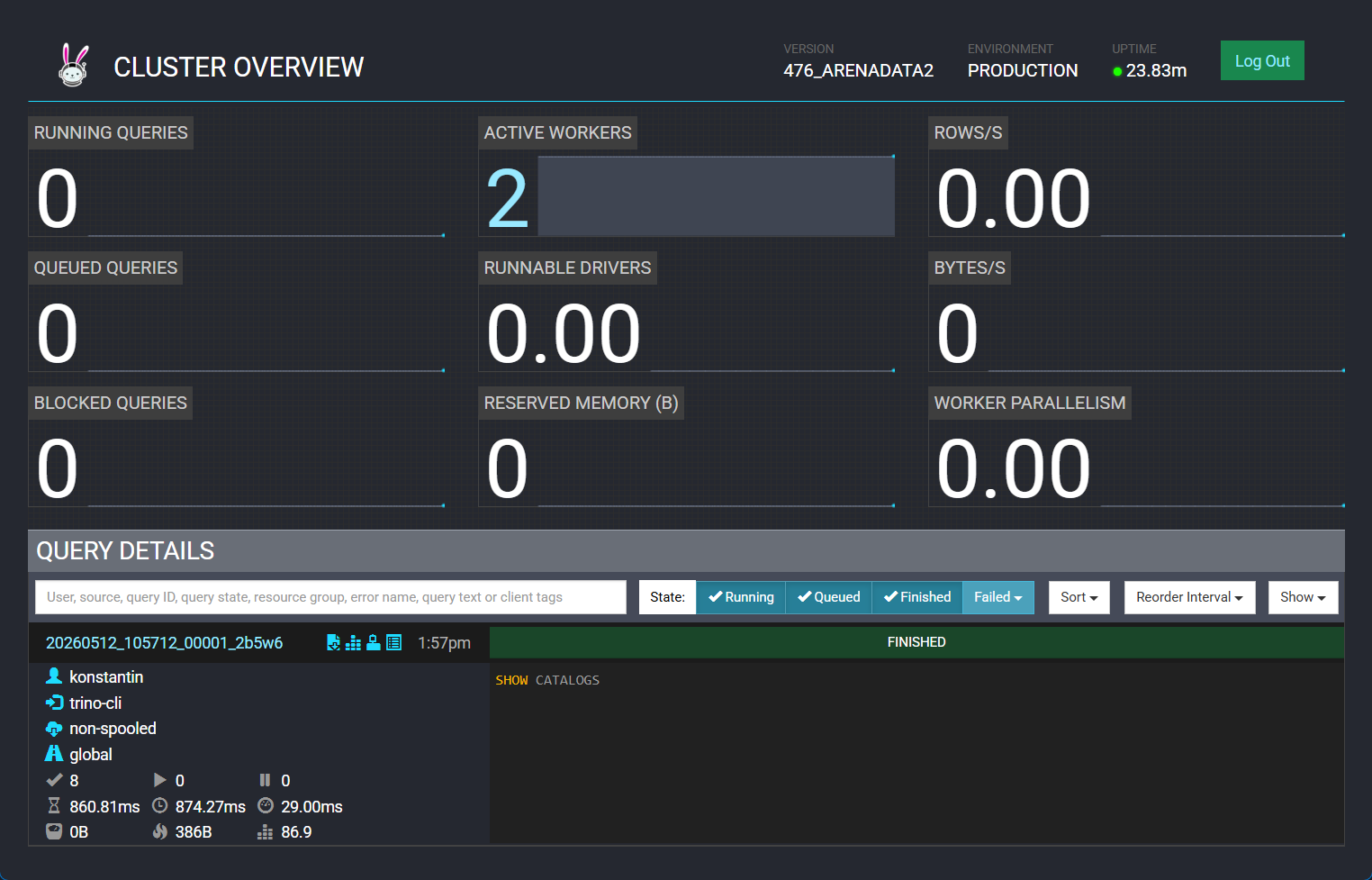 Trino web UI