

Установка Trino в Kubernetes с помощью CLI
В данной статье описан процесс развертывания Trino в Kubernetes с помощью CLI-утилиты adc.
Настройки безопасности для Trino в Kubernetes описаны в отдельных статьях:
Требования
Для развертывания Trino в Kubernetes с помощью CLI необходимы:
-
Кластер Kubernetes (версии 1.32 или более поздней) с настроенным доступом через
kubectl. -
CLI-утилита, извлеченная из offline-пакета.
-
Извлеченные и загруженные в ваш репозиторий образы:
-
hub.arenadata.io/adc-enterprise/trino-operator:<version>
-
hub.arenadata.io/adh-enterprise/trino-docker:<version>
Эти артефакты присутствуют в offline-пакете, который можно запросить у службы поддержки Arenadata.
-
Некоторые требования зависят от используемого хранилища:
Функционирующий ADH-кластер совместимой версии со следующими сервисами:
-
Core configuration
-
ADPG
-
Zookeeper
-
HDFS
-
YARN
-
Hive
-
Hive Metastore (вы можете использовать свой каталог, но совместимость не гарантируется).
-
S3-совместимое хранилище.
Если вы используете HMS ADH, выполните следующие шаги:
-
В ADCM настройте сервис Core configuration, установив следующие параметры в группе core-site.xml:
-
fs.defaultFS —
s3://demo-s3 -
fs.s3a.endpoint —
<s3_host> -
fs.s3a.access.key —
<access_key> -
fs.s3a.secret.key —
<secret_key> -
fs.s3a.path.style.access —
true
-
-
Настройте сервис Hive, установив следующий параметр в группе hive-site.xml:
-
hive.metastore.warehouse.dir —
s3a://demo-s3/apps/hive/warehouse
-
Шаг 1. Установка оператора Trino
-
Инициализируйте оператор Trino:
$ ./adc init --trino-operator -o trino-operator.yamlДанная команда создаст файл trino-operator.yaml с шаблоном конфигурации.
-
Отредактируйте конфигурационный файл:
trino-operator.yamlapiVersion: adc.arenadata.io/v1alpha1 kind: TrinoOperator metadata: name: trino-operator namespace: trino-operator (1) spec: image: hub.arenadata.io/adc-enterprise/trino-operator:<tag> (2) # Number of replicas # replicas: 1 resources: limits: cpu: 500m memory: 256Mi # Operator ServiceAccount. create: true (default) also creates the manager and per-payload-namespace Role/RoleBinding bound to it; create: false skips all three - name then refers to a ServiceAccount (and RBAC) managed entirely outside the CLI. serviceAccount: (3) create: true name: "trino-operator" # Whether the CLI creates the product namespace. # The namespace name is set in metadata.namespace. namespace: create: true # Create namespaces to run the payload. createPayloadNamespaces: true # List of namespaces to run the payload in. payloadNamespaces: (4) - trino ## Image pull secret for a private registry. ## Set 'externalSecretName' to reference an existing Secret, ## or set 'credentials' and optionally 'secretName' to let the CLI create one. #imagePullSecret: # # Use a Secret managed outside ADC. # externalSecretName: existing-registry-secret # # ## Or let ADC create the Secret. # #secretName: custom-registry-secret # # #credentials: # # registry: registry.example.com # # username: user # # password: pass ## Operator monitoring configuration. Supports product-specific metrics export and optional vmagent delivery to an external ADM. #monitoring: # # Renders a namespace-scoped vmagent that sends metrics to an external ADM. # vmagent: # remoteWrite: # url: http://vminsert.example.com/insert/0/prometheus/api/v1/write # scrapeInterval: 15s # image: hub.arenadata.io/adm-enterprise/vmagent:1.136.0-adm-5.0.0-x86_64 # # ## HTTPS settings used by vmagent when scraping product metrics. # #tls: # # ## CA certificate source used to verify the metrics endpoint. # # #ca: # # # # Use a Secret managed outside ADC. # # # externalSecretName: existing-product-metrics-ca # # # # # # ## Or let ADC create the Secret. # # # #secretName: product-metrics-ca # # # # # # # Key containing the CA certificate in the referenced Secret. # # # certificateKey: ca.crt # # # # # # ## Local CA certificate read by ADC to create the configured Secret. # # # #files: # # # # certificatePath: /path/to/ca.crt # # # # ## Server name used to verify the metrics endpoint certificate hostname. # # #serverName: metrics.example.com # # # # # Skip verification of the metrics endpoint certificate. Do not use together with ca. # # insecureSkipVerify: true1 Настройки пространства имен. 2 URL образа оператора Trino в вашем репозитории. 3 Настройки сервисного аккаунта. 4 Список пространств имен, доступных оператору Trino. -
Вы можете проверить конфигурацию перед ее применением, выполнив команду
applyс флагом--dry-run:$ ./adc apply -f trino-operator.yaml --dry-run > trino-operator-render.yamltrino-operator-render.yaml--- apiVersion: v1 kind: Namespace metadata: name: trino-operator spec: {} status: {} --- apiVersion: v1 kind: Namespace metadata: name: trino spec: {} status: {} --- apiVersion: v1 kind: ServiceAccount metadata: name: trino-operator namespace: trino-operator --- apiVersion: rbac.authorization.k8s.io/v1 kind: Role metadata: name: trino-operator-trino-operator-manager namespace: trino-operator rules: - apiGroups: - events.k8s.io resources: - events verbs: - create - patch - apiGroups: - coordination.k8s.io resources: - leases verbs: - create - delete - get - list - patch - update - watch - apiGroups: - trino.arenadata.io resources: - clusters verbs: - get - list - watch - apiGroups: - trino.arenadata.io resources: - clusters/status verbs: - get - patch - update --- apiVersion: rbac.authorization.k8s.io/v1 kind: RoleBinding metadata: name: trino-operator-trino-operator-manager namespace: trino-operator roleRef: apiGroup: rbac.authorization.k8s.io kind: Role name: trino-operator-trino-operator-manager subjects: - kind: ServiceAccount name: trino-operator namespace: trino-operator --- apiVersion: rbac.authorization.k8s.io/v1 kind: Role metadata: name: trino-operator-trino-operator-payload namespace: trino rules: - apiGroups: - events.k8s.io resources: - events verbs: - create - patch - apiGroups: - "" resources: - secrets - services verbs: - create - delete - get - list - patch - update - watch - apiGroups: - apps resources: - deployments - statefulsets verbs: - create - delete - get - list - patch - update - watch - apiGroups: - trino.arenadata.io resources: - clusters verbs: - get - list - watch - apiGroups: - trino.arenadata.io resources: - clusters/status verbs: - get - patch - update --- apiVersion: rbac.authorization.k8s.io/v1 kind: RoleBinding metadata: name: trino-operator-trino-operator-payload namespace: trino roleRef: apiGroup: rbac.authorization.k8s.io kind: Role name: trino-operator-trino-operator-payload subjects: - kind: ServiceAccount name: trino-operator namespace: trino-operator --- apiVersion: apps/v1 kind: Deployment metadata: labels: app.kubernetes.io/component: operator app.kubernetes.io/managed-by: adc-cli arenadata.io/operator-type: trino name: trino-operator-trino-operator namespace: trino-operator spec: selector: matchLabels: app.kubernetes.io/component: operator app.kubernetes.io/managed-by: adc-cli app.kubernetes.io/name: trino-operator-trino-operator strategy: {} template: metadata: labels: app.kubernetes.io/component: operator app.kubernetes.io/managed-by: adc-cli app.kubernetes.io/name: trino-operator-trino-operator spec: containers: - args: - -ns=trino image: hub.arenadata.io/adc-enterprise/trino-operator:<tag> imagePullPolicy: Always livenessProbe: httpGet: path: /healthz port: 8081 initialDelaySeconds: 5 periodSeconds: 10 name: app readinessProbe: httpGet: path: /readyz port: 8081 initialDelaySeconds: 5 periodSeconds: 10 resources: limits: cpu: 500m memory: 256Mi requests: cpu: 500m memory: 256Mi securityContext: allowPrivilegeEscalation: false capabilities: drop: - ALL readOnlyRootFilesystem: true runAsGroup: 10001 runAsNonRoot: true runAsUser: 10001 securityContext: fsGroup: 10001 runAsGroup: 10001 runAsNonRoot: true runAsUser: 10001 serviceAccountName: trino-operator terminationGracePeriodSeconds: 10 status: {} -
Если манифест корректный, примените конфигурацию и разверните оператор Trino:
$ ./adc apply -f trino-operator.yamlОжидаемый вывод содержит сообщение с подтверждением успеха:
time="20260724055215UTC" level="info" msg="operator trino/trino applied to namespace trino-operator"
-
Проверьте работоспособность подов оператора Trino:
$ kubectl get pods -n trino-operatorОжидаемый вывод должен быть похож на следующий:
NAME                               READY   STATUS    RESTARTS      AGE
trino-operator-trino-operator-69ccd6f665-cbk6z      1/1     Running   0          5s
Шаг 2. Установка кластера Trino
-
Подготовьте файл hadoop_conf.yaml с настройками Hadoop:
hadoop_conf.yamlsites: core: fs.defaultFS: hdfs://adh hadoop.security.authentication: simple dfs.client.failover.proxy.provider.adh: org.apache.hadoop.hdfs.server.namenode.ha.ObserverReadProxyProvider dfs.ha.namenodes.adh: nn_tsn-adh-k8s-1,nn_tsn-adh-k8s-3 dfs.namenode.rpc-address.adh.nn_tsn-adh-k8s-1: tsn-adh-k8s-1.ru-central1.internal:8020 dfs.namenode.rpc-address.adh.nn_tsn-adh-k8s-3: tsn-adh-k8s-3.ru-central1.internal:8020 dfs.nameservices: adh hdfs: dfs.client.read.shortcircuit: false ozone: ozone.om.address.adh.om_tsn-adh-k8s-1: tsn-adh-k8s-1.ru-central1.internal:9862 ozone.om.address.adh.om_tsn-adh-k8s-2: tsn-adh-k8s-2.ru-central1.internal:9862 ozone.om.address.adh.om_tsn-adh-k8s-3: tsn-adh-k8s-3.ru-central1.internal:9862 ozone.om.nodes.adh: om_tsn-adh-k8s-1,om_tsn-adh-k8s-2,om_tsn-adh-k8s-3 ozone.om.service.ids: adhom hive: hive.metastore.sasl.enabled: false hive.metastore.uris: thrift://tsn-adh-k8s-1.ru-central1.internal:9083 metastore.use.SSL: falsesites: core: fs.defaultFS: s3a://demo-s3 fs.s3a.impl: org.apache.hadoop.fs.s3a.S3AFileSystem fs.s3a.access.key: p.petrov@RU-CENTRAL1.INTERNAL fs.s3a.secret.key: 3ab197f82fac43374519b4ad3015a76c778acf51897cf73f409ecba827e64255 hive: hive.metastore.uris: thrift://hms-adh-nia-01.ru-central1.internal:9083 metastore.use.SSL: false fs.s3a.endpoint: http://adh-ctrl-nia-02.ru-central1.internal:9878 fs.s3a.path.style.access: true hive.metastore.warehouse.dir: s3a://demo-s3/apps/hive/warehouse -
Инициализируйте кластер Trino:
$ ./adc init --trino-cluster --hadoop-file hadoop_conf.yaml -o trino-cluster.yamlДанная команда создаст файл trino-cluster.yaml с шаблоном конфигурации.
-
Отредактируйте конфигурационный файл:
trino-cluster.yamlapiVersion: adc.arenadata.io/v1alpha1 kind: TrinoCluster metadata: name: trino namespace: trino (1) spec: image: hub.arenadata.io/adc-enterprise/trino:<tag> (2) ## Image pull secret for a private registry. ## Set 'externalSecretName' to reference an existing Secret, ## or set 'credentials' and optionally 'secretName' to let the CLI create one. #imagePullSecret: # # Use a Secret managed outside ADC. # externalSecretName: existing-registry-secret # # ## Or let ADC create the Secret. # #secretName: custom-registry-secret # # #credentials: # # registry: registry.example.com # # username: user # # password: pass hadoop: (3) core: dfs.client.failover.proxy.provider.adh: org.apache.hadoop.hdfs.server.namenode.ha.ObserverReadProxyProvider dfs.ha.namenodes.adh: nn_tsn-adh-k8s-1,nn_tsn-adh-k8s-3 dfs.namenode.rpc-address.adh.nn_tsn-adh-k8s-1: tsn-adh-k8s-1.ru-central1.internal:8020 dfs.namenode.rpc-address.adh.nn_tsn-adh-k8s-3: tsn-adh-k8s-3.ru-central1.internal:8020 dfs.nameservices: adh fs.defaultFS: hdfs://adh fs.s3a.aws.credentials.provider: org.apache.hadoop.fs.s3a.SimpleAWSCredentialsProvider hadoop.proxyuser.trino.groups: '*' hadoop.proxyuser.trino.hosts: '*' hadoop.security.authentication: simple hdfs: dfs.client.read.shortcircuit: "false" hive: hive.metastore.sasl.enabled: "false" hive.metastore.uris: thrift://tsn-adh-k8s-1.ru-central1.internal:9083 metastore.use.SSL: "false" ozone: ozone.om.address.adh.om_tsn-adh-k8s-1: tsn-adh-k8s-1.ru-central1.internal:9862 ozone.om.address.adh.om_tsn-adh-k8s-2: tsn-adh-k8s-2.ru-central1.internal:9862 ozone.om.address.adh.om_tsn-adh-k8s-3: tsn-adh-k8s-3.ru-central1.internal:9862 ozone.om.nodes.adh: om_tsn-adh-k8s-1,om_tsn-adh-k8s-2,om_tsn-adh-k8s-3 ozone.om.service.ids: adhom ## Kerberos configuration for authentication. #kerberos: # realm: EXAMPLE.COM # # # Service name in the Kerberos principal. Defaults to the product name. # service: trino # # # Hostname in the Kerberos principal. # # Required for a fixed service principal; leave it empty only to derive one principal per pod from the cluster domain. # hostname: kerberos.example.com # keytab: # # true - kerberos-operator creates the keytab Secret. # # false (default) - reference an existing keytab Secret with name keytab.secretName. # create: false # # # Name of the keytab Secret. # # Optional when create: true - names the generated Secret (default: <name>-keytab). # # Required when create: false - must reference an existing Secret. # secretName: kerberos-secret # # # Label selector for the Pod that generates the keytab. # # Required when create: true; ignored when create: false. # labelSelector: # env: prod # #additionalPrincipals: # # - HTTP/kerberos.example.com # # rotation: # interval: 24h # checkInterval: 1h ## LDAP authentication configuration. ## Uncomment and fill url and userBindPattern. ## For ldaps:// URLs the ssl: or ca: section must also be configured (depends on product) #ldap: # # LDAP service url. # url: ldaps://ldap.example.com:636 # # # LDAP user Bind pattern. # userBindPattern: uid=${USER},cn=users,dc=example,dc=com ## Ranger plugin configuration. ## Uncomment and fill the lines below. adc apply derives the rest. #ranger: # # fill ranger.plugin.trino.policy.rest.url below with Ranger endpoint, e.g. https://adps-adc.ru-central1.internal:6182 # # fill ranger.plugin.trino.service.name below with Ranger service name you want to use for product, e.g. adc_trino_id_1 # security: # ranger.plugin.trino.policy.rest.url: "" # ranger.plugin.trino.service.name: "" # # # fill xasecure.audit.destination.solr.zookeepers below with Zookeepers endpoints to resolve solr service, e.g. adps-adc.ru-central1.internal:2181/Arenadata.Hadoop-2.solr.server # audit: # xasecure.audit.destination.solr.zookeepers: "" # # # Local Ranger files 'adc apply' writes into the configs Secret. # # Relative paths are resolved against the config file. # files: # jceksStorePath: /path/to/ranger.jceks ## Java KeyStore/TrustStore certificate configuration. ## Set externalSecretName to reference an existing Secret, ## or set files and optional secretName to have ADC create it. #ssl: # ## Name of the Secret containing Java keystores. # #secretName: custom-ssl-secret # externalSecretName: existing-ssl-secret # # # Key in the Secret containing the truststore file. # trustStoreKey: truststore.jks # # ## Password for the truststore (optional). # #trustStorePassword: bigdata # # ## Key in the Secret containing the keystore file (optional). # #keyStoreKey: keystore.jks # # ## Password for the keystore (optional). # #keyStorePassword: bigdata # # ## Alias of the key entry inside the keystore. Required by the Trino JMX exporter when scrape TLS is enabled. # #keyStoreAlias: trino # # ## Local files 'adc apply' puts into the Secret named by ssl.secretName. # ## Relative paths are resolved against the config file. # #files: # # trustStorePath: /path/to/truststore.jks # # #keyStorePath: /path/to/keystore.jks ## Use an external complete configs Secret instead of the one rendered by ADC. #configsSecret: # # Use a Secret managed outside ADC. # externalSecretName: existing-trino-configs # # ## Or let ADC create the Secret. # #secretName: custom-trino-configs coordinator: replicas: 1 #resources: # limits: # cpu: 500m # memory: 4Gi # requests: # cpu: 250m # memory: 512Mi ## Component arguments. Key-value pairs passed to the component configuration. #args: # http-server.http.port: "8080" ## Environment variables passed to the component container. #envs: # - name: JAVA_TOOL_OPTIONS # value: |- # -Djavax.net.ssl.trustStore=/etc/ssl/truststore.jks # -Djavax.net.ssl.trustStorePassword=bigdata worker: replicas: 1 #resources: # limits: # cpu: 500m # memory: 4Gi # requests: # cpu: 250m # memory: 512Mi ## Component arguments. Key-value pairs passed to the component configuration. #args: # http-server.http.port: "8080" ## Environment variables passed to the component container. #envs: # - name: JAVA_TOOL_OPTIONS # value: |- # -Djavax.net.ssl.trustStore=/etc/ssl/truststore.jks # -Djavax.net.ssl.trustStorePassword=bigdata ## Trino catalogs (one entry per .properties file). ## adc apply derives Kerberos/SSL fields for iceberg catalogs from the surrounding cluster config. catalogs: (4) iceberg.properties: connector.name: iceberg fs.hadoop.enabled: "true" hive.config.resources: /opt/trino-server/etc/catalog/core-site.xml hive.hdfs.impersonation.enabled: "true" hive.metastore.thrift.impersonation.enabled: "true" hive.metastore.uri: thrift://tsn-adh-k8s-1.ru-central1.internal:9083 ## Monitoring configuration. #monitoring: # # Enables Prometheus metrics export from this product's pods. # exportMetrics: true ## HTTPS on the Trino coordinator web endpoint. ## Set externalSecretName to reference a keystore Secret, ## or set files and optional secretName to have ADC create it. #webTLS: # #secretName: custom-trino-web-tls # externalSecretName: existing-trino-web-tls # keystoreKey: keystore.p12 # #keystorePassword: changeit # # ## Local keystore 'adc apply' puts into the Secret named by webTLS.secretName. # ## A relative path is resolved against the config file. # #files: # # keystorePath: ./keystore.p12 ## Controls whether Secret/ConfigMap changes restart pods. ## Set enabled: false to update referenced Secrets without restarting ## the workload; pods keep running the previous configuration until ## the policy is re-enabled. Defaults to enabled. #configurationRollout: # enabled: false1 Пространство имен, используемое кластером Trino. 2 Настройки для загрузки образа кластера Trino. 3 Настройки Hadoop, взятые из ранее созданного файла hadoop_conf.yaml. 4 Настройки каталога Iceberg. apiVersion: adc.arenadata.io/v1alpha1 kind: TrinoCluster metadata: name: trino namespace: trino (1) spec: image: hub.arenadata.io/adc-enterprise/trino:<tag> (2) ## Image pull secret for a private registry. ## Set 'externalSecretName' to reference an existing Secret, ## or set 'credentials' and optionally 'secretName' to let the CLI create one. #imagePullSecret: # # Use a Secret managed outside ADC. # externalSecretName: existing-registry-secret # # ## Or let ADC create the Secret. # #secretName: custom-registry-secret # # #credentials: # # registry: registry.example.com # # username: user # # password: pass hadoop: (3) core: fs.defaultFS: s3a://demo-s3 fs.s3a.access.key: p.petrov@RU-CENTRAL1.INTERNAL fs.s3a.aws.credentials.provider: org.apache.hadoop.fs.s3a.SimpleAWSCredentialsProvider fs.s3a.impl: org.apache.hadoop.fs.s3a.S3AFileSystem fs.s3a.secret.key: 3ab197f82fac43374519b4ad3015a76c778acf51897cf73f409ecba827e64255 hadoop.proxyuser.trino.groups: '*' hadoop.proxyuser.trino.hosts: '*' hive: fs.s3a.endpoint: http://adh-ctrl-nia-02.ru-central1.internal:9878 fs.s3a.path.style.access: "true" hive.metastore.uris: thrift://hms-adh-nia-01.ru-central1.internal:9083 hive.metastore.warehouse.dir: s3a://demo-s3/apps/hive/warehouse metastore.use.SSL: "false" ## Kerberos configuration for authentication. #kerberos: # realm: EXAMPLE.COM # # # Service name in the Kerberos principal. Defaults to the product name. # service: trino # # # Hostname in the Kerberos principal. # # Required for a fixed service principal; leave it empty only to derive one principal per pod from the cluster domain. # hostname: kerberos.example.com # keytab: # # true - kerberos-operator creates the keytab Secret. # # false (default) - reference an existing keytab Secret with name keytab.secretName. # create: false # # # Name of the keytab Secret. # # Optional when create: true - names the generated Secret (default: <name>-keytab). # # Required when create: false - must reference an existing Secret. # secretName: kerberos-secret # # # Label selector for the Pod that generates the keytab. # # Required when create: true; ignored when create: false. # labelSelector: # env: prod # #additionalPrincipals: # # - HTTP/kerberos.example.com # # rotation: # interval: 24h # checkInterval: 1h ## LDAP authentication configuration. ## Uncomment and fill url and userBindPattern. ## For ldaps:// URLs the ssl: or ca: section must also be configured (depends on product) #ldap: # # LDAP service url. # url: ldaps://ldap.example.com:636 # # # LDAP user Bind pattern. # userBindPattern: uid=${USER},cn=users,dc=example,dc=com ## Ranger plugin configuration. ## Uncomment and fill the lines below. adc apply derives the rest. #ranger: # # fill ranger.plugin.trino.policy.rest.url below with Ranger endpoint, e.g. https://adps-adc.ru-central1.internal:6182 # # fill ranger.plugin.trino.service.name below with Ranger service name you want to use for product, e.g. adc_trino_id_1 # security: # ranger.plugin.trino.policy.rest.url: "" # ranger.plugin.trino.service.name: "" # # # fill xasecure.audit.destination.solr.zookeepers below with Zookeepers endpoints to resolve solr service, e.g. adps-adc.ru-central1.internal:2181/Arenadata.Hadoop-2.solr.server # audit: # xasecure.audit.destination.solr.zookeepers: "" # # # Local Ranger files 'adc apply' writes into the configs Secret. # # Relative paths are resolved against the config file. # files: # jceksStorePath: /path/to/ranger.jceks ## Java KeyStore/TrustStore certificate configuration. ## Set externalSecretName to reference an existing Secret, ## or set files and optional secretName to have ADC create it. #ssl: # ## Name of the Secret containing Java keystores. # #secretName: custom-ssl-secret # externalSecretName: existing-ssl-secret # # # Key in the Secret containing the truststore file. # trustStoreKey: truststore.jks # # ## Password for the truststore (optional). # #trustStorePassword: bigdata # # ## Key in the Secret containing the keystore file (optional). # #keyStoreKey: keystore.jks # # ## Password for the keystore (optional). # #keyStorePassword: bigdata # # ## Alias of the key entry inside the keystore. Required by the Trino JMX exporter when scrape TLS is enabled. # #keyStoreAlias: trino # # ## Local files 'adc apply' puts into the Secret named by ssl.secretName. # ## Relative paths are resolved against the config file. # #files: # # trustStorePath: /path/to/truststore.jks # # #keyStorePath: /path/to/keystore.jks ## Use an external complete configs Secret instead of the one rendered by ADC. #configsSecret: # # Use a Secret managed outside ADC. # externalSecretName: existing-trino-configs # # ## Or let ADC create the Secret. # #secretName: custom-trino-configs coordinator: replicas: 1 #resources: # limits: # cpu: 500m # memory: 4Gi # requests: # cpu: 250m # memory: 512Mi ## Component arguments. Key-value pairs passed to the component configuration. #args: # http-server.http.port: "8080" ## Environment variables passed to the component container. #envs: # - name: JAVA_TOOL_OPTIONS # value: |- # -Djavax.net.ssl.trustStore=/etc/ssl/truststore.jks # -Djavax.net.ssl.trustStorePassword=bigdata worker: replicas: 1 #resources: # limits: # cpu: 500m # memory: 4Gi # requests: # cpu: 250m # memory: 512Mi ## Component arguments. Key-value pairs passed to the component configuration. #args: # http-server.http.port: "8080" ## Environment variables passed to the component container. #envs: # - name: JAVA_TOOL_OPTIONS # value: |- # -Djavax.net.ssl.trustStore=/etc/ssl/truststore.jks # -Djavax.net.ssl.trustStorePassword=bigdata ## Trino catalogs (one entry per .properties file). ## adc apply derives Kerberos/SSL fields for iceberg catalogs from the surrounding cluster config. catalogs: (4) iceberg.properties: connector.name: iceberg fs.hadoop.enabled: "true" hive.config.resources: /opt/trino-server/etc/catalog/core-site.xml hive.hdfs.impersonation.enabled: "true" hive.metastore.thrift.impersonation.enabled: "true" hive.metastore.uri: thrift://hms-adh-nia-01.ru-central1.internal:9083 ## Monitoring configuration. #monitoring: # # Enables Prometheus metrics export from this product's pods. # exportMetrics: true ## HTTPS on the Trino coordinator web endpoint. ## Set externalSecretName to reference a keystore Secret, ## or set files and optional secretName to have ADC create it. #webTLS: # #secretName: custom-trino-web-tls # externalSecretName: existing-trino-web-tls # keystoreKey: keystore.p12 # #keystorePassword: changeit # # ## Local keystore 'adc apply' puts into the Secret named by webTLS.secretName. # ## A relative path is resolved against the config file. # #files: # # keystorePath: ./keystore.p12 ## Controls whether Secret/ConfigMap changes restart pods. ## Set enabled: false to update referenced Secrets without restarting ## the workload; pods keep running the previous configuration until ## the policy is re-enabled. Defaults to enabled. #configurationRollout: # enabled: false1 Пространство имен, используемое кластером Trino. 2 Настройки для загрузки образа кластера Trino. 3 Настройки Hadoop, взятые из ранее созданного файла hadoop_conf.yaml. 4 Настройки каталога Iceberg. -
Проверьте, что конфигурация создает корректный манифест, выполнив команду
applyс флагом--dry-run:$ ./adc apply -f trino-cluster.yaml --dry-run > trino-cluster-render.yamltrino-cluster-render.yaml--- apiVersion: v1 kind: Secret metadata: name: trino-configs namespace: trino stringData: core-site.xml: |- <configuration> <property> <name>dfs.client.failover.proxy.provider.adh</name> <value>org.apache.hadoop.hdfs.server.namenode.ha.ObserverReadProxyProvider</value> </property> <property> <name>dfs.client.read.shortcircuit</name> <value>false</value> </property> <property> <name>dfs.ha.namenodes.adh</name> <value>nn_tsn-adh-k8s-1,nn_tsn-adh-k8s-3</value> </property> <property> <name>dfs.namenode.rpc-address.adh.nn_tsn-adh-k8s-1</name> <value>tsn-adh-k8s-1.ru-central1.internal:8020</value> </property> <property> <name>dfs.namenode.rpc-address.adh.nn_tsn-adh-k8s-3</name> <value>tsn-adh-k8s-3.ru-central1.internal:8020</value> </property> <property> <name>dfs.nameservices</name> <value>adh</value> </property> <property> <name>fs.defaultFS</name> <value>hdfs://adh</value> </property> <property> <name>fs.s3a.aws.credentials.provider</name> <value>org.apache.hadoop.fs.s3a.SimpleAWSCredentialsProvider</value> </property> <property> <name>hadoop.proxyuser.trino.groups</name> <value>*</value> </property> <property> <name>hadoop.proxyuser.trino.hosts</name> <value>*</value> </property> <property> <name>hadoop.security.authentication</name> <value>simple</value> </property> <property> <name>ozone.om.address.adh.om_tsn-adh-k8s-1</name> <value>tsn-adh-k8s-1.ru-central1.internal:9862</value> </property> <property> <name>ozone.om.address.adh.om_tsn-adh-k8s-2</name> <value>tsn-adh-k8s-2.ru-central1.internal:9862</value> </property> <property> <name>ozone.om.address.adh.om_tsn-adh-k8s-3</name> <value>tsn-adh-k8s-3.ru-central1.internal:9862</value> </property> <property> <name>ozone.om.nodes.adh</name> <value>om_tsn-adh-k8s-1,om_tsn-adh-k8s-2,om_tsn-adh-k8s-3</value> </property> <property> <name>ozone.om.service.ids</name> <value>adhom</value> </property> </configuration> iceberg.properties: | connector.name=iceberg fs.hadoop.enabled=true hive.config.resources=/opt/trino-server/etc/catalog/core-site.xml hive.hdfs.impersonation.enabled=true hive.metastore.thrift.impersonation.enabled=true hive.metastore.uri=thrift://tsn-adh-k8s-1.ru-central1.internal:9083 type: Opaque --- apiVersion: trino.arenadata.io/v1alpha1 kind: Cluster metadata: name: trino namespace: trino spec: configsSecretName: trino-configs coordinator: metadata: {} replicas: 1 spec: image: hub.arenadata.io/adc-enterprise/trino:<tag> imagePullPolicy: Always worker: metadata: {} replicas: 1 spec: image: hub.arenadata.io/adc-enterprise/trino:<tag> imagePullPolicy: Always status: {} -
Если манифест корректный, примените конфигурацию и разверните кластер Trino:
$ ./adc apply -f trino-cluster.yamlОжидаемый вывод содержит сообщение с подтверждением успеха:
time="20260518133858UTC" level="info" msg="cluster trino applied to namespace trino"
-
Проверьте работоспособность подов кластера Trino:
$ kubectl get pods -n trinoОжидаемый вывод должен быть похож на следующий:
trino-cluster-coordinator-0   1/1     Running   0          4m49s
trino-cluster-worker-0        1/1     Running   0          4m49s
Шаг 3. Предоставление доступа к Trino через JDBC
Для внешнего доступа к Trino по JDBC необходимо настроить один из способов публикации сервиса, например, используя балансировщик нагрузки (load balancer) или Ingress-контроллер.
Все настройки, связанные с публикацией сервиса, включая DNS, аннотации, параметры Ingress, правила балансировщика и прочие, должны быть указаны в соответствии с вашей инфраструктурой Kubernetes.
-
Получите внешний адрес балансировщика или Ingress-контроллера. Например:
trino-lb LoadBalancer 10.96.231.158 10.92.42.144 21050:32154/TCP,26000:30753/TCP,24000:32645/TCP 25h
-
Добавьте следующую строку в файл /etc/hosts:
<lb_ip> trino-cloud.ru-central1.internalгде
<lb_ip>— внешний IP-адрес балансировщика нагрузки. В данном примере это10.92.42.144. -
Подключитесь к кластеру Trino через JDBC, например, с помощью DBeaver. Строка подключения JDBC имеет следующий вид:
jdbc:trino://trino-cloud.ru-central1.internal/default
-
Установив подключение, выполните тестовую команду для проверки работоспособности кластера:
SHOW CATALOGS;Ожидаемый вывод:
Catalog   |
----------+
iceberg   |
system    |
Шаг 4. Предоставление доступа к веб-интерфейсу Trino
Для доступа к веб-интерфейсу Trino необходимо настроить один из способов публикации сервиса, например, используя балансировщик нагрузки (load balancer) или Ingress-контроллер. Все настройки, связанные с публикацией сервиса, включая DNS, аннотации, параметры Ingress, правила балансировщика и прочие, должны быть указаны в соответствии с вашей инфраструктурой Kubernetes.
-
Получите внешний адрес балансировщика или Ingress-контроллера. Например:
NAME             CLASS   HOSTS                               ADDRESS       PORTS   AGE
trino-ingress   nginx   trino-cloud.ru-central1.internal   10.92.41.95   80      8m45s
-
Добавьте следующую строку в файл /etc/hosts:
<ingress_ip> trino-cloud.ru-central1.internalгде
<ingress_ip>— внешний IP-адрес контроллера Ingress. В данном примере это10.92.41.95. -
Откройте веб-интерфейс Trino в браузере, используя URL http://trino-cloud.ru-central1.internal (измените протокол на
https, если используете Kerberos и SSL).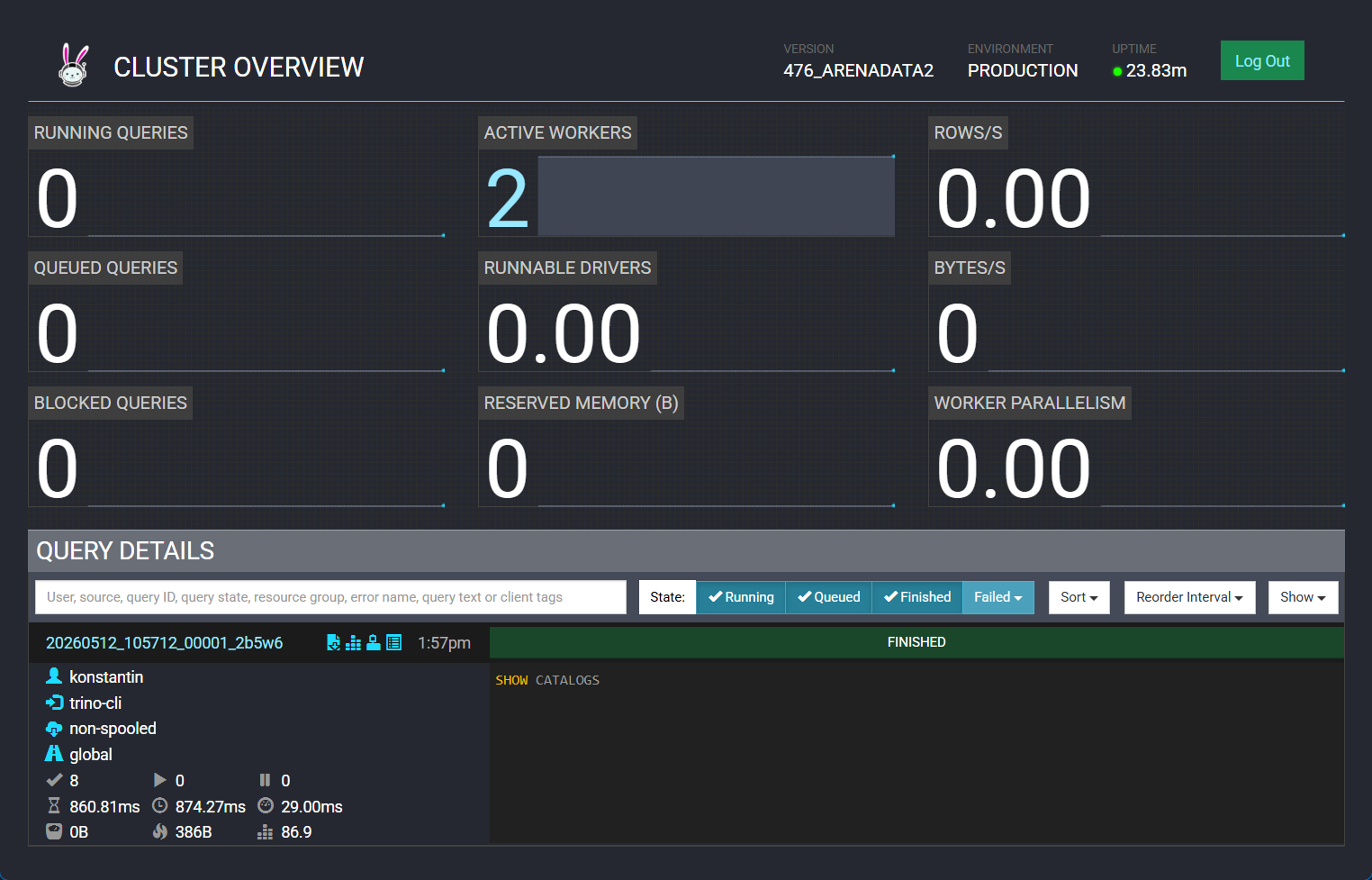 Веб-интерфейс Trino