

Kyuubi integration with Spark Connect
Overview
Spark Connect is a protocol that allows client applications to communicate with a remote Spark server via gRPC without the need to co-locate the client with the Spark driver.
Kyuubi is a multi-tenant gateway that enables submitting Spark workloads and SQL queries on top of various compute engines such as Spark, Hive, Flink, etc.
A standard Spark Connect server does not provide user isolation and authentication. The gRPC channel between a Spark client app and the Spark Connect server remains insecure. But Kyuubi provides the user isolation and authentication features. Therefore, Spark Connect support was introduced to Kyuubi.
Spark Connect supports the following authentication types: KERBEROS, LDAP, and NONE. A client sends an authentication header: Authorization: Negotiate … (for Kerberos, SPNEGO) or Authorization: Basic … (for LDAP). If authentication is correct, the server issues a token that lives for the time specified in the kyuubi.frontend.spark.connect.token.ttl Kyuubi Server configuration parameter (default is 24 hours).
After that, a client can make any Spark request using the token (the client sends this token in the Bearer authentication header on every request). TTL of this token is renewed on every Spark request. When a user closes the Spark session (by calling spark.stop()), the Spark client calls the ReleaseSession RPC method, and the server revokes the token automatically.
Client libraries
There are client libraries available for Python and Java/Scala.
The Python package contains the module which provides the Spark Connect authentication (Spark3/Spark4). The corresponding PySpark package is also provided. These libraries are already present on all ADH hosts (in the /usr/lib/spark3/python and /opt/pyspark3-python directories), but you need to activate the environment before running your Python programs:
$ source /opt/pyspark3-python/bin/activateIf you use a standard PySpark package, the ReleaseSession RPC method will not be called in spark.stop(). Therefore, after closing the Spark session, the authentication token will not be revoked. And if Kyuubi share level is CONNECTION, the YARN session will still be open after closing it with spark.stop().
The packages for Java/Scala are also available:
Setup
In ADCM, add the SPARK_CONNECT value to the kyuubi.frontend.protocols configuration parameter of the Kyuubi Server component and restart the Kyuubi service. That is, the final parameter value may look like THRIFT_BINARY,SPARK_CONNECT.
High availability
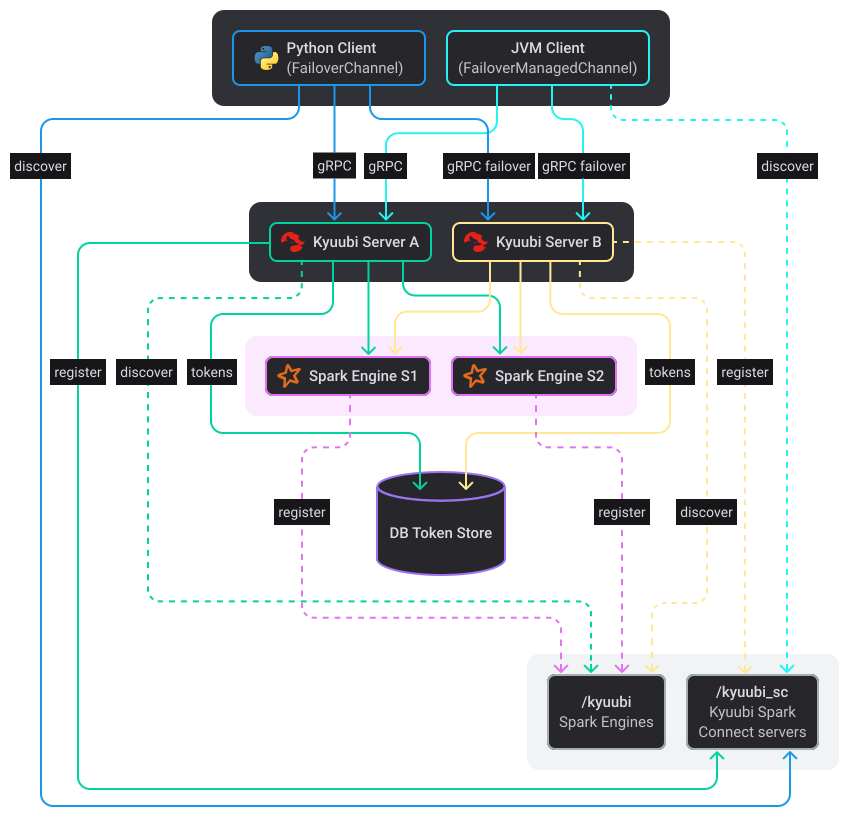
Spark Connect in Kyuubi supports HA (high availability) mode. When a Kyuubi server crashes, clients transparently failover to another server and continue to operate. The following diagram highlights major steps of Kyuubi and Spark Connect components in an HA workflow.
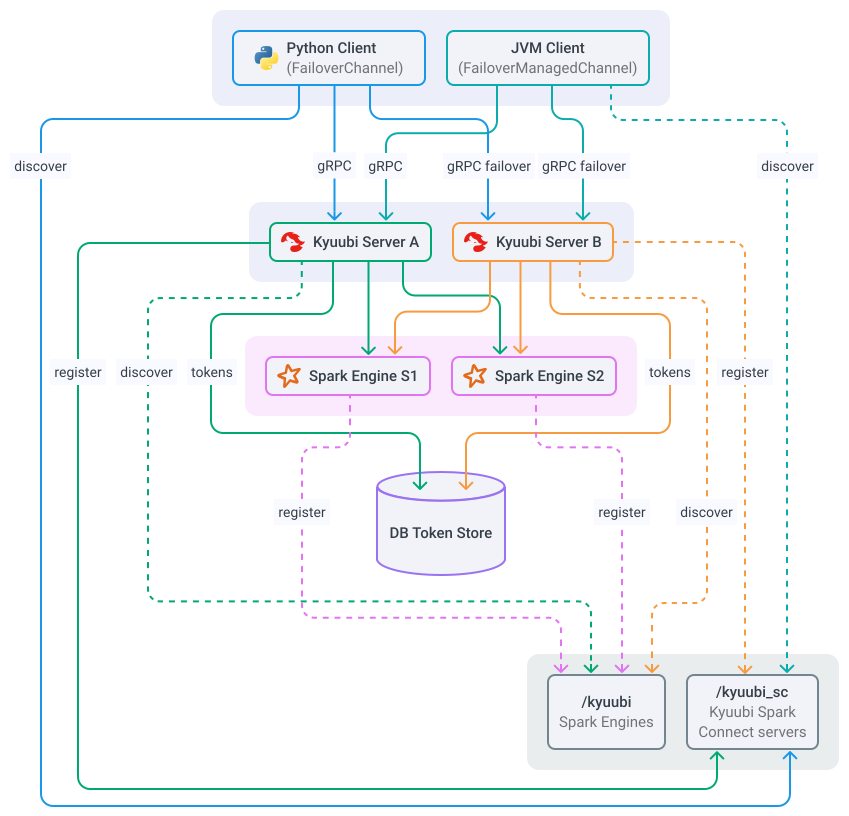
To locate live servers, Kyuubi relies on ZooKeeper service discovery. To use HA, clients should specify discovery URLs in the following format: sc://<zk1>:2181,<zk2>:2181/;serviceDiscoveryMode=zooKeeper;zooKeeperNamespace=kyuubi_sc. A few examples are below.
$ export GRPC_DEFAULT_SSL_ROOTS_FILE_PATH=/etc/ssl/certs/ca-certificates.crt
$ KYUUBI_AUTH=none
$ pyspark3 --remote "sc://ka-adh-1.ru-central1.internal:2181,ka-adh-2.ru-central1.internal:2181,ka-adh-3.ru-central1.internal:2181/;serviceDiscoveryMode=zooKeeper;zooKeeperNamespace=arenadata/cluster/11/kyuubi_sc;"
Example output:
Client connected to the Spark Connect server at ka-adh-1.ru-central1.internal:2181,ka-adh-2.ru-central1.internal:2181,ka-adh-3.ru-central1.internal:2181
SparkSession available as 'spark'.
>>> spark.sql("SELECT current_user()").show()
+--------------+
|current_user()|
+--------------+
|    konstantin|
+--------------+
from kyuubi.spark_connect import KyuubiSessionBuilder

builder = KyuubiSessionBuilder(f"sc://ka-adh-1.ru-central1.internal:2181,ka-adh-2.ru-central1.internal:2181,ka-adh-3.ru-central1.internal:2181/;serviceDiscoveryMode=zooKeeper;zooKeeperNamespace=arenadata/cluster/11/kyuubi_sc;", auth="none")
spark = builder.getOrCreate()

spark.sql("SELECT current_user()").show()
import org.apache.spark.sql.SparkSession;
import org.apache.spark.sql.kyuubi.KyuubiAuthType;
import org.apache.spark.sql.kyuubi.KyuubiSessionBuilder;
public class SparkConnectClientKerberos {
public static void main(String[] args) {
String url = "sc://ka-adh-1.ru-central1.internal:2181,ka-adh-2.ru-central1.internal:2181,ka-adh-3.ru-central1.internal:2181/;serviceDiscoveryMode=zooKeeper;zooKeeperNamespace=arenadata/cluster/11/kyuubi_sc;"
String authStr = System.getenv().getOrDefault("KYUUBI_AUTH", "NONE");
KyuubiAuthType authType = KyuubiAuthType.valueOf(authStr.toUpperCase());
SparkSession spark = new KyuubiSessionBuilder(url, authType).getOrCreate();
try {
spark.sql("SELECT current_user()").show();
} finally {
spark.stop();
}
}
}|
TIP
To prevent Spark applications from terminating on a Kyuubi server restart, set spark.submit.deployMode=cluster in Custom properties of the Kyuubi Server component configuration.
|
Authentication between Kyuubi and Spark
The gRPC communication channel between a Kyuubi server and Spark Connect supports token-based authentication.
To enable this feature, set kyuubi.engine.security.enabled=true in Kyuubi Server → kyuubi-defaults.conf.
To ensure security, a secret key (token) is used. It is a shared symmetric key (AES key material) used to build the AES cipher for encrypting/decrypting actual authentication tokens exchanged between Kyuubi and Spark. It is not a per-session token — Kyuubi and Spark Connect fetch it once per process and initialize it independently.
The secret is stored in a shared znode (kyuubi.ha.zookeeper.engine.secure.secret.node, defaults to /kyuubi_engine_secure_secret) and is auto-created with a random secret on first use.
To disable auto-creation, set the kyuubi.ha.zookeeper.engine.secure.secret.node.auto-create=false parameter to provision the secret manually.
|
IMPORTANT
The auto-created znode with a secret is readable by any authenticated ZooKeeper client, not only by Kyuubi.
|
If you run ZooKeeper with Kerberos or Digest authentication, ensure to set corresponding ACLs.
If multiple Kyuubi clusters use a shared ZooKeeper ensemble, specify a distinct znode path for each cluster using the kyuubi.ha.zookeeper.engine.secure.secret.node parameter.
Manual secret provisioning
To use a custom secret instead of an auto-generated one, set kyuubi.ha.zookeeper.engine.secure.secret.node.auto-create to false, and create a secret znode before starting Kyuubi.
The secret should be at least kyuubi.engine.security.crypto.keyLength/8 characters long (16 characters for the default 128-bit key).
An example of creating a custom secret key is below.
-
Generate a 16-character secret (matches the default 128-bit key length):
$ SECRET=$(tr -dc 'A-Za-z0-9' </dev/urandom | head -c16) -
Create a znode:
$ /usr/lib/zookeeper/bin/zkCli.sh create /arenadata/cluster/11/kyuubi_engine_secure_secret "$SECRET" -
Alternatively, you can use the
simplestatic provider and specify the same secret on each Kyuubi server using the parameters:kyuubi.engine.security.secret.provider=simple kyuubi.engine.security.secret.provider.simple.secret=<secret>
Examples
Python
This example demonstrates how to connect to Kyuubi via Spark Connect from Python with SSL and Kerberos enabled in the ADH cluster.
-
Prepare a shell script that sets the correct environment:
prepare_env.shsource /opt/pyspark3-python/bin/activate export GRPC_DEFAULT_SSL_ROOTS_FILE_PATH=/etc/ssl/certs/ca-certificates.crt -
Prepare a Python program:
spark_connect_client_kerberos.pyfrom kyuubi.spark_connect import KyuubiSessionBuilder HOST = "tsn-adh3-3.ru-central1.internal" PORT = 10199 spark = KyuubiSessionBuilder(f"sc://{HOST}:{PORT}/;use_ssl=true", auth="kerberos").getOrCreate() spark.sql("SELECT current_user()").show() spark.stop()The code for LDAP is similar, but the session parameters should be adjusted as follows:
spark = KyuubiSessionBuilder(f"sc://{HOST}:{PORT}/;use_ssl=true",
    auth="ldap",
    username="<ldap_username>",
    password="<ldap_password>").getOrCreate()
where
<ldap_username>and<ldap_password>are the username and password of a user in LDAP.If you don’t use LDAP or Kerberos, omit the
authparameter. -
Run the Python program:
$ python3 spark_connect_client_kerberos.pyThe expected output should be similar to:
+--------------+
|current_user()|
+--------------+
|   stikhomirov|
+--------------+
Java/Scala
-
Prepare a Java program:
SparkConnectClientKerberos.javaimport org.apache.spark.sql.SparkSession; import org.apache.spark.sql.kyuubi.KyuubiAuthType; import org.apache.spark.sql.kyuubi.KyuubiSessionBuilder; public class SparkConnectClientKerberos { public static void main(String[] args) { String url = System.getenv("KYUUBI_URL"); if (url == null || url.isEmpty()) { throw new IllegalArgumentException("KYUUBI_URL environment variable is required"); } String authStr = System.getenv().getOrDefault("KYUUBI_AUTH", "NONE"); KyuubiAuthType authType = KyuubiAuthType.valueOf(authStr.toUpperCase()); System.out.println("connection string: " + url); System.out.println("auth type: " + authType); SparkSession spark = new KyuubiSessionBuilder(url, authType).getOrCreate(); try { spark.sql("SELECT current_user()").show(); } finally { spark.stop(); } } } -
In your pom.xml file, add the following dependency:
<dependency> <groupId>org.apache.kyuubi</groupId> <artifactId>kyuubi-spark-connect-client-standalone-spark-3.5_2.13</artifactId> <version>1.11.1.3-4.5.0-0</version> </dependency>pom.xml<?xml version="1.0" encoding="UTF-8"?> <project xmlns="http://maven.apache.org/POM/4.0.0" xmlns:xsi="http://www.w3.org/2001/XMLSchema-instance" xsi:schemaLocation="http://maven.apache.org/POM/4.0.0 http://maven.apache.org/xsd/maven-4.0.0.xsd"> <modelVersion>4.0.0</modelVersion> <groupId>org.apache.kyuubi.examples</groupId> <artifactId>kyuubi-spark-connect-client-jvm-examples</artifactId> <version>1.0-SNAPSHOT</version> <properties> <maven.compiler.release>17</maven.compiler.release> <kyuubi.version>1.11.1.1-4.3.0-0</kyuubi.version> <spark.version>3.5.4</spark.version> </properties> <build> <plugins> <plugin> <groupId>org.apache.maven.plugins</groupId> <artifactId>maven-compiler-plugin</artifactId> <version>3.11.0</version> </plugin> <plugin> <groupId>org.apache.maven.plugins</groupId> <artifactId>maven-shade-plugin</artifactId> <version>3.5.0</version> <executions> <execution> <phase>package</phase> <goals><goal>shade</goal></goals> <configuration> <filters> <filter> <artifact>*:*</artifact> <excludes> <exclude>META-INF/versions/*/module-info.class</exclude> <exclude>META-INF/*.SF</exclude> <exclude>META-INF/*.DSA</exclude> <exclude>META-INF/*.RSA</exclude> </excludes> </filter> </filters> <transformers> <transformer implementation="org.apache.maven.plugins.shade.resource.ManifestResourceTransformer"> <mainClass>SparkConnectClientKerberos</mainClass> <manifestEntries> <Multi-Release>true</Multi-Release> </manifestEntries> </transformer> <transformer implementation="org.apache.maven.plugins.shade.resource.ServicesResourceTransformer"/> </transformers> </configuration> </execution> </executions> </plugin> </plugins> </build> <dependencies> <dependency> <groupId>org.apache.kyuubi</groupId> <artifactId>kyuubi-spark-connect-client-standalone_2.13</artifactId> <version>${kyuubi.version}</version> </dependency> <dependency> <groupId>org.slf4j</groupId> <artifactId>slf4j-simple</artifactId> <version>1.7.36</version> </dependency> </dependencies> </project>Build a JAR file with the created POM.
-
Prepare a shell script that sets the correct environment and runs the application:
run.shexport KYUUBI_AUTH=kerberos export KYUUBI_URL = "sc://tsn-adh3-3.ru-central1.internal:10199/;use_ssl=true" java --add-opens=java.base/java.nio=ALL-UNNAMED -jar target/kyuubi-spark-connect-client-jvm-examples-1.0-SNAPSHOT.jar -
Run the prepared shell script:
$ source run.sh