

Configure Ranger for Spark on Kubernetes using Helm
This article shows how to enable Ranger for Spark in Kubernetes using Helm and kubectl.
Prerequisites
-
A Kubernetes cluster (1.32 or later) with access configured through
kubectl. -
Helm (3.8.0 or higher) — a package manager that allows quick deployment of Docker images in Kubernetes.
-
Spark artifacts (Docker images and Helm charts) loaded into your private OCI registry. These artifacts can be found in offline packages, which can be requested from the Arenadata support team. To run Spark on Kubernetes, you need to unpack the following images:
-
hub.arenadata.io/adc-enterprise/spark-operator:<version>
-
hub.arenadata.io/adc-enterprise/spark3:<version>
-
hub.arenadata.io/adc-enterprise/spark4:<version>-java17
-
hub.arenadata.io/adc-enterprise/spark4:<version>-java21
-
hub.arenadata.io/adc-enterprise/charts/spark-apps:<version>
-
hub.arenadata.io/adc-enterprise/charts/spark-operator:<version>
-
-
An ADPS cluster is installed and running. The ADPS version should be compatible with ADH Cloud.
-
An ADH cluster is installed and running. The ADH version should be compatible with ADH Cloud.
-
Spark operator is deployed in Kubernetes according to the instruction.
Deployment steps
Step 1. Create a Ranger service
This guide describes how to create a service via Ranger REST API. Alternatively, you can create a service in the Ranger web UI.
-
Define a service in a JSON file:
ranger-spark-k8s.json{ "isEnabled": true, "type": "hive", "name": "spark_k8s", (1) "displayName": "spark_k8s", "description": "Test service for Spark in Kubernetes", "configs": { "username": "spark", "password": "bigdata", "ranger.plugin.audit.filters": "[ {'accessResult': 'DENIED', 'isAudited': true}, {'actions':['METADATA OPERATION'], 'isAudited': false}, {'users':['hive','hue'],'actions':['SHOW_ROLES'],'isAudited':false} ]", "jdbc.driverClassName": "org.apache.hive.jdbc.HiveDriver", "jdbc.url": "jdbc:hive2://ka-adh-2.ru-central1.internal:10002", "userstore.download.auth.users": "*", "tag.download.auth.users": "*", "policy.download.auth.users": "*" } }1 Name of the service in Ranger. Must be unique. NOTEThe example service configuration includes fields such asusername,password,jdbc.url, andjdbc.driverClassName. These fields are not intended for Spark-Ranger interaction (they are used for fetching metadata from HiveServer2 to provide autocompletion in Ranger UI), however, they are mandatory to satisfy the request validation. Specify dummy field values if you do not use a real HiveServer2. -
Push the defined service to Ranger:
$ curl -u admin:<admin_pwd> -H "Content-Type: application/json" -X POST -d @ranger-spark-k8s.json http://<ranger-admin>:6080/service/public/v2/api/service
Step 2. Create secrets
The scenario assumes that Spark running in Kubernetes communicates with an external ADH cluster. To access the ADH cluster, it is necessary to provide ADH configurations to every Kubernetes pod. A way to do this is through Kubernetes secrets.
-
Create the configuration files (core-site.xml, hdfs-site.xml, hive-site.xml), using the examples below. Use configuration values from your ADH cluster.
core-site.xml<?xml version="1.0"?> <configuration> <property> <name>fs.defaultFS</name> <value>hdfs://adh</value> </property> <property> <name>dfs.nameservices</name> <value>adh</value> </property> <property> <name>hadoop.security.authentication</name> <value>simple</value> </property> <property> <name>dfs.ha.namenodes.adh</name> <value>nn_ka-adh-1,nn_ka-adh-2</value> </property> <property> <name>dfs.namenode.rpc-address.adh.nn_ka-adh-1</name> <value>ka-adh-1.ru-central1.internal:8020</value> </property> <property> <name>dfs.namenode.rpc-address.adh.nn_ka-adh-2</name> <value>ka-adh-2.ru-central1.internal:8020</value> </property> </configuration>hdfs-site.xml<?xml version="1.0"?> <configuration> <property> <name>dfs.nameservices</name> <value>adh</value> </property> <property> <name>dfs.ha.namenodes.adh</name> <value>nn_ka-adh-1,nn_ka-adh-2</value> </property> <property> <name>dfs.namenode.rpc-address.adh.nn_ka-adh-1</name> <value>ka-adh-1.ru-central1.internal:8020</value> </property> <property> <name>dfs.namenode.rpc-address.adh.nn_ka-adh-2</name> <value>ka-adh-2.ru-central1.internal:8020</value> </property> <property> <name>dfs.client.failover.proxy.provider.adh</name> <value>org.apache.hadoop.hdfs.server.namenode.ha.ObserverReadProxyProvider</value> </property> </configuration>hive-site.xml<?xml version="1.0"?> <configuration> <property> <name>hive.metastore.uris</name> <value>thrift://ka-adh-3.ru-central1.internal:9083</value> </property> <property> <name>metastore.use.SSL</name> <value>False</value> </property> <property> <name>hive.metastore.sasl.enabled</name> <value>False</value> </property> </configuration> -
Create the secret:
$ kubectl create secret generic hadoop-conf -n spark-application-min --from-file=core-site.xml --from-file=hdfs-site.xml --from-file=hive-site.xml -
Verify the secret:
$ kubectl get secrets -n spark-application-minThe output:
NAME                                         TYPE                 DATA   AGE
hadoop-conf                                  Opaque               3      2d1h
Step 3. Create a test Spark application
In this scenario, Spark in Kubernetes pulls a PySpark application file from HDFS in the ADH cluster. To create a test PySpark application, do the following:
-
Create the test.py file:
from pyspark.sql import SparkSession
from pyspark import SparkConf


spark = SparkSession.builder \
    .appName("Demo_create_db") \
    .enableHiveSupport() \
    .getOrCreate()

df = spark.sql("create database check_ranger") (1)

df.show(10,0)

spark.sparkContext.stop()
1 Creates a new database. RangerSparkExtension detects this event and reports it to Ranger. -
Upload test.py to HDFS:
$ sudo -u hdfs hdfs dfs -put /tmp/test.py /user/konstantin/test.py
Step 4. Submit the Spark application
-
Create a Helm values file spark-submit.yaml:
spark-submit.yamlimage: registry: "registry" (1) repository: "repository" (2) tag: "version" ## Specify a pullPolicy ## ref: https://kubernetes.io/docs/concepts/containers/images/#pre-pulled-images ## pullPolicy: "Always" ## Existing secret or secret to create to use for image pulling, they must exist in all product namespaces ## pullSecret: name: "" credentials: {} # registry: private-docker-registry # username: user # password: pass #ServiceAccount name for Spark driver/executor pods serviceAccountName: "spark-app" #Application #mainApplicationFile: path to the main app file (hdfs://, local://, etc.) mainApplicationFile: "hdfs://adh/user/konstantin/test.py" (3) #Restart policy on failure: Never or OnFailure #When set to OnFailure, maxRetries must be specified restartPolicy: "" #Maximum number of Job restart attempts on failure #Required when restartPolicy is OnFailure #maxRetries: #Seconds to keep a finished (Succeeded or Failed) SparkApplication CR around #before it is automatically deleted. A Failed application with restart #attempts remaining does not count as finished. Omit to keep finished CRs #until explicit deletion; 0 deletes as soon as the terminal status is recorded. #ttlSecondsAfterFinished: 3600 (4) #mainClass: set only for JVM apps (e.g. SparkConnectServer) #mainClass: "org.apache.spark.examples.SparkPi" #Hadoop configurations hadoopConfigsSecretName: "hadoop-conf" (5) #Spark configurations. When set, this client-managed Secret is the complete #Spark configuration source. If Ranger is enabled, include the ranger-spark-*.xml #files in this Secret; the chart does not create a separate Ranger config Secret. sparkConfigsSecretName: "" #Kerberos (keytab mode), disabled by default. #The referenced Secret must already exist and carry two keys: keytab + krb5.conf. #Ticket-cache mode is CLI-only and is not exposed here. #Extra confs (e.g. spark.kerberos.access.hadoopFileSystems) go under sparkConf. kerberos: {} # principal: user@RU-CENTRAL1.INTERNAL # keytab: # secretName: spark-keytab # Arguments passed to the main application class after the main file args: - "10" #Spark configuration #Key/value map rendered into spec.sparkConf # sparkConf: {} #SSL / truststore settings. The referenced Secret must already exist; #the operator mounts the stores at /etc/ssl. #Enabled implicitly when secretName is set. ssl: {} # secretName: "ca-store" # trustStoreKey: "truststore.jks" # keyStoreKey: "keystore.jks" sparkConf: spark.sql.extensions: org.apache.kyuubi.plugin.spark.authz.ranger.RangerSparkExtension (6) #Ranger authorization (Kyuubi Spark Authz plugin), disabled by default. #When enabled without sparkConfigsSecretName, the chart renders the #ranger-spark-*.xml config Secret. The spark-apps.sparkConf helper always appends #the Ranger extension to spark.sql.extensions. #The audit JAAS block is written only when the kerberos block is set (keytab mode); #the policymgr-ssl truststore is rendered only when ssl.enabled. ranger: enabled: true # ranger.plugin.spark.policy.rest.url policyRestURL: "http://ka-adps-1.ru-central1.internal:6080" (7) # ranger.plugin.spark.service.name serviceName: "spark_k8s" (8) # xasecure.audit.destination.solr.zookeepers ranger.plugin.spark.use.rangerGroups: "True" ranger.plugin.spark.use.only.rangerGroups: "True" solrZookeepers: "ka-adps-1.ru-central1.internal:2181/Arenadata.Hadoop-43.solr.server" (9) job: ## @param replicas set number of job replicas ## replicas: 1 ## When false, the spark-submit Job pod is not automatically deleted after completion (useful for log inspection) ## #deleteOnTermination: false ## Additional configuration that you want to be added to job-config args: {} # "task.max-worker-threads": 8 ## Annotations for job pods annotations: {} ## Set container requests and limits for resource like CPU or memory (essential for production workloads) ## resources: {} #limits: # cpu: "2" # memory: "8Gi" #requests: # cpu: "2" # memory: "8Gi" ## Request additional PVC for pod ## persistentVolume: {} # mountPath: "/data/spark" # volumeClaimTemplates: # - metadata: # name: data # spec: # accessModes: ["ReadWriteOnce"] # resources: # requests: # storage: 10Gi # storageClassName: default ## nodeAffinity: Object defining constraints to place pods on a specific set of Nodes ## nodeSelector: {} topologySpreadConstraints: [] ## Allow a Pod to be scheduled onto nodes that have taints. ## ref: https://kubernetes.io/docs/concepts/configuration/taint-and-toleration/ ## tolerations: [] # - key: "example-key" # operator: "Exists" # effect: "NoSchedule" ## affinity: Object defining soft rules to place pods on a specific set of Nodes or didn't place pod to nodes due to some conditions ## affinity: {} # nodeAffinity: # requiredDuringSchedulingIgnoredDuringExecution: # nodeSelectorTerms: # - matchExpressions: # - key: topology.kubernetes.io/zone # operator: In # values: # - antarctica-east1 # - antarctica-west1 # preferredDuringSchedulingIgnoredDuringExecution: # - weight: 1 # preference: # matchExpressions: # - key: another-node-label-key # operator: In # values: # - another-node-label-value startupProbe: {} # type: httpGet # port: 8080 # path: /v1/info # scheme: HTTP # initialDelaySeconds: 20 # periodSeconds: 5 # timeoutSeconds: 3 # successThreshold: 1 # failureThreshold: 2 livenessProbe: {} # type: httpGet # port: 8080 # path: /v1/info # scheme: HTTP # initialDelaySeconds: 20 # periodSeconds: 5 # timeoutSeconds: 3 # successThreshold: 1 # failureThreshold: 2 readinessProbe: {} # type: exec # command: test -f /opt/spark/etc/truststore/custom-truststore.jks # initialDelaySeconds: 20 # periodSeconds: 5 # timeoutSeconds: 3 # successThreshold: 1 # failureThreshold: 2 ## Mount additional secrets into the pod ## mountSecrets: [] # - secretName: my-secret # mountPath: /etc/spark/my-secret driver: ## @param replicas set number of driver replicas ## replicas: 1 ## Additional configuration that you want to be added to driver-config args: {} # "task.max-worker-threads": 8 ## Annotations for driver pods annotations: {} ## Set container requests and limits for resource like CPU or memory (essential for production workloads) ## resources: {} #limits: # cpu: "2" # memory: "8Gi" #requests: # cpu: "2" # memory: "8Gi" ## Request additional PVC for pod ## persistentVolume: {} # mountPath: "/data/spark" # volumeClaimTemplates: # - metadata: # name: data # spec: # accessModes: ["ReadWriteOnce"] # resources: # requests: # storage: 10Gi # storageClassName: default ## nodeAffinity: Object defining constraints to place pods on a specific set of Nodes ## nodeSelector: {} topologySpreadConstraints: [] ## Allow a Pod to be scheduled onto nodes that have taints. ## ref: https://kubernetes.io/docs/concepts/configuration/taint-and-toleration/ ## tolerations: [] # - key: "example-key" # operator: "Exists" # effect: "NoSchedule" ## affinity: Object defining soft rules to place pods on a specific set of Nodes or didn't place pod to nodes due to some conditions ## affinity: {} # nodeAffinity: # requiredDuringSchedulingIgnoredDuringExecution: # nodeSelectorTerms: # - matchExpressions: # - key: topology.kubernetes.io/zone # operator: In # values: # - antarctica-east1 # - antarctica-west1 # preferredDuringSchedulingIgnoredDuringExecution: # - weight: 1 # preference: # matchExpressions: # - key: another-node-label-key # operator: In # values: # - another-node-label-value startupProbe: {} # type: httpGet # port: 8080 # path: /v1/info # scheme: HTTP # initialDelaySeconds: 20 # periodSeconds: 5 # timeoutSeconds: 3 # successThreshold: 1 # failureThreshold: 2 livenessProbe: {} # type: httpGet # port: 8080 # path: /v1/info # scheme: HTTP # initialDelaySeconds: 20 # periodSeconds: 5 # timeoutSeconds: 3 # successThreshold: 1 # failureThreshold: 2 readinessProbe: {} # type: exec # command: test -f /opt/spark/etc/truststore/custom-truststore.jks # initialDelaySeconds: 20 # periodSeconds: 5 # timeoutSeconds: 3 # successThreshold: 1 # failureThreshold: 2 ## Mount additional secrets into the pod ## mountSecrets: [] # - secretName: my-secret # mountPath: /etc/spark/my-secret executor: ## @param replicas set number of executor replicas ## replicas: 1 ## Additional configuration that you want to be added to executor-config args: {} # "task.max-worker-threads": 8 ## Annotations for executor pods annotations: {} ## Set container requests and limits for resource like CPU or memory (essential for production workloads) ## resources: {} #limits: # cpu: "2" # memory: "8Gi" #requests: # cpu: "2" # memory: "8Gi" ## Request additional PVC for pod ## persistentVolume: {} # mountPath: "/data/spark" # volumeClaimTemplates: # - metadata: # name: data # spec: # accessModes: ["ReadWriteOnce"] # resources: # requests: # storage: 10Gi # storageClassName: default ## nodeAffinity: Object defining constraints to place pods on a specific set of Nodes ## nodeSelector: {} topologySpreadConstraints: [] ## Allow a Pod to be scheduled onto nodes that have taints. ## ref: https://kubernetes.io/docs/concepts/configuration/taint-and-toleration/ ## tolerations: [] # - key: "example-key" # operator: "Exists" # effect: "NoSchedule" ## affinity: Object defining soft rules to place pods on a specific set of Nodes or didn't place pod to nodes due to some conditions ## affinity: {} # nodeAffinity: # requiredDuringSchedulingIgnoredDuringExecution: # nodeSelectorTerms: # - matchExpressions: # - key: topology.kubernetes.io/zone # operator: In # values: # - antarctica-east1 # - antarctica-west1 # preferredDuringSchedulingIgnoredDuringExecution: # - weight: 1 # preference: # matchExpressions: # - key: another-node-label-key # operator: In # values: # - another-node-label-value startupProbe: {} # type: httpGet # port: 8080 # path: /v1/info # scheme: HTTP # initialDelaySeconds: 20 # periodSeconds: 5 # timeoutSeconds: 3 # successThreshold: 1 # failureThreshold: 2 livenessProbe: {} # type: httpGet # port: 8080 # path: /v1/info # scheme: HTTP # initialDelaySeconds: 20 # periodSeconds: 5 # timeoutSeconds: 3 # successThreshold: 1 # failureThreshold: 2 readinessProbe: {} # type: exec # command: test -f /opt/spark/etc/truststore/custom-truststore.jks # initialDelaySeconds: 20 # periodSeconds: 5 # timeoutSeconds: 3 # successThreshold: 1 # failureThreshold: 2 ## Mount additional secrets into the pod ## mountSecrets: [] # - secretName: my-secret # mountPath: /etc/spark/my-secret #Optional: inline Secret for properties-file pattern propertiesFile: enabled: false # Raw content rendered into the Secret's stringData content: "" #RBAC rbac: # Set to false if the ServiceAccount/Role/RoleBinding already exist create: true rules: - apiGroups: - "" resources: - pods - configmaps - persistentvolumeclaims - services - secrets verbs: - get - list - watch - create - update - patch - delete - deletecollection - apiGroups: - networking.k8s.io verbs: - get - list - watch - create - update - patch - delete resources: - networkpolicies1 Address of your OCI registry to pull images from. 2 Name of repository in your registry. 3 Test application to run in Kubernetes. 4 Amount of time after which the Spark application deployment is deleted regardless of the execution result. 5 Kubernetes secret with configurations to access an ADH cluster. 6 RangerSparkExtension detects spark.sql()events (like creating a database) and reports them to Ranger.7 Ranger host URL. You can find one in ADCM (Clusters → <ADPS_cluster> → Ranger → Info). 8 Ranger service name. 9 ZooKeeper connection string with chroot used by Ranger. You can find one using zkCli.sh in your ADPS cluster. -
Submit the Spark application using Helm:
$ helm upgrade --install spark-application oci://hub.adsw.io/ng/charts/spark-apps:<version> -f spark-submit.yaml --namespace spark-application-minThe output:
Release "spark-application" does not exist. Installing it now.
Pulled: hub.adsw.io/ng/charts/spark-apps:1.41.0
Digest: sha256:73debb0c68945951ec0e0f0ef90ff6f3182184581cfb360157c2b5da47e11cf1
NAME: spark-application
LAST DEPLOYED: Fri Sep 18 13:21:15 2026
NAMESPACE: spark-application-min
STATUS: deployed
REVISION: 1
DESCRIPTION: Install complete
TEST SUITE: None
-
Verify the Spark application pods:
$ kubectl get pods -n spark-application-minThe result:
NAME                                                   READY   STATUS    RESTARTS   AGE
demo-create-db-6c9b31a0b4d0d767-exec-1                 1/1     Running   0          3s
spark-application-spark-apps-85973ca0b4d0c34b-driver   1/1     Running   0          8s
spark-application-spark-apps-l77hq                     1/1     Running   0          12s
Once the job completes, the executor pods are deleted and the status of the driver pod changes to
Completed:NAME READY STATUS RESTARTS AGE spark-application-spark-apps-85973ca0b4d0c34b-driver 0/1 Completed 0 7m2s
-
Check the Spark driver logs within the pod:
$ kubectl logs <driver-pod> -n spark-application-min -
Check the Audit page in Ranger Admin web UI. The test database creation is reflected in the list of audit events.
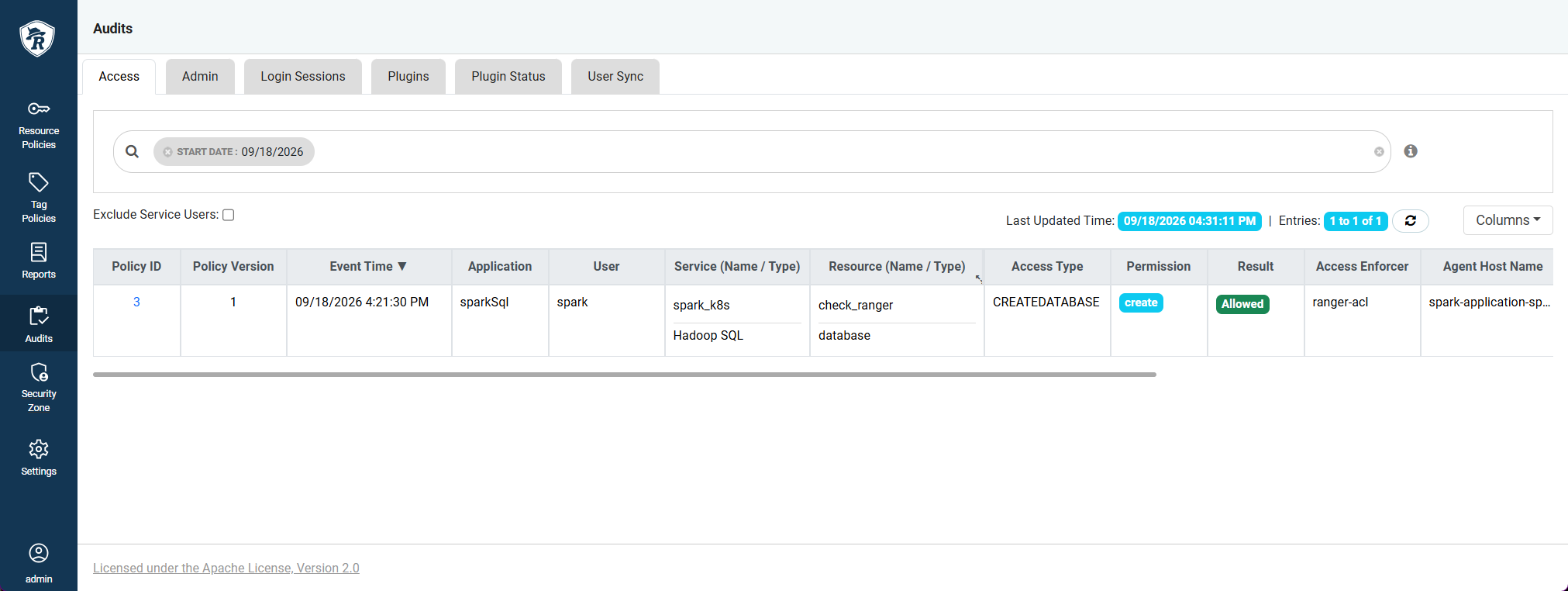 Ranger audit
 Ranger audit