

Настройка Ranger для Spark в Kubernetes с помощью Helm
В данной статье показано, как включить Ranger для Spark в Kubernetes с помощью Helm и kubectl.
Требования
-
Кластер Kubernetes (версии 1.32 или более поздней) с настроенным доступом через
kubectl. -
Helm (версии 3.8.0 или выше) — пакетный менеджер для быстрого развертывания Docker-образов в Kubernetes.
-
Артефакты Spark, включая Docker-образы и Helm-чарты (chart), предварительно загруженные в ваш приватный OCI-реестр. Эти артефакты доступны в offline-пакетах, которые можно запросить у службы поддержки Arenadata. Для деплоя Spark в Kubernetes необходимо извлечь следующие образы:
-
hub.arenadata.io/adc-enterprise/spark-operator:<version>
-
hub.arenadata.io/adc-enterprise/spark3:<version>
-
hub.arenadata.io/adc-enterprise/spark4:<version>-java17
-
hub.arenadata.io/adc-enterprise/spark4:<version>-java21
-
hub.arenadata.io/adc-enterprise/charts/spark-apps:<version>
-
hub.arenadata.io/adc-enterprise/charts/spark-operator:<version>
-
-
Установленный и функционирующий кластер ADPS. Версия ADPS должна быть совместима с ADH Cloud.
-
Установленный и функционирующий кластер ADH. Версия ADH должна быть совместима с ADH Cloud.
-
Оператор Spark, развернутый в Kubernetes согласно инструкции.
Процедура развертывания
Шаг 1. Создание сервиса в Ranger
В этой статье показано создание сервиса Ranger с помощью REST API Ranger. Также сервис можно создать, используя веб-интерфейс Ranger.
-
Создайте JSON-конфигурацию сервиса:
ranger-spark-k8s.json{ "isEnabled": true, "type": "hive", "name": "spark_k8s", (1) "displayName": "spark_k8s", "description": "Test service for Spark in Kubernetes", "configs": { "username": "spark", "password": "bigdata", "ranger.plugin.audit.filters": "[ {'accessResult': 'DENIED', 'isAudited': true}, {'actions':['METADATA OPERATION'], 'isAudited': false}, {'users':['hive','hue'],'actions':['SHOW_ROLES'],'isAudited':false} ]", "jdbc.driverClassName": "org.apache.hive.jdbc.HiveDriver", "jdbc.url": "jdbc:hive2://ka-adh-2.ru-central1.internal:10002", "userstore.download.auth.users": "*", "tag.download.auth.users": "*", "policy.download.auth.users": "*" } }1 Имя сервиса в Ranger. Данное имя должно быть уникальным. ПРИМЕЧАНИЕПример конфигурации сервиса содержит такие поля, какusername,password,jdbc.urlиjdbc.driverClassName. Эти поля не используются для взаимодействия Spark с Ranger (они предназначены для получения метаданных от HiveServer2, чтобы обеспечить автозаполнение в Ranger UI), но должны присутствовать в запросе для прохождения валидации. Если вы не используете реальный HiveServer2, укажите произвольные значения для этих полей. -
Загрузите конфигурацию сервиса в Ranger:
$ curl -u admin:<admin_pwd> -H "Content-Type: application/json" -X POST -d @ranger-spark-k8s.json http://<ranger-admin>:6080/service/public/v2/api/service
Шаг 2. Создание секретов
В данном сценарии Spark, запущенный в Kubernetes, взаимодействует с внешним кластером ADH. Для доступа к ADH-кластеру необходимо предоставить конфигурации ADH в каждый под Kubernetes. Это можно сделать с помощью секретов Kubernetes.
-
Создайте конфигурационные файлы (core-site.xml, hdfs-site.xml, hive-site.xml), используя приведенные ниже примеры. Используйте значения конфигурации из вашего ADH-кластера.
core-site.xml<?xml version="1.0"?> <configuration> <property> <name>fs.defaultFS</name> <value>hdfs://adh</value> </property> <property> <name>dfs.nameservices</name> <value>adh</value> </property> <property> <name>hadoop.security.authentication</name> <value>simple</value> </property> <property> <name>dfs.ha.namenodes.adh</name> <value>nn_ka-adh-1,nn_ka-adh-2</value> </property> <property> <name>dfs.namenode.rpc-address.adh.nn_ka-adh-1</name> <value>ka-adh-1.ru-central1.internal:8020</value> </property> <property> <name>dfs.namenode.rpc-address.adh.nn_ka-adh-2</name> <value>ka-adh-2.ru-central1.internal:8020</value> </property> </configuration>hdfs-site.xml<?xml version="1.0"?> <configuration> <property> <name>dfs.nameservices</name> <value>adh</value> </property> <property> <name>dfs.ha.namenodes.adh</name> <value>nn_ka-adh-1,nn_ka-adh-2</value> </property> <property> <name>dfs.namenode.rpc-address.adh.nn_ka-adh-1</name> <value>ka-adh-1.ru-central1.internal:8020</value> </property> <property> <name>dfs.namenode.rpc-address.adh.nn_ka-adh-2</name> <value>ka-adh-2.ru-central1.internal:8020</value> </property> <property> <name>dfs.client.failover.proxy.provider.adh</name> <value>org.apache.hadoop.hdfs.server.namenode.ha.ObserverReadProxyProvider</value> </property> </configuration>hive-site.xml<?xml version="1.0"?> <configuration> <property> <name>hive.metastore.uris</name> <value>thrift://ka-adh-3.ru-central1.internal:9083</value> </property> <property> <name>metastore.use.SSL</name> <value>False</value> </property> <property> <name>hive.metastore.sasl.enabled</name> <value>False</value> </property> </configuration> -
Создайте секрет:
$ kubectl create secret generic hadoop-conf -n spark-application-min --from-file=core-site.xml --from-file=hdfs-site.xml --from-file=hive-site.xml -
Проверьте секрет:
$ kubectl get secrets -n spark-application-minВывод:
NAME                                         TYPE                 DATA   AGE
hadoop-conf                                  Opaque               3      2d1h
Шаг 3. Создание тестового Spark-приложения
В данном примере Spark в Kubernetes загружает файл PySpark-приложения из HDFS кластера ADH. Для создания тестового PySpark-приложения выполните следующее:
-
Создайте файл test.py:
from pyspark.sql import SparkSession
from pyspark import SparkConf


spark = SparkSession.builder \
    .appName("Demo_create_db") \
    .enableHiveSupport() \
    .getOrCreate()

df = spark.sql("create database check_ranger") (1)

df.show(10,0)

spark.sparkContext.stop()
1 Создает новую базу данных. RangerSparkExtension детектирует это событие и сообщает о нем в Ranger. -
Загрузите файл test.py в HDFS:
$ sudo -u hdfs hdfs dfs -put /tmp/test.py /user/konstantin/test.py
Шаг 4. Запуск Spark-приложения
-
Создайте Helm values-файл spark-submit.yaml:
spark-submit.yamlimage: registry: "registry" (1) repository: "repository" (2) tag: "version" ## Specify a pullPolicy ## ref: https://kubernetes.io/docs/concepts/containers/images/#pre-pulled-images ## pullPolicy: "Always" ## Existing secret or secret to create to use for image pulling, they must exist in all product namespaces ## pullSecret: name: "" credentials: {} # registry: private-docker-registry # username: user # password: pass #ServiceAccount name for Spark driver/executor pods serviceAccountName: "spark-app" #Application #mainApplicationFile: path to the main app file (hdfs://, local://, etc.) mainApplicationFile: "hdfs://adh/user/konstantin/test.py" (3) #Restart policy on failure: Never or OnFailure #When set to OnFailure, maxRetries must be specified restartPolicy: "" #Maximum number of Job restart attempts on failure #Required when restartPolicy is OnFailure #maxRetries: #Seconds to keep a finished (Succeeded or Failed) SparkApplication CR around #before it is automatically deleted. A Failed application with restart #attempts remaining does not count as finished. Omit to keep finished CRs #until explicit deletion; 0 deletes as soon as the terminal status is recorded. #ttlSecondsAfterFinished: 3600 (4) #mainClass: set only for JVM apps (e.g. SparkConnectServer) #mainClass: "org.apache.spark.examples.SparkPi" #Hadoop configurations hadoopConfigsSecretName: "hadoop-conf" (5) #Spark configurations. When set, this client-managed Secret is the complete #Spark configuration source. If Ranger is enabled, include the ranger-spark-*.xml #files in this Secret; the chart does not create a separate Ranger config Secret. sparkConfigsSecretName: "" #Kerberos (keytab mode), disabled by default. #The referenced Secret must already exist and carry two keys: keytab + krb5.conf. #Ticket-cache mode is CLI-only and is not exposed here. #Extra confs (e.g. spark.kerberos.access.hadoopFileSystems) go under sparkConf. kerberos: {} # principal: user@RU-CENTRAL1.INTERNAL # keytab: # secretName: spark-keytab # Arguments passed to the main application class after the main file args: - "10" #Spark configuration #Key/value map rendered into spec.sparkConf # sparkConf: {} #SSL / truststore settings. The referenced Secret must already exist; #the operator mounts the stores at /etc/ssl. #Enabled implicitly when secretName is set. ssl: {} # secretName: "ca-store" # trustStoreKey: "truststore.jks" # keyStoreKey: "keystore.jks" sparkConf: spark.sql.extensions: org.apache.kyuubi.plugin.spark.authz.ranger.RangerSparkExtension (6) #Ranger authorization (Kyuubi Spark Authz plugin), disabled by default. #When enabled without sparkConfigsSecretName, the chart renders the #ranger-spark-*.xml config Secret. The spark-apps.sparkConf helper always appends #the Ranger extension to spark.sql.extensions. #The audit JAAS block is written only when the kerberos block is set (keytab mode); #the policymgr-ssl truststore is rendered only when ssl.enabled. ranger: enabled: true # ranger.plugin.spark.policy.rest.url policyRestURL: "http://ka-adps-1.ru-central1.internal:6080" (7) # ranger.plugin.spark.service.name serviceName: "spark_k8s" (8) # xasecure.audit.destination.solr.zookeepers ranger.plugin.spark.use.rangerGroups: "True" ranger.plugin.spark.use.only.rangerGroups: "True" solrZookeepers: "ka-adps-1.ru-central1.internal:2181/Arenadata.Hadoop-43.solr.server" (9) job: ## @param replicas set number of job replicas ## replicas: 1 ## When false, the spark-submit Job pod is not automatically deleted after completion (useful for log inspection) ## #deleteOnTermination: false ## Additional configuration that you want to be added to job-config args: {} # "task.max-worker-threads": 8 ## Annotations for job pods annotations: {} ## Set container requests and limits for resource like CPU or memory (essential for production workloads) ## resources: {} #limits: # cpu: "2" # memory: "8Gi" #requests: # cpu: "2" # memory: "8Gi" ## Request additional PVC for pod ## persistentVolume: {} # mountPath: "/data/spark" # volumeClaimTemplates: # - metadata: # name: data # spec: # accessModes: ["ReadWriteOnce"] # resources: # requests: # storage: 10Gi # storageClassName: default ## nodeAffinity: Object defining constraints to place pods on a specific set of Nodes ## nodeSelector: {} topologySpreadConstraints: [] ## Allow a Pod to be scheduled onto nodes that have taints. ## ref: https://kubernetes.io/docs/concepts/configuration/taint-and-toleration/ ## tolerations: [] # - key: "example-key" # operator: "Exists" # effect: "NoSchedule" ## affinity: Object defining soft rules to place pods on a specific set of Nodes or didn't place pod to nodes due to some conditions ## affinity: {} # nodeAffinity: # requiredDuringSchedulingIgnoredDuringExecution: # nodeSelectorTerms: # - matchExpressions: # - key: topology.kubernetes.io/zone # operator: In # values: # - antarctica-east1 # - antarctica-west1 # preferredDuringSchedulingIgnoredDuringExecution: # - weight: 1 # preference: # matchExpressions: # - key: another-node-label-key # operator: In # values: # - another-node-label-value startupProbe: {} # type: httpGet # port: 8080 # path: /v1/info # scheme: HTTP # initialDelaySeconds: 20 # periodSeconds: 5 # timeoutSeconds: 3 # successThreshold: 1 # failureThreshold: 2 livenessProbe: {} # type: httpGet # port: 8080 # path: /v1/info # scheme: HTTP # initialDelaySeconds: 20 # periodSeconds: 5 # timeoutSeconds: 3 # successThreshold: 1 # failureThreshold: 2 readinessProbe: {} # type: exec # command: test -f /opt/spark/etc/truststore/custom-truststore.jks # initialDelaySeconds: 20 # periodSeconds: 5 # timeoutSeconds: 3 # successThreshold: 1 # failureThreshold: 2 ## Mount additional secrets into the pod ## mountSecrets: [] # - secretName: my-secret # mountPath: /etc/spark/my-secret driver: ## @param replicas set number of driver replicas ## replicas: 1 ## Additional configuration that you want to be added to driver-config args: {} # "task.max-worker-threads": 8 ## Annotations for driver pods annotations: {} ## Set container requests and limits for resource like CPU or memory (essential for production workloads) ## resources: {} #limits: # cpu: "2" # memory: "8Gi" #requests: # cpu: "2" # memory: "8Gi" ## Request additional PVC for pod ## persistentVolume: {} # mountPath: "/data/spark" # volumeClaimTemplates: # - metadata: # name: data # spec: # accessModes: ["ReadWriteOnce"] # resources: # requests: # storage: 10Gi # storageClassName: default ## nodeAffinity: Object defining constraints to place pods on a specific set of Nodes ## nodeSelector: {} topologySpreadConstraints: [] ## Allow a Pod to be scheduled onto nodes that have taints. ## ref: https://kubernetes.io/docs/concepts/configuration/taint-and-toleration/ ## tolerations: [] # - key: "example-key" # operator: "Exists" # effect: "NoSchedule" ## affinity: Object defining soft rules to place pods on a specific set of Nodes or didn't place pod to nodes due to some conditions ## affinity: {} # nodeAffinity: # requiredDuringSchedulingIgnoredDuringExecution: # nodeSelectorTerms: # - matchExpressions: # - key: topology.kubernetes.io/zone # operator: In # values: # - antarctica-east1 # - antarctica-west1 # preferredDuringSchedulingIgnoredDuringExecution: # - weight: 1 # preference: # matchExpressions: # - key: another-node-label-key # operator: In # values: # - another-node-label-value startupProbe: {} # type: httpGet # port: 8080 # path: /v1/info # scheme: HTTP # initialDelaySeconds: 20 # periodSeconds: 5 # timeoutSeconds: 3 # successThreshold: 1 # failureThreshold: 2 livenessProbe: {} # type: httpGet # port: 8080 # path: /v1/info # scheme: HTTP # initialDelaySeconds: 20 # periodSeconds: 5 # timeoutSeconds: 3 # successThreshold: 1 # failureThreshold: 2 readinessProbe: {} # type: exec # command: test -f /opt/spark/etc/truststore/custom-truststore.jks # initialDelaySeconds: 20 # periodSeconds: 5 # timeoutSeconds: 3 # successThreshold: 1 # failureThreshold: 2 ## Mount additional secrets into the pod ## mountSecrets: [] # - secretName: my-secret # mountPath: /etc/spark/my-secret executor: ## @param replicas set number of executor replicas ## replicas: 1 ## Additional configuration that you want to be added to executor-config args: {} # "task.max-worker-threads": 8 ## Annotations for executor pods annotations: {} ## Set container requests and limits for resource like CPU or memory (essential for production workloads) ## resources: {} #limits: # cpu: "2" # memory: "8Gi" #requests: # cpu: "2" # memory: "8Gi" ## Request additional PVC for pod ## persistentVolume: {} # mountPath: "/data/spark" # volumeClaimTemplates: # - metadata: # name: data # spec: # accessModes: ["ReadWriteOnce"] # resources: # requests: # storage: 10Gi # storageClassName: default ## nodeAffinity: Object defining constraints to place pods on a specific set of Nodes ## nodeSelector: {} topologySpreadConstraints: [] ## Allow a Pod to be scheduled onto nodes that have taints. ## ref: https://kubernetes.io/docs/concepts/configuration/taint-and-toleration/ ## tolerations: [] # - key: "example-key" # operator: "Exists" # effect: "NoSchedule" ## affinity: Object defining soft rules to place pods on a specific set of Nodes or didn't place pod to nodes due to some conditions ## affinity: {} # nodeAffinity: # requiredDuringSchedulingIgnoredDuringExecution: # nodeSelectorTerms: # - matchExpressions: # - key: topology.kubernetes.io/zone # operator: In # values: # - antarctica-east1 # - antarctica-west1 # preferredDuringSchedulingIgnoredDuringExecution: # - weight: 1 # preference: # matchExpressions: # - key: another-node-label-key # operator: In # values: # - another-node-label-value startupProbe: {} # type: httpGet # port: 8080 # path: /v1/info # scheme: HTTP # initialDelaySeconds: 20 # periodSeconds: 5 # timeoutSeconds: 3 # successThreshold: 1 # failureThreshold: 2 livenessProbe: {} # type: httpGet # port: 8080 # path: /v1/info # scheme: HTTP # initialDelaySeconds: 20 # periodSeconds: 5 # timeoutSeconds: 3 # successThreshold: 1 # failureThreshold: 2 readinessProbe: {} # type: exec # command: test -f /opt/spark/etc/truststore/custom-truststore.jks # initialDelaySeconds: 20 # periodSeconds: 5 # timeoutSeconds: 3 # successThreshold: 1 # failureThreshold: 2 ## Mount additional secrets into the pod ## mountSecrets: [] # - secretName: my-secret # mountPath: /etc/spark/my-secret #Optional: inline Secret for properties-file pattern propertiesFile: enabled: false # Raw content rendered into the Secret's stringData content: "" #RBAC rbac: # Set to false if the ServiceAccount/Role/RoleBinding already exist create: true rules: - apiGroups: - "" resources: - pods - configmaps - persistentvolumeclaims - services - secrets verbs: - get - list - watch - create - update - patch - delete - deletecollection - apiGroups: - networking.k8s.io verbs: - get - list - watch - create - update - patch - delete resources: - networkpolicies1 Адрес OCI-реестра, из которого загружаются образы. 2 Наименование репозитория в вашем реестре. 3 Тестовое приложение, которое требуется запустить в Kubernetes. 4 Период в секундах, после которого приложение Spark будет удалено вне зависимости от причины завершения работы. 5 Секрет Kubernetes с параметрами доступа к кластеру ADH. 6 RangerSparkExtension отслеживает события spark.sql()(например, создание базы данных) и передает сведения о них в Ranger.7 URL хоста Ranger. Актуальный URL доступен в ADCM (Clusters → <ADPS_cluster> → Ranger → Info). 8 Имя сервиса Ranger. 9 Строка подключения ZooKeeper с chroot, используемая Ranger. Актуальную строку можно получить с помощью zkCli.sh в кластере ADPS. -
Запустите Spark-приложение с помощью Helm:
$ helm upgrade --install spark-application oci://hub.adsw.io/ng/charts/spark-apps:<version> -f spark-submit.yaml --namespace spark-application-minВывод:
Release "spark-application" does not exist. Installing it now.
Pulled: hub.adsw.io/ng/charts/spark-apps:1.41.0
Digest: sha256:73debb0c68945951ec0e0f0ef90ff6f3182184581cfb360157c2b5da47e11cf1
NAME: spark-application
LAST DEPLOYED: Fri Sep 18 13:21:15 2026
NAMESPACE: spark-application-min
STATUS: deployed
REVISION: 1
DESCRIPTION: Install complete
TEST SUITE: None
-
Проверьте поды Spark-приложения:
$ kubectl get pods -n spark-application-minРезультат:
NAME                                                   READY   STATUS    RESTARTS   AGE
demo-create-db-6c9b31a0b4d0d767-exec-1                 1/1     Running   0          3s
spark-application-spark-apps-85973ca0b4d0c34b-driver   1/1     Running   0          8s
spark-application-spark-apps-l77hq                     1/1     Running   0          12s
После завершения задачи executor-поды удаляются, а статус драйвер-пода переходит в
Completed:NAME READY STATUS RESTARTS AGE spark-application-spark-apps-85973ca0b4d0c34b-driver 0/1 Completed 0 7m2s
-
Проверьте логи в поде Spark-драйвера:
$ kubectl logs <driver-pod> -n spark-application-min -
Откройте страницу Audit в веб-интерфейсе Ranger Admin. Создание тестовой базы данных отображается в списке событий аудита.
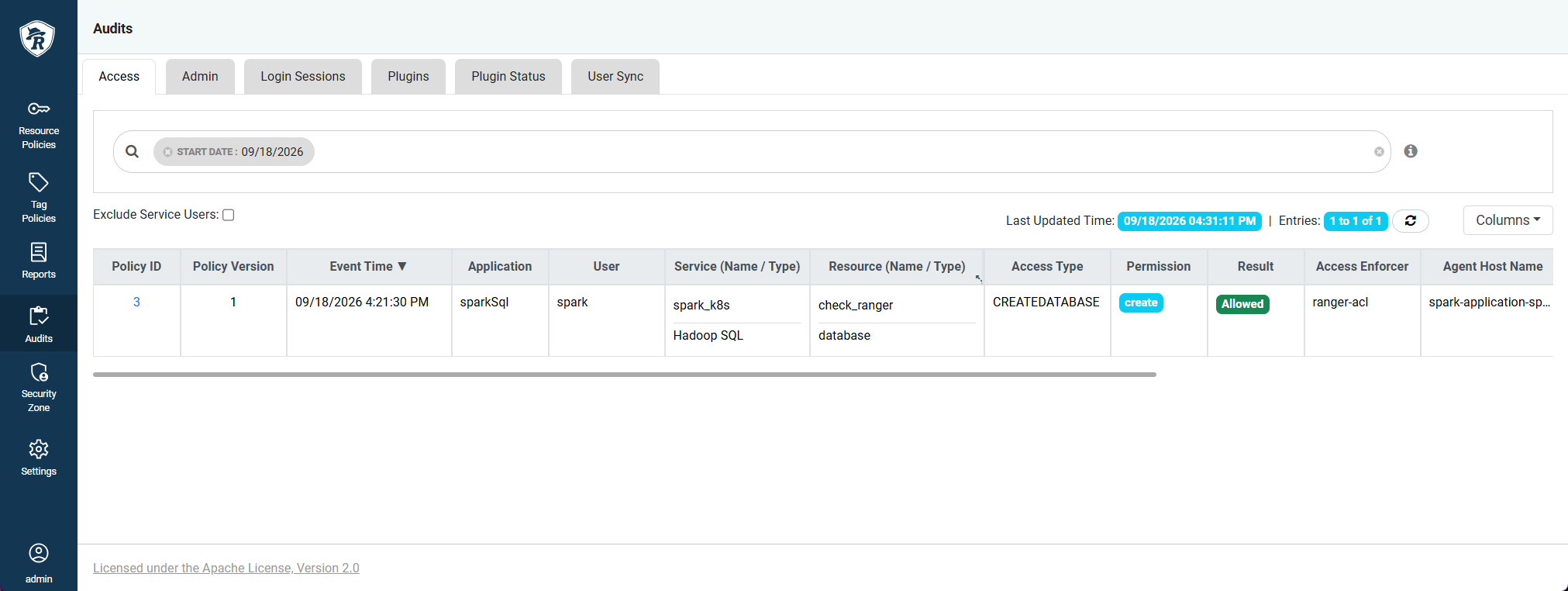 Аудит Ranger
 Аудит Ranger