

Настройка Ranger для Spark в Kubernetes с помощью CLI
Требования
-
Установленный и функционирующий кластер ADPS версии 2.0.0 или более поздней.
-
Установленный и функционирующий кластер ADH версии 4.2.0 или более поздней.
-
Оператор Spark, развернутый в Kubernetes согласно инструкции.
Шаг 1. Создание сервиса в Ranger
На данном шаге описывается создание сервиса с помощью REST API Ranger. Вы также можете создать сервис в веб-интерфейсе Ranger.
-
Создайте конфигурацию сервиса в JSON-файле:
ranger-spark-k8s.json{ "isEnabled": true, "type": "hive", "name": "spark_k8s", (1) "displayName": "spark_k8s", "description": "Service for Kubernetes Spark", "configs": { "username": "spark", (2) "password": "bigdata", (3) "ranger.plugin.audit.filters": "[ {'accessResult': 'DENIED', 'isAudited': true}, {'actions':['METADATA OPERATION'], 'isAudited': false}, {'users':['hive','hue'],'actions':['SHOW_ROLES'],'isAudited':false} ]", "jdbc.driverClassName": "org.apache.hive.jdbc.HiveDriver", "jdbc.url": "jdbc:hive2://tsn-adh-k8s-2.ru-central1.internal:10002" (4) } }1 Наименование сервиса Spark в Ranger. Данное имя должно быть уникальным. 2 Имя пользователя для сервиса. 3 Пароль для сервиса. 4 JDBC-строка подключения к HiveServer2. -
Загрузите конфигурацию сервиса в Ranger:
$ curl -u admin:<admin_pwd> -H "Content-Type: application/json" -X POST -d @ranger-spark-k8s.json http://<ranger-admin>:6080/service/public/v2/api/service
Шаг 2. Запуск приложения Spark
-
Подготовьте файл hadoop_conf.yaml с настройками Hadoop (необходимо, только если приложение обращается к данным, управляемым этими сервисами; для самодостаточных JAR-приложений блок
hadoopможно опустить):hadoop_conf.yamlsites: core: fs.defaultFS: hdfs://adh hadoop.security.authentication: simple dfs.client.failover.proxy.provider.adh: org.apache.hadoop.hdfs.server.namenode.ha.ObserverReadProxyProvider dfs.ha.namenodes.adh: nn_tsn-adh-k8s-1,nn_tsn-adh-k8s-3 dfs.namenode.rpc-address.adh.nn_tsn-adh-k8s-1: tsn-adh-k8s-1.ru-central1.internal:8020 dfs.namenode.rpc-address.adh.nn_tsn-adh-k8s-3: tsn-adh-k8s-3.ru-central1.internal:8020 dfs.nameservices: adh hdfs: dfs.client.read.shortcircuit: false ozone: ozone.om.address.adh.om_tsn-adh-k8s-1: tsn-adh-k8s-1.ru-central1.internal:9862 ozone.om.address.adh.om_tsn-adh-k8s-2: tsn-adh-k8s-2.ru-central1.internal:9862 ozone.om.address.adh.om_tsn-adh-k8s-3: tsn-adh-k8s-3.ru-central1.internal:9862 ozone.om.nodes.adh: om_tsn-adh-k8s-1,om_tsn-adh-k8s-2,om_tsn-adh-k8s-3 ozone.om.service.ids: adhom hive: hive.metastore.sasl.enabled: false hive.metastore.uris: thrift://tsn-adh-k8s-1.ru-central1.internal:9083 metastore.use.SSL: false -
Инициализируйте приложение Spark:
$ ./adc init --spark-application --hadoop-file=hadoop_conf.yaml -o spark-application.yamlДанная команда создаст файл spark-application.yaml с шаблоном конфигурации.
-
Отредактируйте конфигурационный файл:
spark-application.yamlapiVersion: adc.arenadata.io/v1alpha1 kind: SparkApplication metadata: name: spark-application namespace: spark-applications (1) spec: image: hub.arenadata.io/adc-enterprise/spark3:<tag> (2) ## Image pull secret for a private registry. ## Set 'externalSecretName' to reference an existing Secret, ## or set 'credentials' and optionally 'secretName' to let the CLI create one. #imagePullSecret: # # Use a Secret managed outside ADC. # externalSecretName: existing-registry-secret # # ## Or let ADC create the Secret. # #secretName: custom-registry-secret # # #credentials: # # registry: registry.example.com # # username: user # # password: pass hadoop: (3) core: dfs.client.failover.proxy.provider.adh: org.apache.hadoop.hdfs.server.namenode.ha.ObserverReadProxyProvider dfs.ha.namenodes.adh: nn_tsn-adh-k8s-1,nn_tsn-adh-k8s-3 dfs.namenode.rpc-address.adh.nn_tsn-adh-k8s-1: tsn-adh-k8s-1.ru-central1.internal:8020 dfs.namenode.rpc-address.adh.nn_tsn-adh-k8s-3: tsn-adh-k8s-3.ru-central1.internal:8020 dfs.nameservices: adh fs.defaultFS: hdfs://adh hadoop.security.authentication: simple hdfs: dfs.client.read.shortcircuit: "false" hive: hive.metastore.sasl.enabled: "false" hive.metastore.uris: thrift://tsn-adh-k8s-1.ru-central1.internal:9083 metastore.use.SSL: "false" ozone: ozone.om.address.adh.om_tsn-adh-k8s-1: tsn-adh-k8s-1.ru-central1.internal:9862 ozone.om.address.adh.om_tsn-adh-k8s-2: tsn-adh-k8s-2.ru-central1.internal:9862 ozone.om.address.adh.om_tsn-adh-k8s-3: tsn-adh-k8s-3.ru-central1.internal:9862 ozone.om.nodes.adh: om_tsn-adh-k8s-1,om_tsn-adh-k8s-2,om_tsn-adh-k8s-3 ozone.om.service.ids: adhom ## Kerberos configuration for authentication. #kerberos: # principal: user@EXAMPLE.COM # # # CLI reads the local files and creates the kerberos-ccache Secret on 'adc apply'. # # Alternative - keytab mode: replace this block with: # # keytab: # # secretName: <name-of-existing-keytab-secret> # ticketCache: # #secretName: custom-ticket-cache # externalSecretName: existing-ticket-cache # #ticketPath: /tmp/krb5cc_1000 # #krb5ConfPath: /etc/krb5.conf ## Ranger plugin configuration. ## Uncomment and fill the lines below. adc apply derives the rest. ranger: (4) # # fill ranger.plugin.spark.policy.rest.url below with Ranger endpoint, e.g. https://adps-adc.ru-central1.internal:6182 # # fill ranger.plugin.spark.service.name below with Ranger service name you want to use for product, e.g. adc_spark_id_1 security: ranger.plugin.spark.policy.rest.url: "http://tsn-adps-2.ru-central1.internal:6080" ranger.plugin.spark.service.name: "spark_k8s" ranger.plugin.spark.use.rangerGroups: "True" ranger.plugin.spark.use.only.rangerGroups: "True" # # # fill xasecure.audit.destination.solr.zookeepers below with Zookeepers endpoints to resolve solr service, e.g. adps-adc.ru-central1.internal:2181/Arenadata.Hadoop-2.solr.server audit: xasecure.audit.destination.solr.zookeepers: "tsn-adps-2.ru-central1.internal:2181/Arenadata.Hadoop-40.solr.server" # # # Local Ranger files 'adc apply' writes into the configs Secret. # # Relative paths are resolved against the config file. # files: # jceksStorePath: /path/to/ranger.jceks ## Java KeyStore/TrustStore certificate configuration. ## Set externalSecretName to reference an existing Secret, ## or set files and optional secretName to have ADC create it. #ssl: # ## Name of the Secret containing Java keystores. # #secretName: custom-ssl-secret # externalSecretName: existing-ssl-secret # # # Key in the Secret containing the truststore file. # trustStoreKey: truststore.jks # # ## Password for the truststore (optional). # #trustStorePassword: bigdata # # ## Key in the Secret containing the keystore file (optional). # #keyStoreKey: keystore.jks # # ## Password for the keystore (optional). # #keyStorePassword: bigdata # # ## Local files 'adc apply' puts into the Secret named by ssl.secretName. # ## Relative paths are resolved against the config file. # #files: # # trustStorePath: /path/to/truststore.jks # # #keyStorePath: /path/to/keystore.jks ## Use an external Hadoop configs Secret instead of the one rendered by ADC. #hadoopConfigsSecret: # # Use a Secret managed outside ADC. # externalSecretName: existing-spark-hadoop-configs # # ## Or let ADC create the Secret. # #secretName: custom-spark-hadoop-configs ## Use an external Ranger configs Secret instead of the one rendered by ADC. #rangerConfigsSecret: # # Use a Secret managed outside ADC. # externalSecretName: existing-spark-ranger-configs # # ## Or let ADC create the Secret. # #secretName: custom-spark-ranger-configs # Spark application main resource (e.g. local:///opt/spark/examples/jars/spark-examples.jar). mainApplicationFile: "local:///opt/spark/examples/jars/spark-examples.jar" (5) ## HDFS or local directory for the Spark event log. ## When set, the CLI adds spark.eventLog.enabled=true, spark.eventLog.dir, ## spark.eventLog.rolling.enabled=true and spark.eventLog.rolling.interval=30s to sparkConf. #eventLogDir: "" ## Fully-qualified main class name. Required for Java/Scala applications. mainClass: "org.apache.spark.examples.sql.SparkSQLExample" (6) # ServiceAccount used by the Spark driver, also injected into # spark.kubernetes.authenticate.driver.serviceAccountName. The CLI creates it, plus a Role # and RoleBinding for Spark pods, by default (create: true). Set create: false to skip that # and only reference a ServiceAccount managed elsewhere. # The Role rules are managed by the CLI and cannot be customized. serviceAccount: (7) create: true name: spark-application job: (8) ## true (default) deletes the spark-submit Job pod after it finishes; set false to keep it for debugging. deleteOnTermination: false #resources: # limits: # cpu: "1" # memory: 512Mi # requests: # cpu: 500m # memory: 64Mi ## Component arguments. Key-value pairs passed to the component configuration. #args: # executor-memory: 1g # num-executors: "2" ## Application arguments appended after mainApplicationFile. args: - "100" # Spark configuration entries (spark.*). sparkConf: (9) spark.artifactory.dir.path: /tmp/artifacts spark.jars.ivy: /tmp/ivy spark.local.dir: /tmp/data spark.sql.catalog.spark_catalog: org.apache.iceberg.spark.SparkSessionCatalog spark.sql.extensions: org.apache.iceberg.spark.extensions.IcebergSparkSessionExtensions,org.apache.kyuubi.plugin.spark.authz.ranger.RangerSparkExtension spark.sql.security.confblacklist: spark.sql.extensions ## Seconds after the application finishes (Succeeded, or Failed with no ## retries left) before the SparkApplication is deleted. Omit to keep it ## until explicit deletion. #ttlSecondsAfterFinished: 3600 (10) ## Celeborn remote shuffle service for Spark. ## tiers mirror the cluster's storage.tiers: local (SSD/HDD) and MEMORY advertise their name only, ## remote (S3/HDFS) also set dir (and, for S3, credentials). Ozone is an HDFS tier with an ofs:// dir. #celeborn: # # Storage tiers mirroring the cluster's storage.tiers so the client advertises the same layers. # # type: SSD, HDD, S3, HDFS, MEMORY. SSD/HDD and MEMORY are advertise-only here (no dir; worker-only # # fields ignored); remote S3/HDFS set dir (s3a:// for S3; hdfs:// or ofs:// for Ozone on HDFS). Example: # # - type: MEMORY # cache tier; pair with a durable tier below, no dir # # - type: SSD # advertise-only on the client, no dir needed # # - dir: s3a://bucket/celeborn # # s3: { endpoint: https://s3:9878, region: us-east-1 } # # type: S3 # # - dir: hdfs://nn/celeborn # or ofs://om/volume/bucket/celeborn for Ozone # # type: HDFS # tiers: # - dir: s3a://shuffle/my-cluster # s3: # accessKey: <access-key> # endpoint: https://s3.endpoint:443 # pathStyleAccess: true # region: <region> # secretKey: <secret-key> # type: S3 # masterEndpoint: "" # extraSparkConf: # spark.sql.adaptive.enabled: "true" # # # Enable TLS on the client's RPC connection to the Celeborn cluster. # # When true the CLI renders spark.celeborn.ssl.* into the Spark conf # # and requires the ssl section with trustStoreKey. # rpcEncryption: false # # # Enable TLS on the client's data module, which carries shuffle push/fetch # # traffic between executors and workers. Requires the ssl section with trustStoreKey. # dataEncryption: false ## YuniKorn scheduler configuration for queue selection and Gang scheduling. ## Uncomment the block to route the Spark job into a YuniKorn queue; the CLI renders the ## scheduler name, queue labels and gang annotations into sparkConf. #yunikorn: # queue: root.analytics # taskGroups: # - minMember: 1 # minResource: # cpu: "1" # memory: 1433Mi # name: spark-driver # - minMember: 2 # minResource: # cpu: "1" # memory: 1433Mi # name: spark-executor ## Monitoring configuration. #monitoring: # # Enables Prometheus metrics export from this product's pods. # exportMetrics: true1 Пространство имен, используемое приложением Spark. 2 URL образа Spark в вашем репозитории. 3 Настройки Hadoop, взятые из ранее созданного файла hadoop_conf.yaml. 4 Настройки Ranger. 5 URL к файлу с задачей приложения (JAR или .py). 6 Имя главного класса для приложений на Java/Scala. 7 Настройки сервисного аккаунта. 8 Настройки задачи. После завершения работы по умолчанию поды приложения удаляются автоматически. Чтобы поды задачи и драйвера не удалялись (например, для проверки логов), присвойте параметру deleteOnTerminationзначениеfalse. Чтобы оставить executor-поды, присвойте параметруdeleteOnTerminationзначениеfalseв блокеspark.executor— он не включен в сгенерированную минимальную конфигурацию, поэтому его требуется добавить вручную.9 Настройки Spark. 10 Период в секундах, после которого приложение Spark будет удалено вне зависимости от причины завершения работы. -
Вы можете проверить конфигурацию перед ее применением, выполнив команду
applyс флагом--dry-run:$ ./adc apply -f spark-application.yaml --dry-run > spark-application-render.yamlspark-application-render.yaml--- apiVersion: v1 kind: Secret metadata: name: spark-application-configs namespace: spark-applications stringData: core-site.xml: |- <configuration> <property> <name>dfs.client.failover.proxy.provider.adh</name> <value>org.apache.hadoop.hdfs.server.namenode.ha.ObserverReadProxyProvider</value> </property> <property> <name>dfs.client.read.shortcircuit</name> <value>false</value> </property> <property> <name>dfs.ha.namenodes.adh</name> <value>nn_tsn-adh-k8s-1,nn_tsn-adh-k8s-3</value> </property> <property> <name>dfs.namenode.rpc-address.adh.nn_tsn-adh-k8s-1</name> <value>tsn-adh-k8s-1.ru-central1.internal:8020</value> </property> <property> <name>dfs.namenode.rpc-address.adh.nn_tsn-adh-k8s-3</name> <value>tsn-adh-k8s-3.ru-central1.internal:8020</value> </property> <property> <name>dfs.nameservices</name> <value>adh</value> </property> <property> <name>fs.defaultFS</name> <value>hdfs://adh</value> </property> <property> <name>hadoop.security.authentication</name> <value>simple</value> </property> <property> <name>ozone.om.address.adh.om_tsn-adh-k8s-1</name> <value>tsn-adh-k8s-1.ru-central1.internal:9862</value> </property> <property> <name>ozone.om.address.adh.om_tsn-adh-k8s-2</name> <value>tsn-adh-k8s-2.ru-central1.internal:9862</value> </property> <property> <name>ozone.om.address.adh.om_tsn-adh-k8s-3</name> <value>tsn-adh-k8s-3.ru-central1.internal:9862</value> </property> <property> <name>ozone.om.nodes.adh</name> <value>om_tsn-adh-k8s-1,om_tsn-adh-k8s-2,om_tsn-adh-k8s-3</value> </property> <property> <name>ozone.om.service.ids</name> <value>adhom</value> </property> </configuration> hive-site.xml: |- <configuration> <property> <name>hive.metastore.sasl.enabled</name> <value>false</value> </property> <property> <name>hive.metastore.uris</name> <value>thrift://tsn-adh-k8s-1.ru-central1.internal:9083</value> </property> <property> <name>metastore.use.SSL</name> <value>false</value> </property> </configuration> type: Opaque --- apiVersion: v1 kind: Secret metadata: name: spark-application-configs-ranger namespace: spark-applications stringData: ranger-spark-audit.xml: |- <configuration> <property> <name>xasecure.audit.destination.solr</name> <value>true</value> </property> <property> <name>xasecure.audit.destination.solr.batch.filespool.dir</name> <value>/tmp/ranger/spark_plugin/audit_solr_spool</value> </property> <property> <name>xasecure.audit.destination.solr.zookeepers</name> <value>tsn-adps-2.ru-central1.internal:2181/Arenadata.Hadoop-40.solr.server</value> </property> <property> <name>xasecure.audit.is.enabled</name> <value>True</value> </property> </configuration> ranger-spark-security.xml: |- <configuration> <property> <name>ranger.plugin.spark.enable.implicit.userstore.enricher</name> <value>True</value> </property> <property> <name>ranger.plugin.spark.policy.cache.dir</name> <value>/tmp/ranger/spark/policycache</value> </property> <property> <name>ranger.plugin.spark.policy.rest.url</name> <value>http://tsn-adps-2.ru-central1.internal:6080</value> </property> <property> <name>ranger.plugin.spark.policy.source.impl</name> <value>org.apache.ranger.admin.client.RangerAdminRESTClient</value> </property> <property> <name>ranger.plugin.spark.service.name</name> <value>spark_k8s</value> </property> <property> <name>ranger.plugin.spark.use.only.rangerGroups</name> <value>True</value> </property> <property> <name>ranger.plugin.spark.use.rangerGroups</name> <value>True</value> </property> </configuration> type: Opaque --- apiVersion: v1 kind: ServiceAccount metadata: name: spark-application namespace: spark-applications --- apiVersion: rbac.authorization.k8s.io/v1 kind: Role metadata: name: spark-application namespace: spark-applications rules: - apiGroups: - "" resources: - pods - configmaps - persistentvolumeclaims - services - secrets verbs: - get - list - watch - create - update - patch - delete - deletecollection - apiGroups: - networking.k8s.io resources: - networkpolicies verbs: - get - list - watch - create - update - patch - delete - apiGroups: - events.k8s.io resources: - events verbs: - create - patch - update --- apiVersion: rbac.authorization.k8s.io/v1 kind: RoleBinding metadata: name: spark-application namespace: spark-applications roleRef: apiGroup: rbac.authorization.k8s.io kind: Role name: spark-application subjects: - kind: ServiceAccount name: spark-application namespace: spark-applications --- apiVersion: spark.arenadata.io/v1alpha1 kind: SparkApplication metadata: name: spark-application namespace: spark-applications spec: args: - "100" driver: metadata: {} spec: image: hub.arenadata.io/adc-enterprise/spark3:<tag> imagePullPolicy: Always executor: metadata: {} spec: image: hub.arenadata.io/adc-enterprise/spark3:<tag> imagePullPolicy: Always hadoopConfigsSecretName: spark-application-configs job: deleteOnTermination: false metadata: {} spec: image: hub.arenadata.io/adc-enterprise/spark3:<tag> imagePullPolicy: Always mainApplicationFile: local:///opt/spark/examples/jars/spark-examples.jar mainClass: org.apache.spark.examples.sql.SparkSQLExample serviceAccountName: spark-application sparkConf: spark.artifactory.dir.path: /tmp/artifacts spark.jars.ivy: /tmp/ivy spark.kubernetes.authenticate.driver.serviceAccountName: spark-application spark.kubernetes.namespace: spark-applications spark.local.dir: /tmp/data spark.sql.catalog.spark_catalog: org.apache.iceberg.spark.SparkSessionCatalog spark.sql.extensions: org.apache.iceberg.spark.extensions.IcebergSparkSessionExtensions,org.apache.kyuubi.plugin.spark.authz.ranger.RangerSparkExtension spark.sql.security.confblacklist: spark.sql.extensions sparkConfigsSecretName: spark-application-configs-ranger status: {} -
Если манифест корректный, примените конфигурацию и запустите приложение Spark:
$ ./adc apply -f spark-application.yamlОжидаемый вывод содержит сообщение с подтверждением успеха:
time="20260826112450UTC" level="info" msg="cluster spark-application applied to namespace spark-applications"
-
Проверьте работоспособность подов приложения Spark:
$ kubectl get pods -n spark-applicationsОжидаемый вывод должен быть похож на следующий:
NAME                                              READY   STATUS    RESTARTS   AGE
spark-application-815a0ca03dd0dd38-driver         1/1     Running   0          9s
spark-application-mfq6f                           1/1     Running   0          13s
spark-sql-basic-example-d532f1a03dd0ee78-exec-1   1/1     Running   0          5s
spark-sql-basic-example-d532f1a03dd0ee78-exec-2   1/1     Running   0          4s
После завершения работы executor-поды удаляются, а статус подов приложения меняется на
Completed:NAME READY STATUS RESTARTS AGE spark-application-815a0ca03dd0dd38-driver 0/1 Completed 0 6m59s spark-application-mfq6f 0/1 Completed 0 7m3s
-
Проверьте вывод в логах driver-пода:
$ kubectl logs spark-application-815a0ca03dd0dd38-driver -n spark-applicationsЛоги должны содержать строки, соответствующие задаче.
-
Проверьте страницу Audit в веб-интерфейсе Ranger Admin.
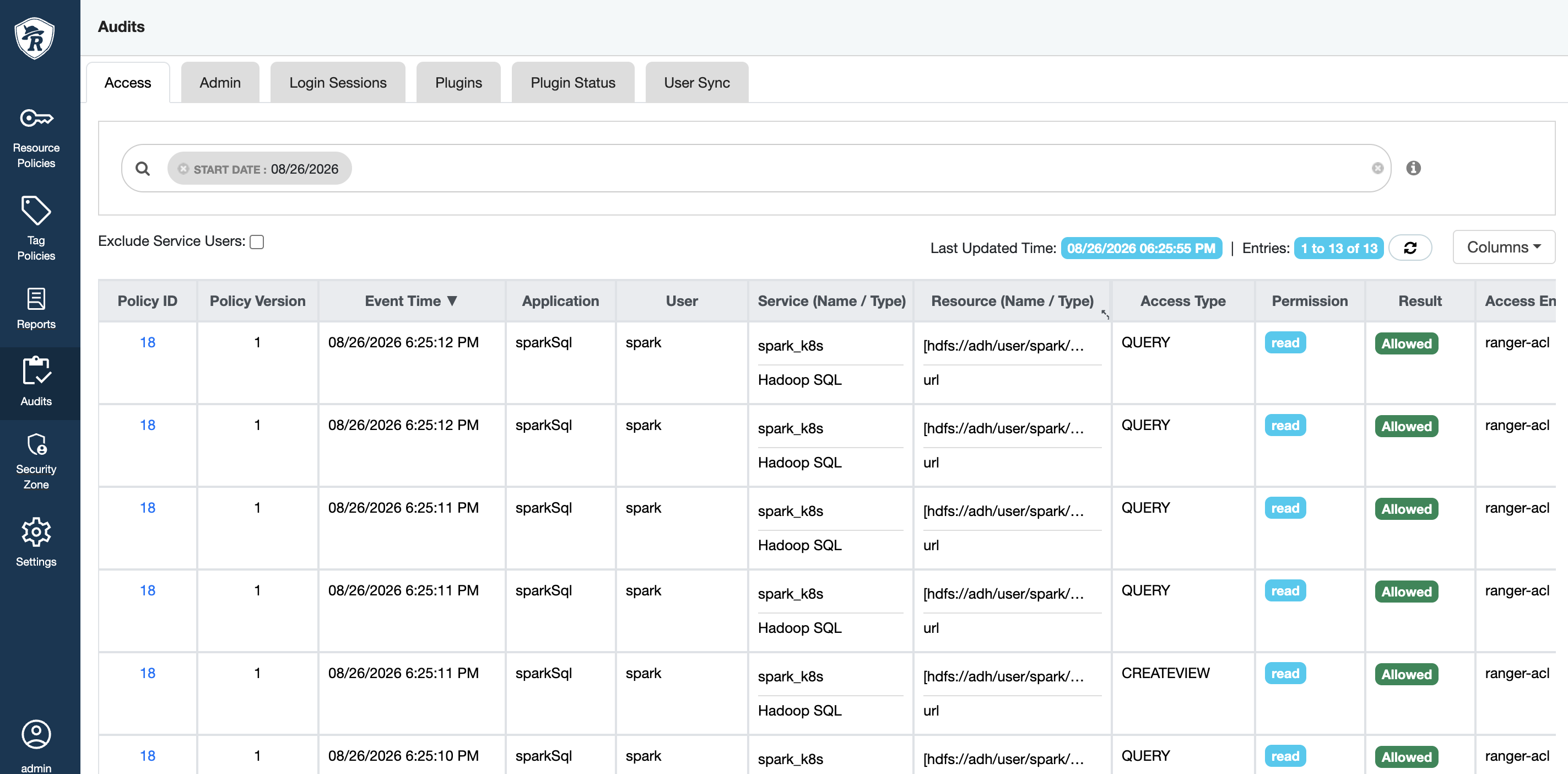 Ranger audit
 Ranger audit