

Manage SSL in ET
The Manage SSL action allows you to control the SSL encryption for ET cluster services (Docker Registry, HTTP Mirror, Grafana).
Key points when enabling SSL for an ET cluster:
-
Although some ET services have their own HTTPS settings (HTTPS listener block), it is strongly recommended to use Manage SSL cluster action rather than configuring services individually.
-
SSL certificates should be trusted by the ET cluster host(s).
-
Do not upgrade an ET cluster with SSL enabled. Disable SSL first.
The action execution process and results are available on the Jobs page. During the execution of the Manage SSL action, ADCM reconfigures required services and restarts, so no explicit cluster restart is required after the action.
Enable SSL
To enable SSL in ET:
-
Go to the Clusters page, click

 in the Actions column, and select the action from the drop-down list.
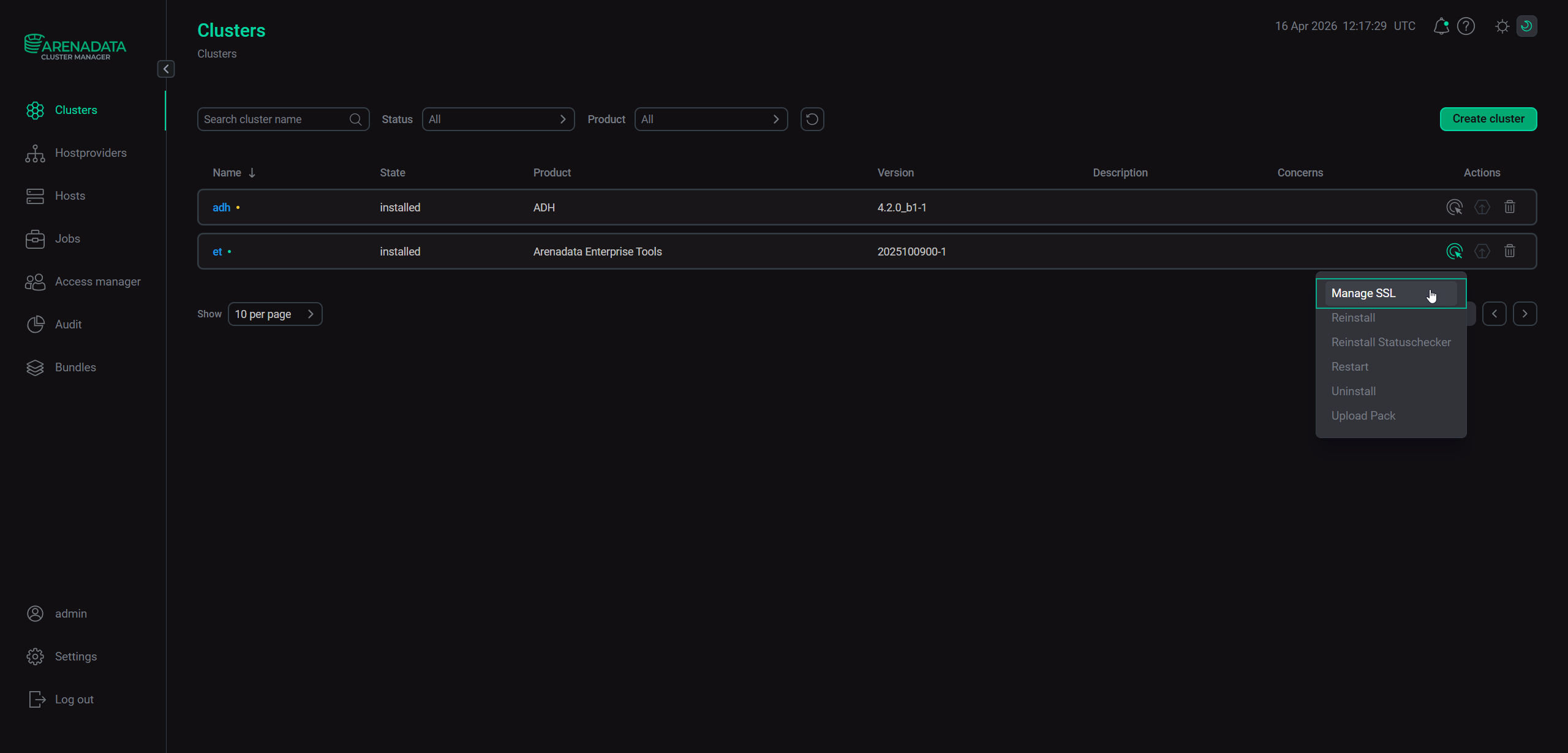 Execute the "Manage SSL" action
 -
Activate the Enable SSL configuration group and specify the SSL parameters.
 Execute the "Manage SSL" action
 -
Click Next and then click Run to start the action.
Manage SSL action parameters
When running the Manage SSL action, ADCM displays a dialog window where you can specify the following SSL parameters.
| Parameter | Description | Default value |
|---|---|---|
Server certificate |
SSL certificate in the PEM format. SSL certificates must be trusted by ET cluster host(s) |
— |
Server private key |
Private key in the PEM format |
— |
Registry Host(optional) |
Filled automatically with the IP address, where the Docker Registry web UI is available. Can be set manually for custom configuration |
<et-host-ip> |
Registry HTTPS port |
HTTPS port for the Docker Registry component |
443 |
Registry TLS Min Version |
Minimum TLS version allowed for the Docker Registry service |
tls1.2 |
HTTP Mirror Host(optional) |
Filled automatically with the IP address, where the HTTP Mirror web UI is available. Can be set manually for custom configuration |
— |
HTTP Mirror HTTPS port |
HTTPS port for the HTTP Mirror service |
8443 |
HTTP Mirror TLS Version |
TLS version allowed for the HTTP Mirror component |
TLSv1.2 TLSv1.3 |
Grafana Host(optional) |
Filled automatically with the IP address, where the Grafana web UI is available. Can be set manually for custom configuration |
— |
Grafana HTTPS port |
HTTPS port for the Grafana service |
3003 |
Grafana TLS Versions |
TLS version allowed for the Grafana service |
TLSv1.2 TLSv1.3 |