

Hive Metastore replication with SSM
SSM provides a mechanism for replicating data between Hive Metastores (HMS) located in different ADH clusters. This article describes replication concepts, workflow, and provides a replication example.
Under the hood, HMS stores all metadata in a relational database. By default, in ADH, it is a database provided by the ADPG service. In this database, HMS stores metadata about various Hive entities like tables, partitions, functions, and so on. SSM can replicate the following Hive entities:
-
databases;
-
tables;
-
partitions;
-
functions;
-
constraints (
PRIMARY KEY,FOREIGN KEY,UNIQUE,NOT NULL,DEFAULT,CHECK).
Before diving into the replication process, it is worth mentioning basic concepts that make the replication possible.
Event-based replication
In SSM, the replication mechanism is based on Hive events, which are generated whenever a modification occurs in a Hive Metastore.
Hive events
A Hive event is a text record that reflects a single operation on a Hive entity, for example, creation of a Hive table.
Hive events are generated by org.apache.hive.hcatalog.listener.DbNotificationListener whenever a metadata-changing operation succeeds and are stored in the NOTIFICATION_LOG table of the HMS database.
The events are stored as follows:
NL_ID|EVENT_ID|EVENT_TIME|EVENT_TYPE               |CAT_NAME|DB_NAME|TBL_NAME |MESSAGE                                                                                                                                                                                                                                                        |MESSAGE_FORMAT|
-----+--------+----------+-------------------------+--------+-------+---------+---------------------------------------------------------------------------------------------------------------------------------------------------------------------------------------------------------------------------------------------------------------+--------------+
   12|       8|1771231855|CREATE_TABLE             |hive    |hr     |employees|H4sIAAAAAAAAAL1WbU/bMBD+K1M+l7ROYYV+K23Q2DpATZAmrShymyv1cF7mOLBS9b/vbDejCS6DSUOqYvce3/l8fu7Oa6cAcQ/C6TtyKdhC9tvtO3pA42UM9wddV5QHc0iloJy4LJUgUsr7J53jrtPSmmwOV4Klc5ZTjjZQGs9wXAqcSTrjgH8gyXm2AigqWbjKldz/FvqTi8E4CgenY78CL2c/PhdZivh66pCp08ehkAIn0ydLU2fTmjpeHV0|gzip(json-2.0)|
   13|       9|1771231928|ALTER_TABLE              |hive    |hr     |employees|H4sIAAAAAAAAAO1WbW/aMBD+K1M+00BCO16+UUo1NlYmSKVJY4oMOcCr8zLbKaMV/31nO1lJGmg7adoXJBSbe7HP5+fu8aMlgN8Dt7qWXHO6lN16/Y6ckWAdwP1Z0+bp2QIiyQlzbBpJ4BFh3U6j3bRq2pMu4Aun0YImhOEaKA3mOK45ziSZM8A/ECYs3gKIXOZtEyUffPUGk5veyPd6l6NBrhzPf1zCMubwUcQRWj3OLGdmdXEQkuNk9rTezNr|gzip(json-2.0)|
   14|      10|1771231928|INSERT                   |hive    |hr     |employees|H4sIAAAAAAAAAJ1WbW/aMBD+K1P6NYQktOPlGwWqdWNlglSatFSRIQd4dV7mOO0o4r/vbCctSUO3DqHYPM/d5Xy+F/ZGBvwBuDEwxJbTtRi02/ekRcJtCA+tjsXz1gpiwQlzLBoL4DFhg77d6xim0qQr+MZpvKIpYWgD0XCJ65bjTpAlA/wBUcqSHUBWYt4ulfjkuzeZ3wyngTe8nE5Kcrb8+TlLYuT3vuH4xgCXTHDc+C+WfONg+oZbZbdcw50|gzip(json-2.0)|
Notice the MESSAGE column — it contains a serialized event payload describing what exactly happened.
This payload carries detailed information about the operation, performed on the Hive entity, for example:
{
  "eventType": "CREATE_TABLE",
  "server": "thrift://metastore:9083",
  "servicePrincipal": "hive/_HOST@REALM",
  "db": "hr",
  "table": "employees",
  "timestamp": 1771231855,
  "tableObj": {
    "tableName": "employees",
    "sd": {
      "location": "hdfs://warehouse/hr.db/employees",
      "inputFormat": "org.apache.hadoop.mapred.TextInputFormat",
      "cols": [
        {"name":"id","type":"int"},
        {"name":"name","type":"string"}
      ]
    }
  }
}
By analyzing Hive events in the source HMS and performing corresponding actions in the target HMS, SSM can re-create all Hive entities and thus, replicate the entire Metastore, which is how it actually works.
SSM can replicate the following event types.
| Entity | Replicated events |
|---|---|
Database |
CREATE, DROP, ALTER |
Table |
CREATE, DROP, ALTER |
Partition |
CREATE, DROP, ALTER |
Function |
CREATE, DROP |
Constraints |
CREATE, DROP |
Hive Metastore fetcher
Hive Metastore fetcher is an SSM process responsible for fetching events from a Hive Metastore. When the replication feature is enabled, this process starts with SSM, asynchronously pulls events from the source HMS to a database. Then, SSM analyzes retrieved events and runs corresponding actions on the target HMS side (creates tables, renames columns, and so on). The high-level replication workflow is presented on the following diagram.
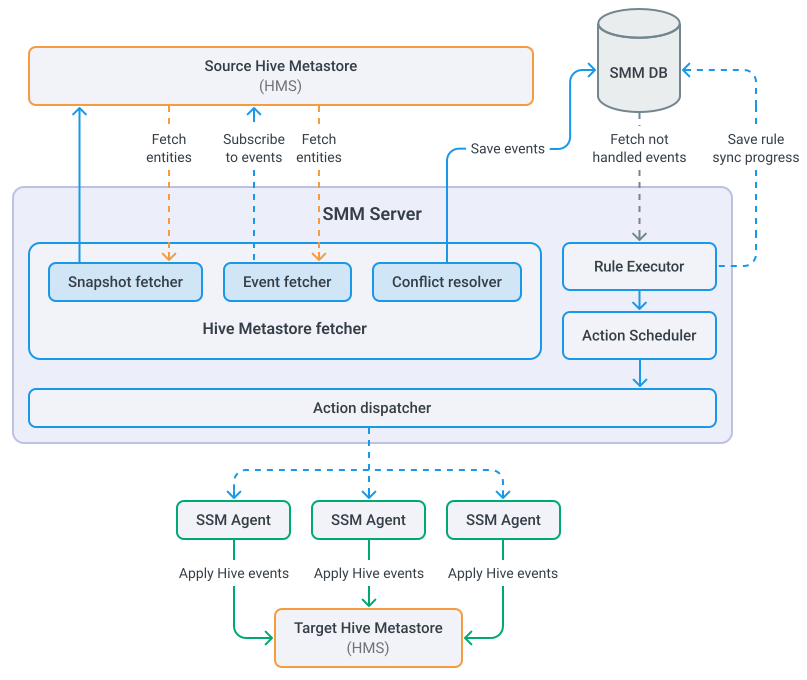
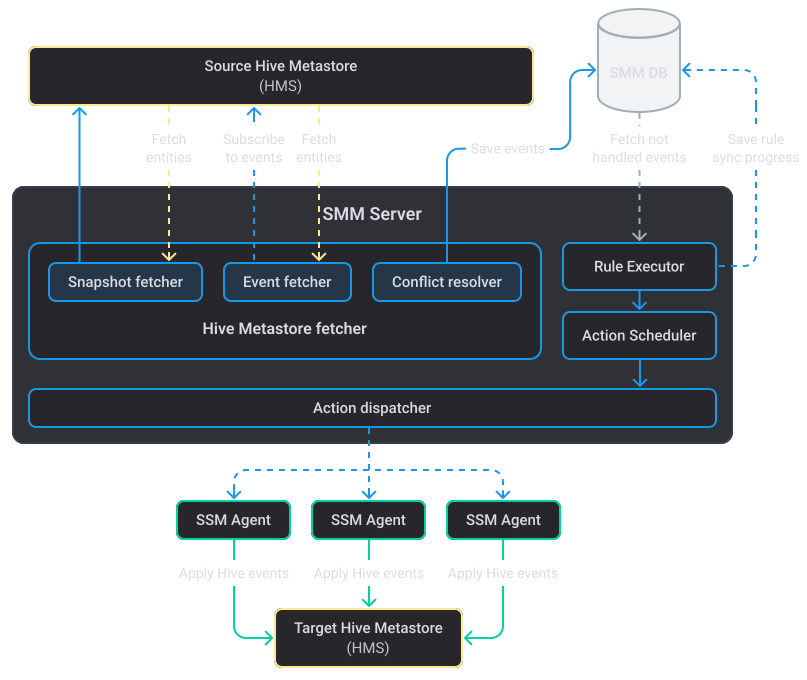
The major replication steps are as follows:
-
An SSM rule triggers and initiates the replication process.
-
Hive Metastore fetcher pulls a snapshot of Hive events from the source HMS. The snapshot includes all entities currently available in the source HMS.
-
Hive Metastore fetcher transitions to a listening phase and subscribes to Hive events to receive events that occur after the snapshot has been pulled.
-
SSM analyzes fetched events, and for each individual event, runs a corresponding action in the target HMS (for example, creates a new Hive table).
-
When all Hive events are processed, SSM keeps listening to new events while the SSM rule is active.
As the workflow suggests, SSM uses a special 2-step algorithm for retrieving events from HMS, which is described below.
Events retrieval. Snapshot vs listening phases
In a replication cycle, SSM fetches events from the source HMS in two steps:
-
Snapshot retrieval. In the beginning of the replication process, SSM pulls a snapshot of Hive events. This includes all events currently available in the HMS.
-
Listening to events. After pulling the snapshot, SSM transitions to the listening phase — it periodically polls the HMS, asking for new events, if any.
|
NOTE
HMS replication with SSM assumes that the target HMS database is empty to avoid possible conflicts.
|
Enable replication
To enable the HMS replication mechanism, set the following parameters in the source ADH cluster (the one to replicate data from).
| Parameter | Value | Location |
|---|---|---|
Enable SmartFileSystem for Hadoop |
true |
Clusters → <source_ADH_cluster> → Services → SSM → Primary configuration |
smart.hive.event.fetch.enabled |
true |
Clusters → <source_ADH_cluster> → Services → SSM → Primary configuration → smart-site.xml |
hive.metastore.event.listeners |
org.apache.hive.hcatalog.listener.DbNotificationListener |
Clusters → <source_ADH_cluster> → Services → Hive → Primary configuration → Custom hive-site.xml |
hive.metastore.event.db.listener.timetolive |
86400s |
Clusters → <source_ADH_cluster> → Services → Hive → Primary configuration → Custom hive-site.xml |
|
TIP
More configuration parameters for tuning the replication process are located in smart-site.xml section.
|
To start the replication process, create an SSM rule that uses the hms object and the hms-sync action, for example:
hms: name matches "test_db.*" | hms-sync -dest thrift://ka-adh-1.ru-central1.internal:9083More details on running the replication process are described in the example below.
Example
The following example shows how to replicate HMS content from one ADH cluster to another using SSM. Such a scenario is applicable, for example, when you want to have a standby HMS that kicks in as a disaster recovery option when the main HMS is out of service.
In this example, two test ADH clusters are used. Both clusters have the Hive service installed; additionally, the source cluster has the SSM service.
-
In the source cluster, enable the HMS replication mechanism. After setting configuration parameters, restart Hive and SSM services.
-
In the source cluster, on a host with the Hive Client component, run /bin/beeline and create a test Hive table:
CREATE DATABASE test_db;
CREATE TABLE test_db.t1 (i int);
INSERT INTO test_db.t1 VALUES (1), (2), (3);
This will generate several Hive events in HMS.
-
Open SSM UI. The up-to-date URL can be found in ADCM (Clusters → <source_ADH_cluster> → Services → SSM → Info).
-
On the Rules page, create a new rule:
hms : name matches "test_db.*" | hms-sync -dest thrift://ka-adh2-3.ru-central1.internal:9083 -cascade -nameservice_rename "adh1 adh2"where:
-
name matches "test_db.*"— a rule to replicate all entities from thetest_dbHive database. -
-dest thrift://ka-adh2-3.ru-central1.internal:9083— the address of the target HMS. You can find the Thrift address in the hive-site.xml configuration section of the Hive service (enable the Advanced switch). -
-cascade— indicates whether to perform cascade deletes for parent entities when replicatingDROPevents. -
-nameservice_rename "adh1 adh2"— renames HDFS nameservices when replicating entities (dfs.internal.nameservicesparameter in HDFS).
-
-
Start the rule.
-
After a short delay, verify the Actions page. It contains a list of actions, performed by SSM in order to replicate the
CREATE/INSERToperations on the test Hive table.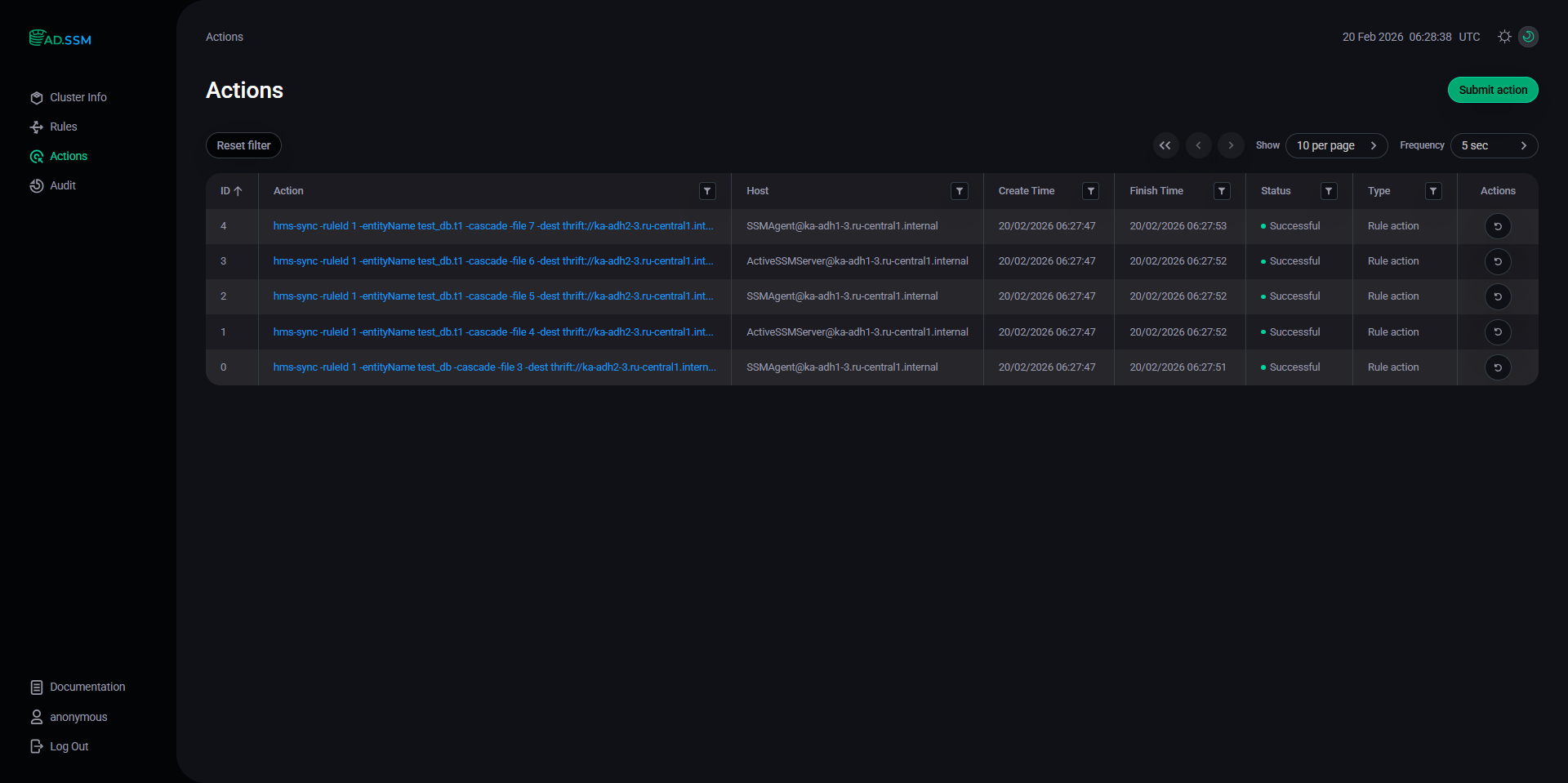 Actions page
 -
In the target cluster, run /bin/beeline and verify the replicated Hive table:
SHOW DATABASES;
SHOW TABLES IN test_db ;
The test database/table has been replicated to the target HMS:
SHOW DATABASES;
+----------------+
| database_name  |
+----------------+
| default        |
| test_db        |
+----------------+

SHOW TABLES in test_db;
+-----------+
| tab_name  |
+-----------+
| t1        |
+-----------+
-
In the target cluster,
DESCRIBEthe replicated table:DESCRIBE EXTENDED test_db.t1;The output:
+-----------------------------+----------------------------------------------------+----------+
|          col_name           |                     data_type                      | comment  |
+-----------------------------+----------------------------------------------------+----------+
| i                           | int                                                |          |
|                             | NULL                                               | NULL     |
| Detailed Table Information  | Table(tableName:t1, dbName:test_db, owner:hive, createTime:1771568872, lastAccessTime:0, retention:0, sd:StorageDescriptor(cols:[FieldSchema(name:i, type:int, comment:null)], location:hdfs://adh2/apps/hive/warehouse/test_db.db/t1, inputFormat:org.apache.hadoop.mapred.TextInputFormat, outputFormat:org.apache.hadoop.hive.ql.io.HiveIgnoreKeyTextOutputFormat, compressed:false, numBuckets:-1, serdeInfo:SerDeInfo(name:null, serializationLib:org.apache.hadoop.hive.serde2.lazy.LazySimpleSerDe, parameters:{serialization.format=1}), bucketCols:[], sortCols:[], parameters:{}, skewedInfo:SkewedInfo(skewedColNames:[], skewedColValues:[], skewedColValueLocationMaps:{}), storedAsSubDirectories:false), partitionKeys:[], parameters:{external.table.purge=TRUE, totalSize=0, numRows=1, rawDataSize=1, EXTERNAL=TRUE, COLUMN_STATS_ACCURATE={\"COLUMN_STATS\":{\"i\":\"true\"}}, numFiles=0, transient_lastDdlTime=1771566711, TRANSLATED_TO_EXTERNAL=TRUE, bucketing_version=2, numFilesErasureCoded=0}, viewOriginalText:null, viewExpandedText:null, tableType:EXTERNAL_TABLE, rewriteEnabled:false, catName:hive, ownerType:USER, writeId:0, accessType:8, id:11) |          |
+-----------------------------+----------------------------------------------------+----------+
Notice
location:hdfs://adh2/apps/hive/…. Setting-nameservice_rename "adh1 adh2"in the SSM rule renamed theadh1nameservice toadh2during the replication. -
While the test SSM rule is active, SSM continuously polls the source HMS for new events, and replicates those, if any. In the source cluster, remove the test table:
DROP TABLE test_db.t1; -
In the target cluster, verify that the
DROP TABLEoperation has been replicated and the corresponding table has been deleted:SHOW TABLES in test_db;The output:
+-----------+
| tab_name  |
+-----------+
+-----------+