

Настройка Ranger для StarRocks в Kubernetes с помощью Helm
В данной статье показано, как включить Ranger для StarRocks в Kubernetes с помощью Helm и kubectl.
Требования
-
Кластер Kubernetes (версии 1.32 - 1.34) с настроенным доступом через
kubectl. -
Helm (версии 3.8.0 или выше) — пакетный менеджер для быстрого развертывания Docker-образов в Kubernetes.
-
Артефакты StarRocks, включая Docker-образы и Helm-чарты (chart), предварительно загруженные в ваш приватный OCI-реестр. Эти артефакты доступны в offline-пакетах, которые можно запросить у службы поддержки Arenadata. Для деплоя StarRocks в Kubernetes необходимо извлечь следующие образы:
-
hub.arenadata.io/adc-enterprise/starrocks:<version>-adc-<version>-fe
-
hub.arenadata.io/adc-enterprise/starrocks:<version>-adc-<version>-be
-
hub.arenadata.io/adc-enterprise/starrocks-operator:<version>
-
hub.arenadata.io/adc-enterprise/charts/starrocks-operator:<version>
-
hub.arenadata.io/adc-enterprise/charts/starrocks-cluster:<version>
-
-
Установленный и функционирующий кластер ADPS. Версия ADPS должна быть совместима с ADH Cloud.
-
Установленный и функционирующий кластер ADH (если предполагается взаимодействие StarRocks c ADH). Версия ADH должна быть совместима с ADH Cloud.
-
Оператор StarRocks, развернутый в Kubernetes согласно инструкции.
Процедура развертывания
Шаг 1. Создание сервиса в Ranger
В этом примере показано создание сервиса Ranger с помощью веб-интерфейса Ranger. Также сервис можно создать, используя Ranger REST API.
-
Откройте веб-интерфейс Ranger и добавьте новый сервис типа STARROCKS.
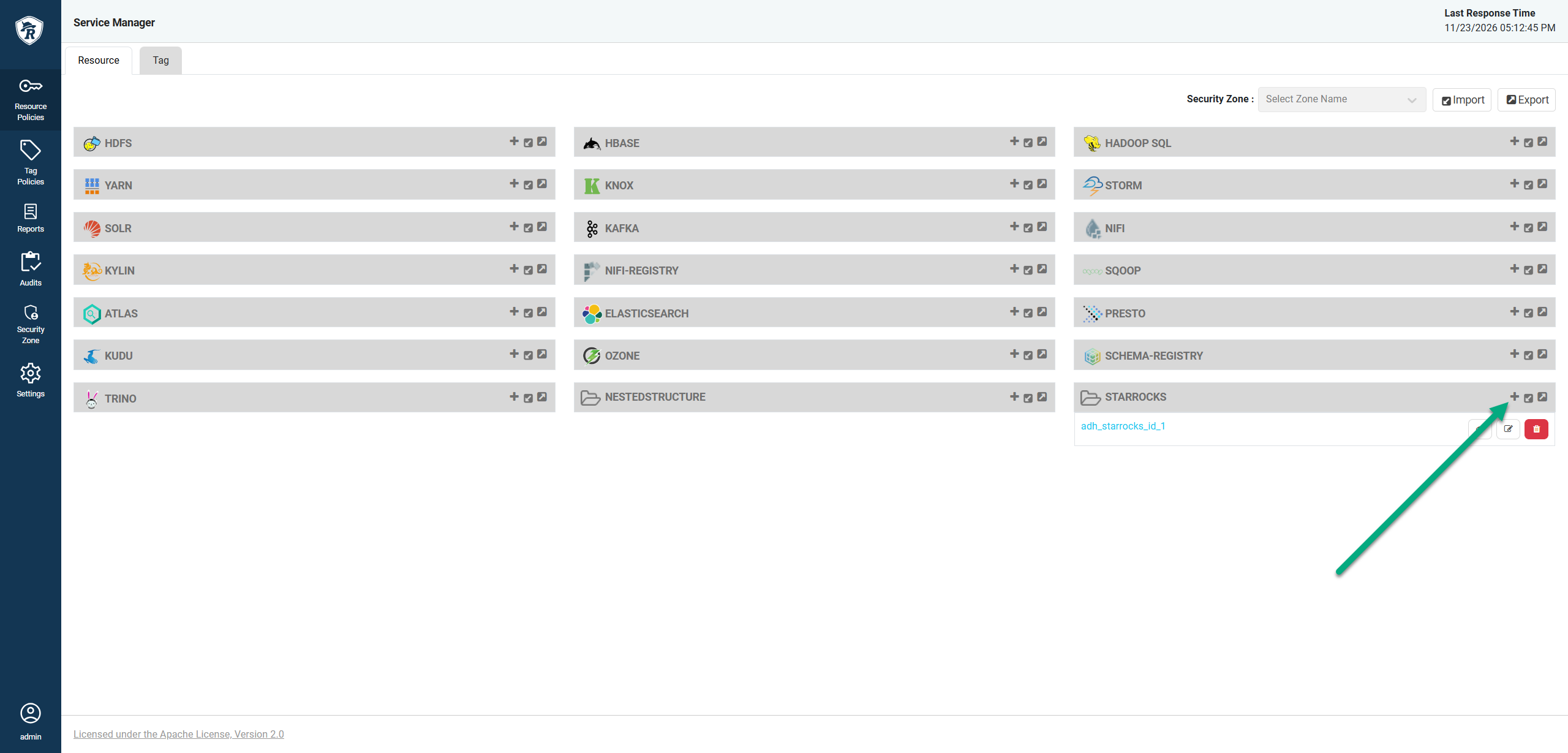 Создание сервиса для StarRocks
 Создание сервиса для StarRocks
-
Укажите следующие параметры сервиса:
Параметр Значение Service name
starrocks-k8s
Active Status
Enabled
Username
root
Password
Используйте пароль, указанный в секрете root-pwd (
root)jdbc.driverClassName
com.mysql.cj.jdbc.Driver
jdbc.url
Используйте JDBC URL для доступа к компоненту StarRocks FE. Например, jdbc:mysql://<LoadBalancerIP>:19030
-
Сохраните конфигурацию Ranger-сервиса.
Шаг 2. Создание секретов Kubernetes
-
Создайте следующие конфигурационные файлы StarRocks:
fe.confaccess_control = ranger (1) cloud_native_meta_port = 6090 enable_fqdn_mode = true enable_load_volume_from_conf = false min_graceful_exit_time_second = 25 run_mode = shared_data sys_log_level = INFO1 Включает интеграцию с Ranger. cn.confsys_log_level = INFOranger-starrocks-audit.xml<configuration> <property> <name>xasecure.audit.destination.solr</name> <value>true</value> </property> <property> <name>xasecure.audit.destination.solr.batch.filespool.dir</name> <value>/tmp/ranger/starrocks_plugin/audit_solr_spool</value> </property> <property> <name>xasecure.audit.destination.solr.force.use.inmemory.jaas.config</name> <value>True</value> </property> <property> <name>xasecure.audit.destination.solr.zookeepers</name> <value>ka-adps.vm.develop.vk.adsw.io:2181/Arenadata.Hadoop-2.solr.server</value> (1) <property> <name>xasecure.audit.is.enabled</name> <value>True</value> </property> <property> <name>xasecure.audit.jaas.Client.loginModuleControlFlag</name> <value>required</value> </property> <property> <name>xasecure.audit.jaas.Client.option.serviceName</name> <value>solr</value> </property> <property> <name>xasecure.audit.jaas.Client.option.storeKey</name> <value>False</value> </property> </configuration>1 Строка подключения ZooKeeper с chroot, используемая Ranger. Актуальную строку можно получить с помощью zkCli.sh в кластере ADPS. -
Если предполагается взаимодействие StarRocks с внешним ADH-кластером, создайте конфигурационные файлы (core-site.xml, hdfs-site.xml, hive-site.xml), используя следующие примеры в качестве шаблона. Параметры конфигурации в этих файлах необходимо заменить значениями из вашего ADH-кластера.
core-site.xml<?xml version="1.0"?> <configuration> <property> <name>fs.defaultFS</name> <value>hdfs://adh</value> (1) </property> <property> <name>hadoop.security.authentication</name> <value>simple</value> </property> </configuration>1 Замените значением из файла /etc/hadoop/conf/core-site.xml вашего ADH-кластера. hdfs-site.xmlЗамените все параметры в файле значениями из /etc/hadoop/conf/hdfs-site.xml вашего ADH-кластера.
<?xml version="1.0"?> <configuration> <property> <name>dfs.nameservices</name> <value>adh</value> </property> <property> <name>dfs.ha.namenodes.adh</name> <value>nn_ka-adh-1,nn_ka-adh-2</value> </property> <property> <name>dfs.namenode.rpc-address.adh.nn_ka-adh-1</name> <value>ka-adh-1.ru-central1.internal:8020</value> </property> <property> <name>dfs.namenode.rpc-address.adh.nn_ka-adh-2</name> <value>ka-adh-2.ru-central1.internal:8020</value> </property> <property> <name>dfs.client.failover.proxy.provider.adh</name> <value>org.apache.hadoop.hdfs.server.namenode.ha.ObserverReadProxyProvider</value> </property> </configuration>hive-site.xml<?xml version="1.0"?> <configuration> <property> <name>hive.metastore.uris</name> <value>thrift://ka-adh-2.ru-central1.internal:9083</value> (1) </property> <property> <name>metastore.use.SSL</name> <value>False</value> </property> <property> <name>hive.metastore.sasl.enabled</name> <value>False</value> </property> </configuration>1 Замените значением из файла /etc/hive/conf/hive-site.xml вашего ADH-кластера. РЕКОМЕНДАЦИЯФайлы конфигурации вашего ADH-кластера находятся на хостах кластера в директориях /etc/hadoop/conf/ и /etc/hive/conf/. -
Создайте Kubernetes-секреты на основе конфигурационных файлов:
$ kubectl create secret generic fe-conf --namespace starrocks-helm --from-file=fe.conf=fe.conf $ kubectl create secret generic cn-conf --namespace starrocks-helm --from-file=cn.conf=cn.conf $ kubectl create secret generic root-pwd --namespace starrocks-helm --from-literal=password='<password>' $ kubectl create secret generic starrocks-cluster-configs-ranger --namespace starrocks-helm --from-file=ranger-starrocks-audit.xml=ranger-starrocks-audit.xml -
Проверьте созданные секреты:
$ kubectl get secrets -n starrocks-helmПример вывода:
cn-conf                                   Opaque               1      1d5h
fe-conf                                   Opaque               1      1d5h
root-pwd                                  Opaque               1      1d5h
starrocks-cluster-configs-ranger          Opaque               1      17s
Шаг 3. Установка кластера StarRocks
-
Создайте файл Helm values starrocks-cluster-values.yaml:
starrocks-cluster-values.yaml# Replace the chart name (starrocks-cluster) used in the default name of the resources this chart creates. nameOverride: "" # Override the fully qualified app name. Defaults to <release>-starrocks-cluster (or just <release> when the release # name already contains the chart name). fullnameOverride: "" ## Controls whether changes to referenced Secrets trigger an automatic pod rollout. ## Set enabled: false to update referenced Secrets without restarting the workload; ## pods keep running the previous configuration until the policy is re-enabled. ## Defaults to enabled (true); the block is rendered on the Cluster CR only when disabled (false). ## #configurationRollout: # enabled: true ## Root password of the StarRocks cluster: the name of an existing Secret with the password under the ## `password` key. With it set, a Job sets the password on FE after `helm install` and every `helm upgrade` ## (it does nothing once the password is set), and MYSQL_PWD of FE and CN is filled from the Secret ## unless a component sets MYSQL_PWD in its envs. Without it root keeps the empty password. ## rootPassword: secretName: root-pwd (1) # ## query_port of fe.conf, when it is not the default. # queryPort: 9030 # ## The security contexts of the init password Job, overridable wholesale. # podSecurityContext: # fsGroup: 1000 # securityContext: # runAsUser: 1000 # runAsGroup: 1000 # runAsNonRoot: true # allowPrivilegeEscalation: false # readOnlyRootFilesystem: true # capabilities: # drop: ["ALL"] # seccompProfile: # type: RuntimeDefault ## Ranger plugin on FE. The plugin files are yours: name a Secret and the keys of it the plugin reads, ## and the chart mounts all of them into /opt/starrocks/fe/conf, next to fe.conf. Set ## access_control = ranger in the fe.conf of fe.configsSecretName to turn the plugin on. ranger: ## Name of an existing Secret with the plugin files. Set it to enable Ranger. secretName: "starrocks-cluster-configs-ranger" (2) ## Hadoop client configuration (*-site.xml) of the external catalogs, mounted into the conf dir of FE and CN. ## See "Hadoop configuration (hadoopConfigs)" in the README. hadoopConfigs: ## Name of an existing Secret with the *-site.xml files. secretName: "" ## Kerberos authentication of the FE, which then talks to Hive, HDFS and Ranger as a principal of ## the realm. The block is optional; without it FE runs unauthenticated. The operator mounts the keytab ## Secret at /etc/security/keytabs and its krb5.conf key at /etc/krb5.conf, so the fe.conf of ## fe.configsSecretName needs kerberos_keytab and nothing else: /etc/krb5.conf is where the JVM looks ## on its own. Rotating the keytab does not restart FE. See the "Kerberos (kerberos)" section of the ## README. ## #kerberos: # ## Realm of the KDC, the realm part of the principal, as it appears in a keytab: EXAMPLE.COM. # realm: EXAMPLE.COM # ## First component of the FE principal and the name of the service in Ranger Admin. # ## Defaults to starrocks, the name the plugin registers its service by. # service: starrocks # ## Hostname of the FE, the host part of the principal: *.<hostname>@<realm>. # hostname: starrocks-fe.kerberos.example.com # keytab: # ## Renders a Keytab CR that kerberos-operator keeps up to date. It needs the # ## krb5.arenadata.io CRDs in the cluster and a labelSelector to reach the KDC. # ## Leave it off to mount a Secret that already exists. # create: false # ## Name of the Secret with the `keytab` and `krb5.conf` keys, the one to create or the one to # ## mount. Defaults to the name of this release. # secretName: "" # ## Labels of the KDC the Keytab CR asks for the principal, as a map of label to value. # labelSelector: {} # ## Principals of other services to put into the same keytab. # additionalPrincipals: [] # ## Keytab CR only: how often kerberos-operator regenerates the keytab, and how often it checks # ## whether it is due. Both are Go durations, for example 24h and 1m. # rotation: ## ## Regenerating the Secret refreshes the files in the pods, it does not restart them. # interval: "" # checkInterval: "" ## Image pull Secret, referenced by name in the imagePullSecrets of both components. Either name an ## existing Secret, or give credentials and let the chart create <fullname>-docker-config. The ## components pull from the same registry, so one Secret covers FE and CN. imagePullSecret: ## Name of an existing image pull Secret. The chart creates nothing then. name: "" ## Credentials the chart builds the image pull Secret from, all three keys together. The chart ## creates <fullname>-docker-config from them, so a values file carries the password in the clear. credentials: {} # registry: private-docker-registry # username: user # password: pass ## JKS stores of FE, mounted at /opt/starrocks/fe/conf/ssl. A key store turns TLS on; its passwords ## go into your own fe.conf. See "SSL and CA" in the README. ## #ssl: # secretName: existing-starrocks-ssl # trustStoreKey: truststore.jks # keyStoreKey: keystore.jks ## The CA CN verifies FE with, mounted at /opt/starrocks/cn/conf/ca. Requires ssl.keyStoreKey. ## #ca: # secretName: existing-starrocks-ca # certificateKey: ca.crt ## LDAP search of FE (authentication_ldap_simple). The authentication_ldap_simple_* keys go into your own ## fe.conf; the chart only fills the admin account they reference as ${LDAP_BIND_ROOT_DN} and ## ${LDAP_BIND_ROOT_PWD}. A direct bind by the DN on the user or by a DN pattern ## (authentication_ldap_simple_bind_dn_pattern) needs no ldap at all. ## See "LDAP authentication" in the README. ## #ldap: # ## Existing Secret with the admin account of the search, keys bind-root-dn and bind-root-password. # secretName: existing-starrocks-ldap ## Component FE: keeps the cluster metadata. Configuration and credentials come from the existing ## configsSecretName, which is mounted over the conf directory and replaces the whole directory. fe: ## Name of the existing Secret that carries fe.conf. Required. configsSecretName: "fe-conf" (3) ## Number of replicas. replicas: 1 image: registry: "<registry>" repository: "<repository>" tag: "<version>" pullPolicy: "" ## Set container requests and limits for resource like CPU or memory (essential for production workloads). ## Rendered as spec.resources of the component on the Cluster CR. ## resources: {} #limits: # cpu: "4" # memory: "8Gi" #requests: # cpu: "4" # memory: "4Gi" ## Persistent volumes of the component, rendered as a `storageVolumes` list on the Cluster CR in order. ## Every entry needs `name` and `mountPath`. The operator creates one PVC per entry, named after `name`, ## with ReadWriteOnce; `emptyDir` mounts a scratch directory instead of a PVC. ## A `storageSize` starting with `0` drops the volume. ## Conventional values: fe-meta at /opt/starrocks/fe/meta, cn-storage at /opt/starrocks/cn/storage. storageVolumes: (4) - name: fe-meta mountPath: /opt/starrocks/fe/meta storageSize: 10Gi storageClassName: "<yourStorageClassName>" subPath: "" ## Pod-level security context applied to the pod (rendered as spec.fe.spec.podSecurityContext). ## The operator already sets fsGroup 1000 so the mounted Secrets (mode 0440) stay readable; ## fields set here override that default. ## ref: https://kubernetes.io/docs/tasks/configure-pod-container/security-context/ ## podSecurityContext: {} # runAsUser: 1000 # runAsGroup: 1000 # fsGroup: 1000 ## Container-level security context applied to the container (rendered as spec.fe.spec.securityContext). ## The container runs as the starrocks user (uid/gid 1000) with a read-only root filesystem, ## every capability dropped and the RuntimeDefault seccomp profile; fields set here override ## that default, e.g. runAsUser: 0 switches back to root, readOnlyRootFilesystem: false makes ## the installation writable again. ## ref: https://kubernetes.io/docs/tasks/configure-pod-container/security-context/ ## securityContext: {} # runAsNonRoot: true # readOnlyRootFilesystem: true ## Name of an existing ServiceAccount the component pods run as. The chart never creates it. ## Empty leaves the operator without a ServiceAccount, so the pods use the namespace default one. serviceAccount: "" ## terminationGracePeriodSeconds defines duration in seconds the FE pod needs to terminate gracefully. ## the default value is 120 seconds # # terminationGracePeriodSeconds: 120 ## Add annotations to the metadata of the component. annotations: {} ## nodeSelector: Object defining constraints to place pods on a specific set of Nodes. nodeSelector: {} ## Allow a Pod to be scheduled onto nodes that have taints. ## ref: https://kubernetes.io/docs/concepts/configuration/taint-and-toleration/ ## tolerations: [] # - key: "example-key" # operator: "Exists" # effect: "NoSchedule" ## affinity: Object defining soft rules to place pods on a specific set of Nodes. affinity: {} # nodeAffinity: # requiredDuringSchedulingIgnoredDuringExecution: # nodeSelectorTerms: # - matchExpressions: # - key: topology.kubernetes.io/zone # operator: In # values: # - antarctica-east1 ## topologySpreadConstraints for scheduling pods across failure-domains. ## ref: https://kubernetes.io/docs/concepts/scheduling-eviction/topology-spread-constraints/ ## topologySpreadConstraints: [] # - maxSkew: 1 # topologyKey: topology.kubernetes.io/zone # whenUnsatisfiable: DoNotSchedule ## Additional environment variables for the container. With rootPassword the chart adds MYSQL_PWD, ## unless an entry here sets it. envs: [] # - name: JAVA_TOOL_OPTIONS # value: >- # -Djavax.net.ssl.trustStore=/opt/starrocks/fe/conf/ssl/truststore.jks # -Djavax.net.ssl.trustStorePassword=bigdata ## Mount additional secrets into the pod. ## configsSecretName already covers the conf directory, so an entry here must not repeat that ## path. The chart renders the config secret and these entries as the `secrets` of the ## component, the config secret first. Only the subPath option is supported, the same set the ## Cluster CR carries. ## mountSecrets: [] # - name: my-secret # mountPath: /etc/starrocks/my-secret # subPath: "" ## Component CN: computes. Configuration and credentials come from the existing configsSecretName, ## which is mounted over the conf directory and replaces the whole directory. cn: ## Name of the existing Secret that carries cn.conf. Required. configsSecretName: "cn-conf" (5) ## Number of replicas. replicas: 1 ## CN runs from the BE image (the fork ships no separate CN image). ## All three fields are required: an empty one fails the render. image: registry: "<registry>" repository: "<repository>" tag: "<version>" pullPolicy: "" ## Set container requests and limits for resource like CPU or memory (essential for production workloads). ## Rendered as spec.resources of the component on the Cluster CR. ## resources: {} #limits: # cpu: "8" # memory: "8Gi" #requests: # cpu: "4" # memory: "8Gi" ## Persistent volumes of the component, rendered as a `storageVolumes` list on the Cluster CR in order. ## Every entry needs `name` and `mountPath`. The operator creates one PVC per entry, named after `name`, ## with ReadWriteOnce; `emptyDir` mounts a scratch directory instead of a PVC. ## A `storageSize` starting with `0` drops the volume. ## Conventional values: fe-meta at /opt/starrocks/fe/meta, cn-storage at /opt/starrocks/cn/storage. storageVolumes: [] # - name: cn-storage # mountPath: /opt/starrocks/cn/storage # storageSize: 1Ti # storageClassName: "" # subPath: "" ## Pod-level security context applied to the pod (rendered as spec.cn.spec.podSecurityContext). ## The operator already sets fsGroup 1000 so the mounted Secrets (mode 0440) stay readable; ## fields set here override that default. ## ref: https://kubernetes.io/docs/tasks/configure-pod-container/security-context/ ## podSecurityContext: {} # runAsUser: 1000 # runAsGroup: 1000 # fsGroup: 1000 ## Container-level security context applied to the container (rendered as spec.cn.spec.securityContext). ## The container runs as the starrocks user (uid/gid 1000) with a read-only root filesystem, ## every capability dropped and the RuntimeDefault seccomp profile; fields set here override ## that default, e.g. runAsUser: 0 switches back to root, readOnlyRootFilesystem: false makes ## the installation writable again. ## ref: https://kubernetes.io/docs/tasks/configure-pod-container/security-context/ ## securityContext: {} # runAsNonRoot: true # readOnlyRootFilesystem: true ## Name of an existing ServiceAccount the component pods run as. The chart never creates it. ## Empty leaves the operator without a ServiceAccount, so the pods use the namespace default one. serviceAccount: "" ## terminationGracePeriodSeconds defines duration in seconds the CN pod needs to terminate gracefully. ## the default value is 120 seconds # # terminationGracePeriodSeconds: 120 ## Add annotations to the metadata of the component. annotations: {} ## nodeSelector: Object defining constraints to place pods on a specific set of Nodes. nodeSelector: {} ## Allow a Pod to be scheduled onto nodes that have taints. ## ref: https://kubernetes.io/docs/concepts/configuration/taint-and-toleration/ ## tolerations: [] # - key: "example-key" # operator: "Exists" # effect: "NoSchedule" ## affinity: Object defining soft rules to place pods on a specific set of Nodes. affinity: {} # nodeAffinity: # requiredDuringSchedulingIgnoredDuringExecution: # nodeSelectorTerms: # - matchExpressions: # - key: topology.kubernetes.io/zone # operator: In # values: # - antarctica-east1 ## topologySpreadConstraints for scheduling pods across failure-domains. ## ref: https://kubernetes.io/docs/concepts/scheduling-eviction/topology-spread-constraints/ ## topologySpreadConstraints: [] # - maxSkew: 1 # topologyKey: topology.kubernetes.io/zone # whenUnsatisfiable: DoNotSchedule ## Additional environment variables for the container. With rootPassword the chart adds MYSQL_PWD, ## unless an entry here sets it. envs: [] # - name: SSL_CERT_FILE # value: /etc/ssl/outbound/ca-certificates.crt ## Mount additional secrets into the pod. ## configsSecretName already covers the conf directory, so an entry here must not repeat that ## path. The chart renders the config secret and these entries as the `secrets` of the ## component, the config secret first. Only the subPath option is supported, the same set the ## Cluster CR carries. ## mountSecrets: [] # - name: existing-outbound-ca # mountPath: /etc/ssl/outbound/ca-certificates.crt # subPath: ca-certificates.crt1 Секрет с root-паролем для кластера StarRocks. 2 Секрет с конфигурацией Ranger. 3 Секрет с конфигурацией компонента Frontend (FE). 4 Создает том персистентного хранилища (PersistentVolumeClaim, PVC) для метаданных FE и монтирует его внутри контейнера FE. Идея заключается в том, чтобы один раз создать PVC для FE-метаданных, а затем подключать его к FE-подам, например, при рестарте пода. Если закоментировать данный блок настроек, FE-метаданные будут генерироваться заново при каждом запуске контейнера FE. 5 Секрет с конфигурацией компонента Compute Node (CN). -
Установите кластер StarRocks:
$ helm upgrade --install starrocks-cluster oci://<registry-address>/ng/charts/starrocks-cluster:<version> -f starrocks-cluster-values.yaml --namespace starrocks-helm --create-namespaceРезультат:
Pulled: hub.adsw.io/ng/charts/starrocks-cluster:0.19.0
Digest: sha256:4d830f08aa1a6143df67e4ee3fe893255a8630cc4ae1a85170aa5ef3b905b637
Release "starrocks-cluster" has been upgraded. Happy Helming!
NAME: starrocks-cluster
LAST DEPLOYED: Fri Nov 20 19:56:09 2026
NAMESPACE: starrocks-helm
STATUS: deployed
REVISION: 2
DESCRIPTION: Upgrade complete
TEST SUITE: None
-
Проверьте установку кластера с помощью следующих команд:
$ kubectl get clusters.starrocks.arenadata.io -n starrocks-helm
$ kubectl get pods -n starrocks-helm
Вывод:
konstantin@ka-starrocks-k8s-demo:~$ kubectl get clusters.starrocks.arenadata.io -n starrocks-helm
NAME                PHASE     FESTATUS   BESTATUS   CNSTATUS   FEPROXYSTATUS
starrocks-cluster   running   running               running
konstantin@ka-starrocks-k8s-demo:~$ kubectl get pods -n starrocks-helm
NAME                              READY   STATUS      RESTARTS   AGE
starrocks-cluster-cn-0            1/1     Running     0          2d1h
starrocks-cluster-fe-0            1/1     Running     0          2d1h
starrocks-cluster-initpwd-cvtwc   0/1     Completed   0          2d1h
Убедитесь, что кластер и все поды кластера находятся в состоянии
Running.
Step 4. Проверка интеграции с Ranger
-
Подключитесь к кластеру StarRocks, следуя инструкциям.
-
Выполните несколько SQL-команд для генерации событий аудита, например:
SHOW CATALOGS; SELECT current_user(); CREATE EXTERNAL CATALOG hive_catalog PROPERTIES ( "hive.metastore.type" = "hive", "hive.metastore.uris" = "thrift://<HMS-IP>:9083", "type" = "hive" ); USE hive_catalog; -
Откройте страницу Audit в веб-интерфейсе Ranger Admin. Операции доступа к StarRocks отражены в списке аудит-событий.
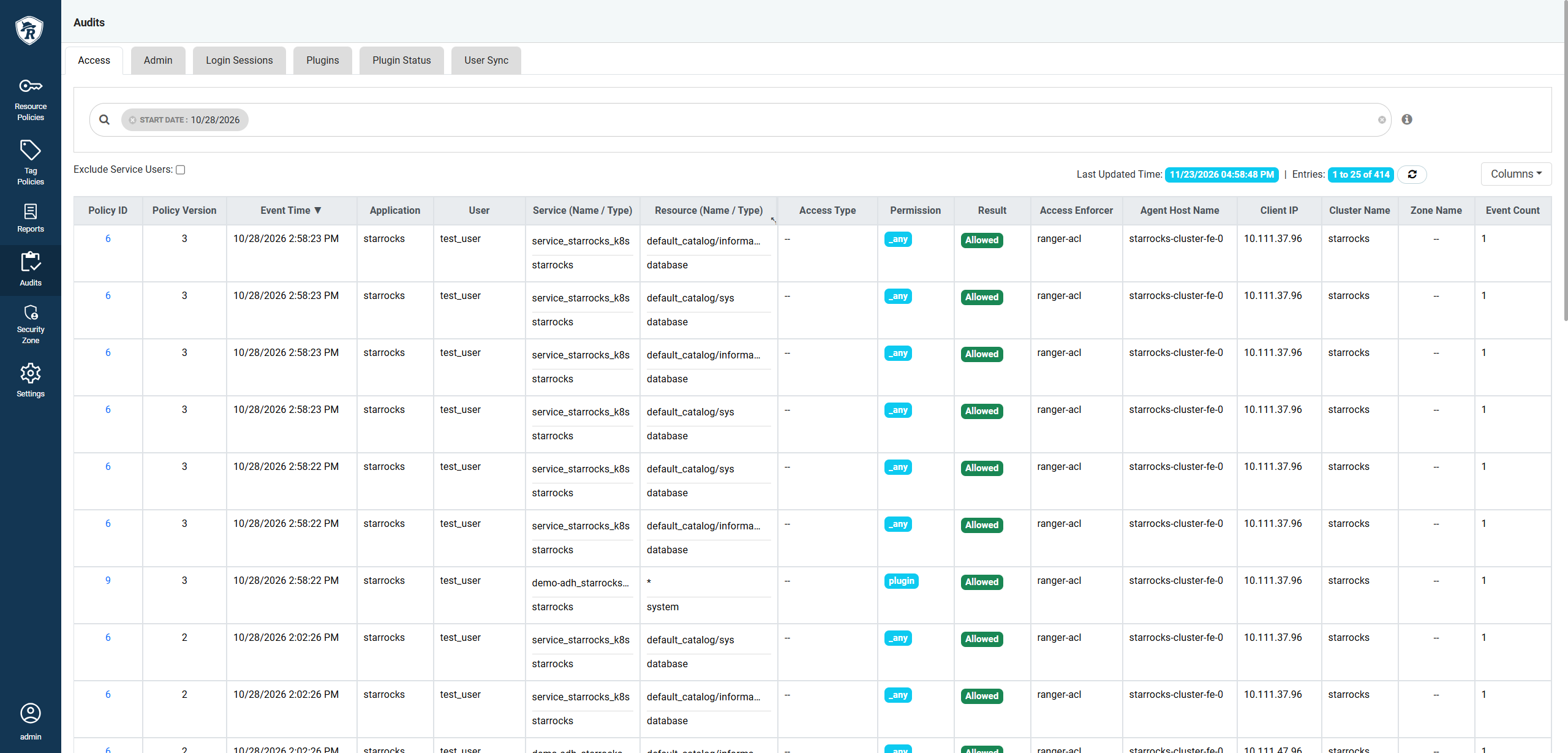 Аудит Ranger
 Аудит Ranger