

Add a new connector for Kafka Connect
Overview
By default, the following Kafka Connect connectors are available for creation in ADS:
Plugins of these connectors are displayed when creating a connector in the ADS Control user interface and are located in the /usr/lib/kafka-connect/plugins directory, which is specified as the plugin.path parameter value in the connect-distributed.properties group on the Kafka Connect service configuration page.
The rest of the connectors can be added on your own.
Add a connector plugin
-
Prepare one of the following connector plugin options:
-
an executable JAR file (uber-JAR) containing the connector’s Java code and all its dependencies;
-
a plugin subdirectory with all JAR files and dependencies (one subdirectory per plugin is recommended).
CAUTIONThe plugin must not include the Kafka Connect runtime libraries.
For example, this article uses the executable JAR file of the plugin for ClickHouseSinkConnector.
Below are links to the open repositories of some connectors:
-
-
If necessary, create a custom directory to store plugins (for example, /var/lib/kafka-connect/jars).
-
On each host with a Kafka Connect Worker component, copy the connector plugin to the created directory (or to the existing directory /usr/lib/kafka-connect/plugins), for example:
$ scp /tmp/clickhouse-kafka-connect-v1.0.16-confluent.jar olga@10.92.38.105:/var/lib/kafka-connect/jars -
Open the Kafka Connect service configuration page, enable the Advanced flag, and expand the connect-distributed.properties→plugin.path group, where the path to the plugins added by default is already indicated — /usr/lib/kafka-connect/plugins.
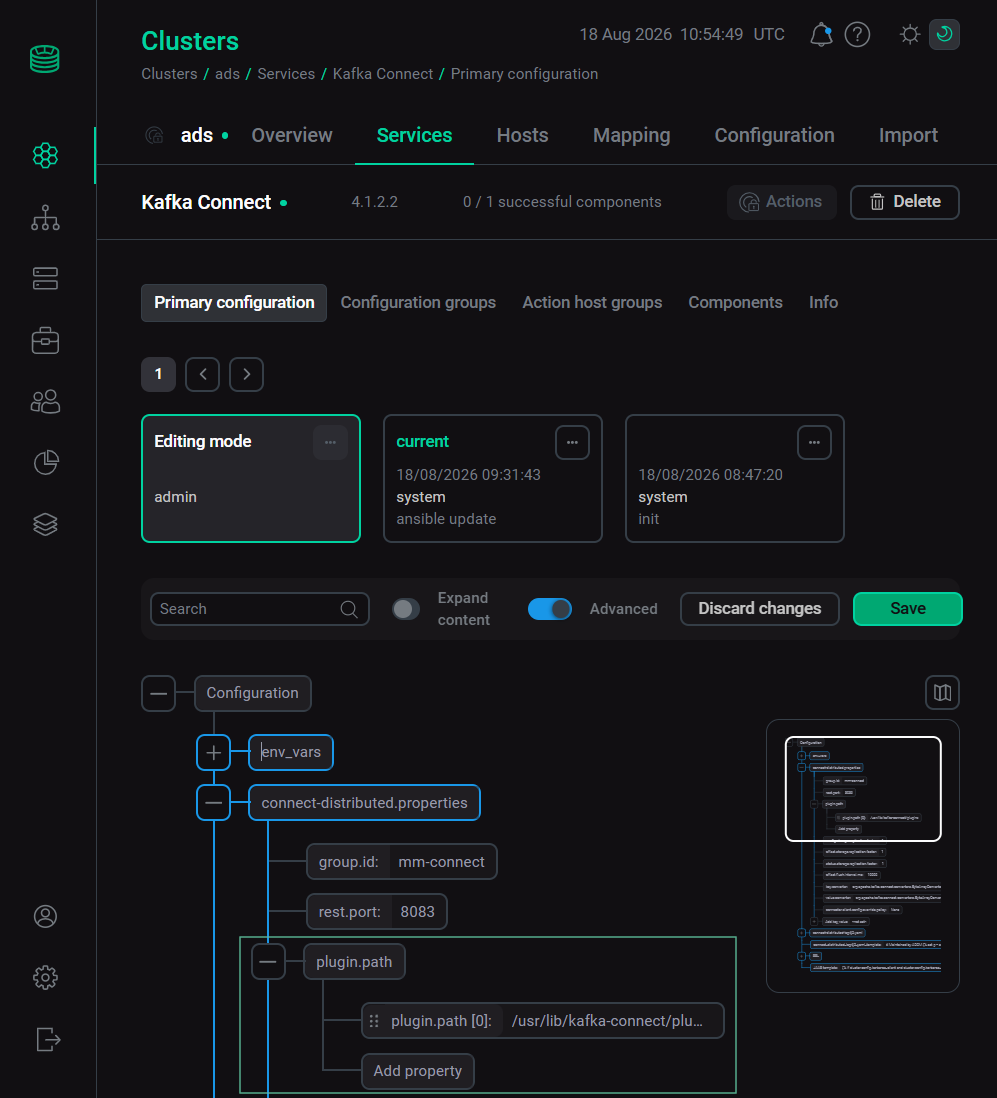 Configure plugin.path
 -
If the new plugin is located in the custom directory, select the Add property field, and for the new line of the plugin.path parameter value, specify the path to the user folder for storing plugins.
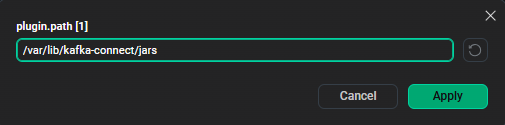 Specify a new plugin.path
 -
Restart the Kafka Connect service via the Restart action, clicking on the icon

 in the Actions column.
 -
Check that the new plugin.path settings appear in the /etc/kafka-connect/config/connect-distributed.properties file on the host. Below is an example of the file after the changes:
connect-distributed.properties# Maintained by ADCM # Kafka Broker Configuration bootstrap.servers=sov-ads-1.ru-central1.internal:9092 security.protocol=PLAINTEXT sasl.mechanism=none producer.sasl.mechanism=none consumer.sasl.mechanism=none consumer.security.protocol=PLAINTEXT producer.security.protocol=PLAINTEXT config.storage.topic=mm-connect-configs offset.storage.topic=mm-connect-offsets status.storage.topic=mm-connect-status rest.advertised.host.name = sov-ads-1.ru-central1.internal rest.advertised.listener=http listeners=http://0.0.0.0:8083 config.storage.replication.factor=1 connector.client.config.override.policy=None group.id=mm-connect key.converter=org.apache.kafka.connect.converters.ByteArrayConverter offset.flush.interval.ms=10000 offset.storage.replication.factor=1 plugin.path=/usr/lib/kafka-connect/plugins,/var/lib/kafka-connect/jars rest.port=8083 status.storage.replication.factor=1 value.converter=org.apache.kafka.connect.converters.ByteArrayConverter -
Check that when creating a connector in the ADS Control user interface, the new plugin appears.
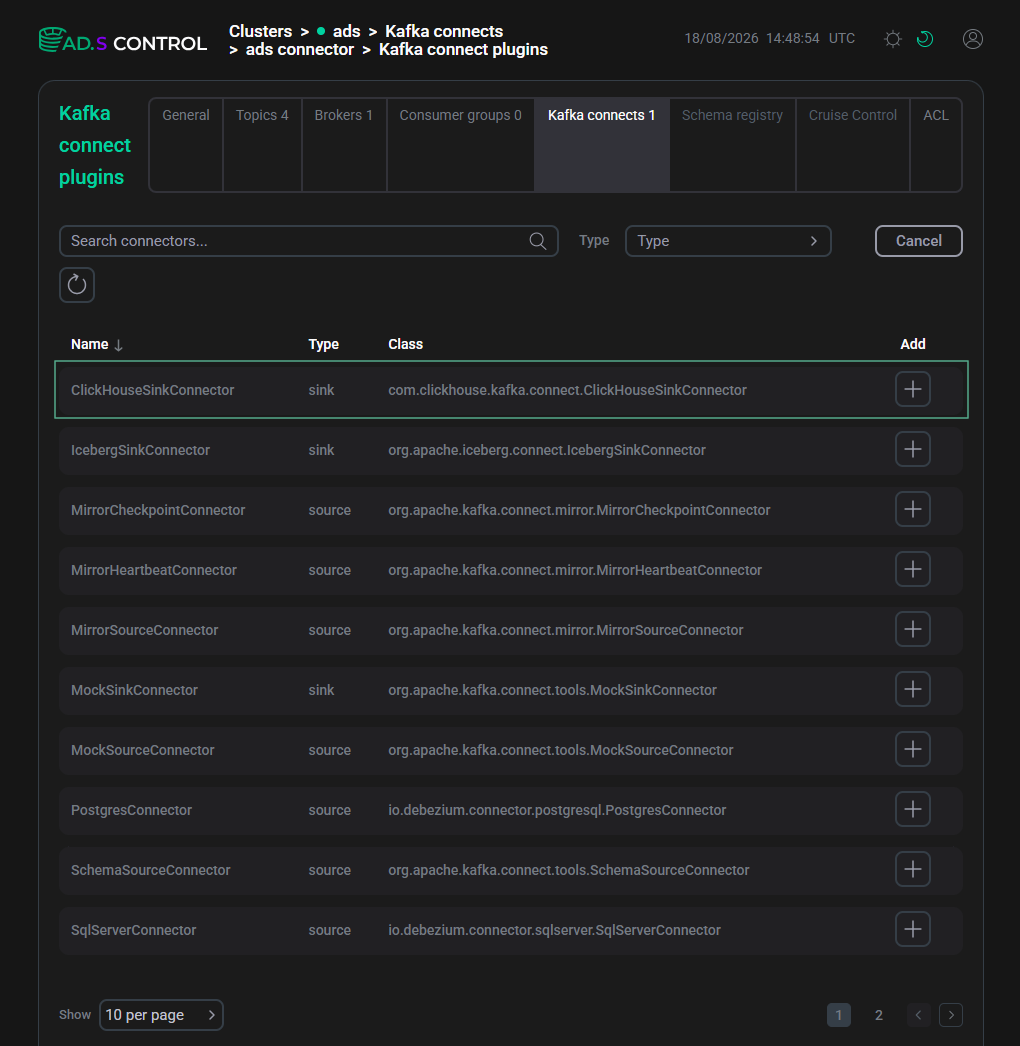 New connector plugin in ADS Control
You can also check for the plugin via an HTTP request to the REST API of any Kafka Connect Worker:
$ curl -X GET 'http://10.92.38.105:8083/connector-plugins' |jqIn response to the request, a list of available plugins for the cluster and their versions is displayed.
Connector plugins[ { "class": "com.clickhouse.kafka.connect.ClickHouseSinkConnector", "type": "sink", "version": "v1.0.16" }, { "class": "org.apache.iceberg.connect.IcebergSinkConnector", "type": "sink", "version": "1.10.1.1-4.3.0-1" }, { "class": "org.apache.kafka.connect.tools.MockSinkConnector", "type": "sink", "version": "4.1.2.2-4.0.0-1" }, { "class": "org.apache.kafka.connect.tools.VerifiableSinkConnector", "type": "sink", "version": "4.1.2.2-4.0.0-1" }, { "class": "io.debezium.connector.postgresql.PostgresConnector", "type": "source", "version": "3.5.1.1-4.0.0-1" }, { "class": "io.debezium.connector.sqlserver.SqlServerConnector", "type": "source", "version": "3.5.1.1-4.0.0-1" }, { "class": "org.apache.kafka.connect.mirror.MirrorCheckpointConnector", "type": "source", "version": "4.1.2.2-4.0.0-1" }, { "class": "org.apache.kafka.connect.mirror.MirrorHeartbeatConnector", "type": "source", "version": "4.1.2.2-4.0.0-1" }, { "class": "org.apache.kafka.connect.mirror.MirrorSourceConnector", "type": "source", "version": "4.1.2.2-4.0.0-1" }, { "class": "org.apache.kafka.connect.tools.MockSourceConnector", "type": "source", "version": "4.1.2.2-4.0.0-1" }, { "class": "org.apache.kafka.connect.tools.SchemaSourceConnector", "type": "source", "version": "4.1.2.2-4.0.0-1" }, { "class": "org.apache.kafka.connect.tools.VerifiableSourceConnector", "type": "source", "version": "4.1.2.2-4.0.0-1" } ]
Impact of Kafka Connect parameters
Below are the Kafka Connect parameters that affect the creation of a connector:
-
plugin.path — directories for storing plugins (default is
/usr/lib/kafka-connect/plugins); -
rest.port— REST API port for making HTTP requests (default is8083); -
connector.client.config.override.policy — determines whether individual overrides of client/security properties are allowed for each connector (default is
None).
The specified parameters are located in the file /etc/kafka-connect/config/connect-distributed.properties on each host with the Kafka Connect Worker component.
The parameters can be changed on the configuration page of the Kafka Connect service in the connect-distributed.properties group after enabling the Advanced flag.
After making all the changes, restart the Kafka Connect service.
Limitations when adding plugins
-
After copying the JAR files to the specified directory, you need to restart the Kafka Connect service. This is because plugin detection only happens when the Kafka Connect worker starts.
-
Using the ADS Control tools, you can only create connectors through the user interface. Adding new plugins is only possible manually on the hosts by changing parameters through ADCM.
-
In ADS 3.9.1.3 and below, only one version of a plugin can be running in a Kafka Connect cluster.
-
In ADS 3.7.2.1, to create the Iceberg Sink Connector, you need to manually set an additional plugin.path value to
/usr/lib/kafka-connect/plugins. Using the CLASSPATH mechanism is not recommended (library conflicts, lack of isolation).Starting with ADS 3.9.0.1, the
/usr/lib/kafka-connect/pluginsvalue for plugin.path is preset, along with/var/lib/kafka-connect/libs.Starting with ADS 4.0.0, the
/usr/lib/kafka-connect/pluginsvalue is the only preset value for plugin.path. All default plugins in ADS are located in this path.