

ADS architecture
Overview
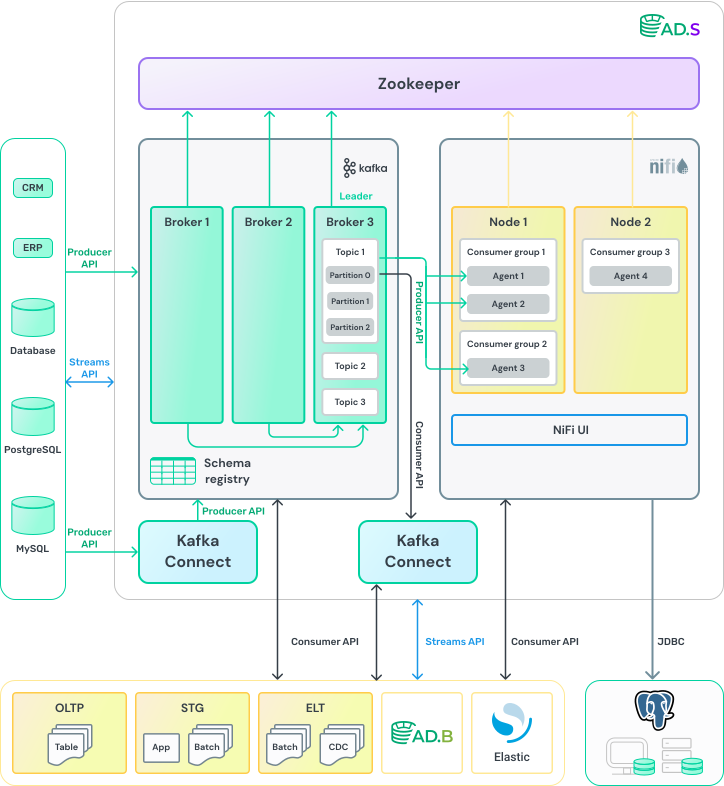
For each use case, the architecture of ADS is determined by the consumer, depending on the tasks. The high-level architecture view of one of the options of ADS is shown below.
Kafka
-
Every named topic in Kafka consists of one or more partitions distributed among brokers within one ADS cluster.
-
When a new message is added to a topic, it is written to one of that topic’s partitions. Messages with the same keys are always written to the same partition, thereby guaranteeing the sequence or order of writing and reading.
-
To ensure data integrity, each partition in Kafka can be replicated multiple times. This ensures that there are multiple copies of the message stored on different brokers.
-
Every partition has a leader — a broker that works with clients. It is the leader that works with the producers and generally gives messages to the consumers. Messages are always sent to the leader and, in general, are read from the leader.
-
To store information about the cluster configuration (topics, brokers, partition leaders), ensure Kafka brokers stay in sync during data replication, and update cluster metadata, the KRaft protocol is used. The KRaft concept is based on creating a controller quorum, where special Kafka Controller are used.
-
To manage high-load Kafka clusters or clusters with a large number of hosts, Cruise Control is used, which allows you to assess the state of brokers and also perform load balancing.
-
For scalably and reliably streaming data between Kafka and other data systems Kafka Connect is used. Kafka Connect can ingest entire databases or collect metrics from all your application servers into Kafka topics, and can also deliver data from Kafka topics, for example, into data analysis and retrieval systems (ADLS) or database management system (ADB).
-
Confluent Schema-Registry ensures schemas compatibility between Kafka producer and consumer.
NiFi
-
To work with stream files, NiFi uses a lot of handlers (processors) — separate code fragments to perform a specific operation with stream files.
-
Every Kafka consumer is part of a Consumer Group that is configured by the ConsumeKafka processor in NiFi with a specific Kafka broker and group name.
-
Every Consumer Group has a unique name and is registered by brokers in the Kafka cluster. Data from the same topic can be read by multiple Consumer Groups at the same time.
-
When several consumers read data from Kafka and they are members of the same group, each of them receives messages from different topic partitions, thus distributing the load. NiFi in this case acts as a Kafka consumer and implements all the data processing logic.
-
It is also possible to transfer data from Kafka to another system using NiFi.
-
The NiFi web user interface allows development, management and monitoring in a single interface.
ZooKeeper
-
Every NiFi node in a cluster registers itself with ZooKeeper by creating an ephemeral ZooKeeper node (znode) that contains the node ID, hostname, and port.
-
ZooKeeper is used to track availability, coordinate the operation of NiFi nodes in a distributed system (in a cluster), and ensures the flow data remains accessible in case of failures or maintenance of nodes.
API
-
Producer API allows an application to publish a message stream to one or more topics of the Kafka platform.
-
Consumer API allows an application to subscribe to one or more topics and process the post streams that belong to them.
-
Streams API allows an application to act as a stream processor. It consumes an input data stream from one or more topics and creates an output data stream for one or more topics as well. Thus Streams API effectively converts input streams into output streams.