

NiFi ADB Connector overview
Overview
NiFi ADB Connector provides high-speed parallel data writing between NiFi and Arenadata DB (ADB).
In the NiFi user interface, the following Arenadata development components are available for creating NiFi ADB Connector:
-
PutGreengageRecord processor — available starting with ADS 3.9.0.1.b1 (PutGreenplumRecord before ADS 3.9.1.2.b1);
-
GetGreengageRecord processor — available starting with ADS 4.0.0.b1;
-
StandardGpfdistService controller service — available starting with ADS 3.9.0.1.b1.
NiFi ADB Connector architecture
The figure below shows the interaction between NiFi ADB Connector objects.
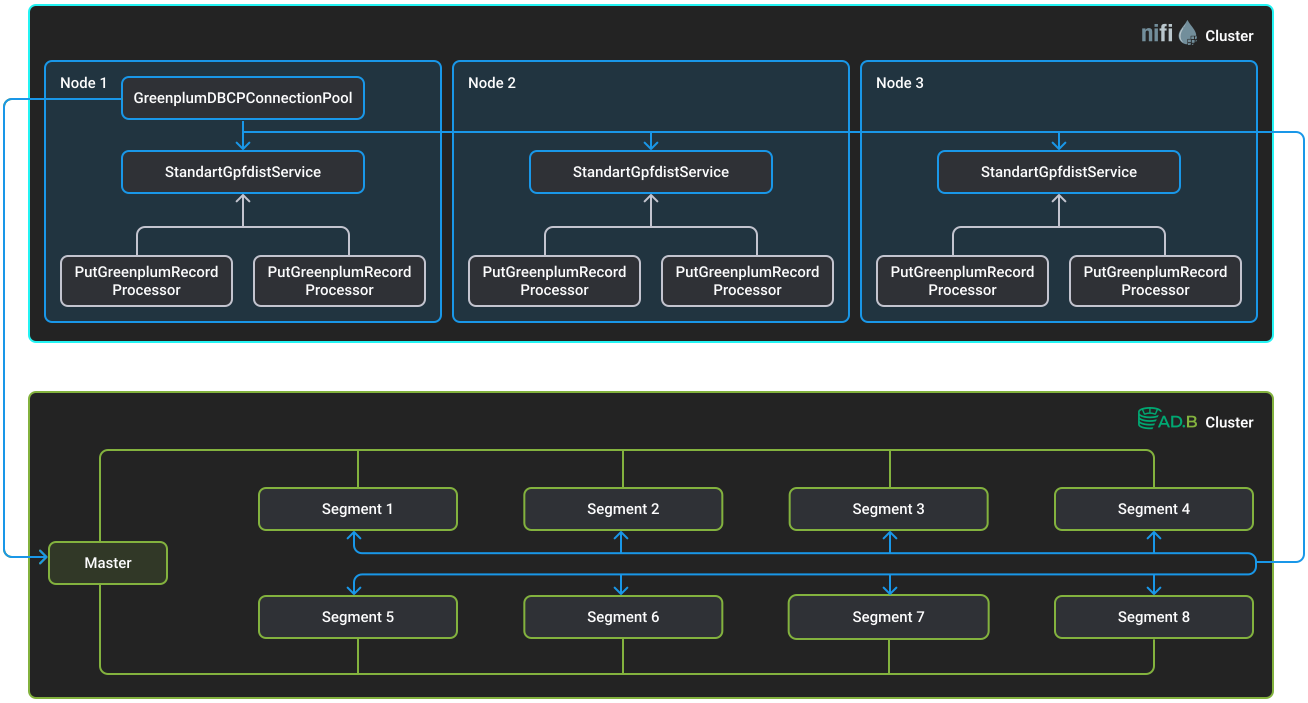
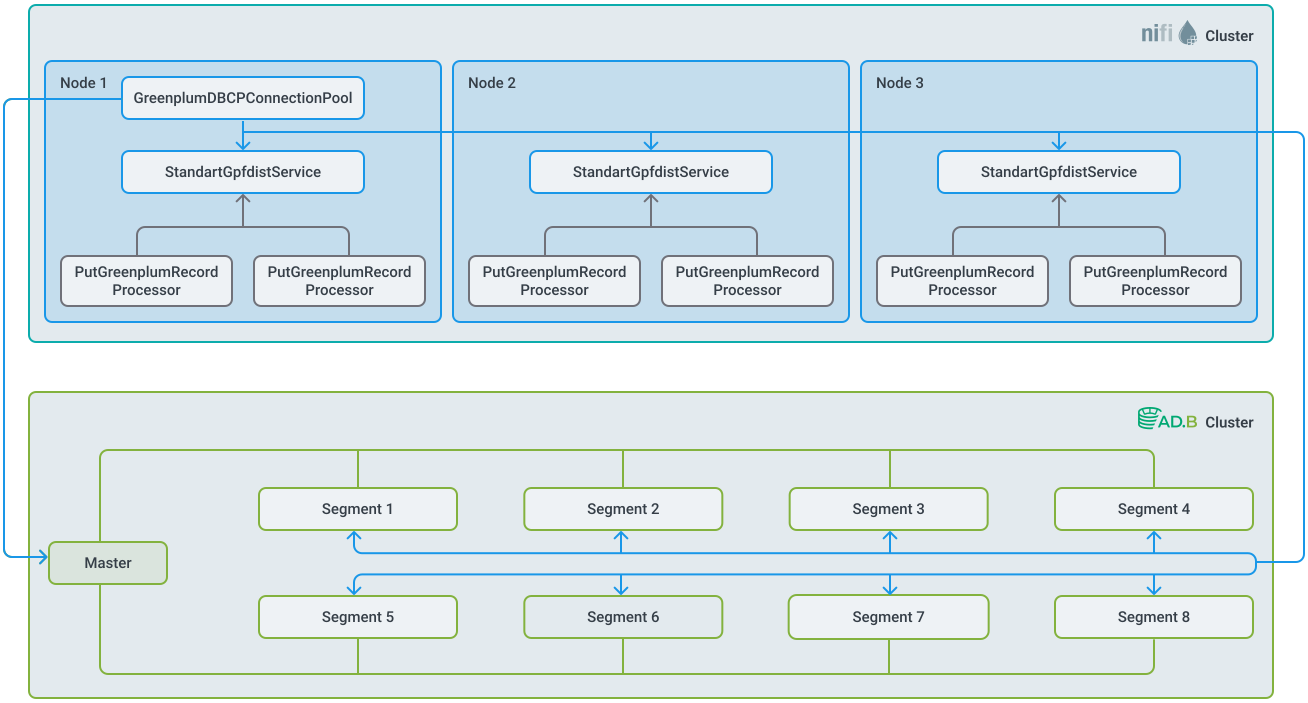
StandardGpfdistService — controller service for connecting to ADB segments, using the mechanism of a readable external table with the gpfdist protocol.
StandardGpfdistService connects to ADB via the GreengageDBCPConnectionPool database connection pool service.
Gpfdist is a Greengage DB utility for reading and writing data from files located on remote servers. It is installed on all hosts of the ADB cluster and provides parallel loading of data, distributing it between segments evenly or according to the specified data distribution key.
The description of the StandardGpfdistService configuration parameters is provided below.
To manage data, the StandardGpfdistService can be connected to the following processors:
-
PutGreengageRecord — writes data to Greengage DB.
To ensure control over the loading of Greengage DB segments and the distribution of load flows between NiFi nodes, a parallelism model is used.
Processors create parallel data streams and transfer them to Greengage DB segments. Record processing is performed asynchronously relative to gpfdist HTTP streaming.
Description of the PutGreengageRecord processor configuration parameters is provided below.
-
GetGreengageRecord — loads data from Greengage DB.
Processors on each NiFi node create a certain number of tasks that are executed in parallel and unload data fragments from Greengage DB segments. The number of processor threads that will handle these tasks can be configured using the Concurrent Tasks parameter on the SCHEDULING tab.
The processors support a stepwise unloading mode, in which each processor cycle reads only newly appeared data ranges, instead of rereading the entire table. This approach reduces the load on Greengage DB and NiFi, decreases the amount of transmitted data, and makes re-polling predictable for real-time scenarios.
Description of the configuration parameters of the GetGreengageRecord processor is provided below.
PutGreengageRecord
Below are the parameters of the PutGreengageRecord processor.
| Parameter | Required | Description | Default value |
|---|---|---|---|
Record Reader |
true |
Link to start one of the controller services: CSVReader, AvroReader, or another, depending on the source of input data |
— |
Gpfdist Service |
true |
Link to the running StandardGpfdistService controller service |
— |
Schema Name |
false |
Name of the schema where the data will be loaded |
null |
Table Name |
true |
Name of the table where the data will be loaded |
— |
Table Columns |
true |
Columns of the table where the data will be loaded |
— |
Greengage Segment Concurrency Multiplier |
false |
Integer factor for Greengage segment parallelism, number of load streams per segment. Possible values:
|
1 |
Maximum Record Processor Threads |
false |
Maximum number of threads used for processing records. This parameter should be set taking into account the following values:
|
8 |
Flow File Batching Enabled |
false |
If enabled, the processor will group multiple FlowFiles into a single |
false |
Flow Files Batch Size |
false |
Maximum total size (in bytes) of FlowFiles included in a single load. Soft limit: the last FlowFile may exceed it |
10 MB |
GetGreengageRecord
Below are the parameters of the GetGreengageRecord processor.
| Parameter | Required | Description | Default value |
|---|---|---|---|
Gpfdist Service |
true |
Link to the running service of the StandardGpfdistService controller |
— |
Schema Name |
false |
Name of the schema where the data will be loaded |
null |
Table Name |
true |
Name of the table where the data will be loaded |
— |
Table Columns |
true |
Columns of the table where the data will be loaded |
— |
Record Writer |
true |
RecordSetWriterFactory that will be used for writing records |
— |
false |
Number of parallel tasks/external tables for data export to the node |
1 |
|
Read Batch Record Count |
false |
Number of records that will be read at one time from the buffer queue that already contains deserialized records when generating FlowFiles. The higher this value, the faster FlowFiles will be generated, provided that the buffer queues have sufficient capacity |
10000 |
Record Buffer Size Per Task |
false |
Buffer size of processed parsed CSV records per task |
10000 |
Pull Buffer Records Timeout |
false |
Maximum timeout (in milliseconds) for waiting for at least one record to appear in the buffer queue during FlowFiles generation. The smaller the timeout, the faster the current NiFi thread will release the task and resources. It is not recommended to set this value above 100-500 ms, so as not to slow down record retrieval from buffer queues, as other tasks may already have data ready |
100 |
Max FlowFiles Per Trigger |
false |
Maximum number of FlowFiles created in a single call of the NiFi parallel stream export method. This limit helps save processor resources and reduce frequent context switches between NiFi threads performing export tasks |
10 |
false |
A list of column names separated by commas. After configuration, the processor will track the maximum value for each specified column that has been returned since the processor started. Requirements for the columns listed:
Several columns are tracked in the order specified in the parameter field |
— |
StandardGpfdistService
Below are the parameters of the StandardGpfdistService controller service.
| Parameter | Required | Description | Default value |
|---|---|---|---|
Listening Port |
true |
Port to listen for incoming gpfdist requests |
— |
Database Connection Pooling Service |
true |
Reference to the configured DBCPConnectionPool controller service |
— |
Maximum Gpfdist Request Processor Threads |
false |
Maximum number of threads used to process a gpfdist request |
8 |
Minimum Gpfdist Server Threads |
false |
Minimum number of threads used to run gpfdist server |
1 |
Maximum Gpfdist Server Threads |
false |
Maximum number of threads used to run gpfdist server |
4 |
Maximum Gpfdist Server Threads Idle Timeout |
false |
Maximum idle time of gpfdist server threads in milliseconds |
60000 |
Total Nifi Nodes |
true |
Total number of nodes in a NiFi cluster |
1 |
Gpfdist Per Greengage Segment Stream Max Buffer Size |
false |
Maximum amount of data that may be buffered in memory for a single gpfdist write stream per Greengage DB segment before backpressure is applied. This limits in-flight data when writing records to Greengage DB via gpfdist |
32 MB |
Gpfdist Per Greengage Segment Stream Enqueue Timeout |
false |
Maximum time to wait when attempting to enqueue data into a gpfdist write stream buffer for a Greengage DB segment. If the timeout is exceeded, the operation fails fast to prevent unbounded blocking under backpressure |
200 ms |
GreengageDBCPConnectionPool
GreengageDBCPConnectionPool — ADB connection service. Provides a database connection pool service.
Supported data types
Mapping ADB data types to NiFi record field types is given below.
| ADB data type | NiFi record field data type | Comment |
|---|---|---|
BIT |
BOOLEAN |
— |
BOOLEAN |
BOOLEAN |
— |
SMALLINT |
SHORT, INT |
Value size should be less than 2 bytes |
INTEGER |
INT |
— |
BIGINT |
BIGINT, LONG |
— |
REAL |
FLOAT |
— |
DOUBLE |
DOUBLE |
— |
NUMERIC(p, s) |
DECIMAL |
— |
CHAR(n) |
STRING |
— |
VARCHAR(n) |
STRING |
— |
ENUM |
STRING |
— |
BYTEA |
BYTE[], STRING |
For the STRING type, a value should be written in hexadecimal format, for example: |
DATE |
DATE |
— |
TIME(n) |
TIME |
— |
TIMESTAMP(n) |
TIMESTAMP |
— |
TIMESTAMPTZ(n) |
TIMESTAMP |
— |
MONEY |
DECIMAL, STRING, DOUBLE, FLOAT |
— |
UUID |
STRING |
— |
JSONB |
STRING |
— |
HSTORE |
STRING, MAP(STRING, STRING) |
For the STRING type, a value should be in the format |
ARRAY |
STRING, STRING[] |
For the STRING type, a value should be in the format |
|
NOTE
The configuration and use of the NiFi ADB Connector in ADS via the NiFi interface are described in the Example of writing data to ADB with NiFi ADB Connector article. |