

Integrate ADP with an ADP ES cluster

If you need to use an ADP ES cluster to manage ADP, import ADP ES cluster services before ADP cluster installation. Otherwise, skip this step.

NOTE
  • A single ADP ES cluster can manage multiple ADP and PostgreSQL clusters.

  • It is necessary to create ADP clusters that should be integrated with ADP ES in the same ADCM instance.

Open the Import tab of the ADP cluster. Select Cluster configuration and All services of the ADP ES cluster and click Import.
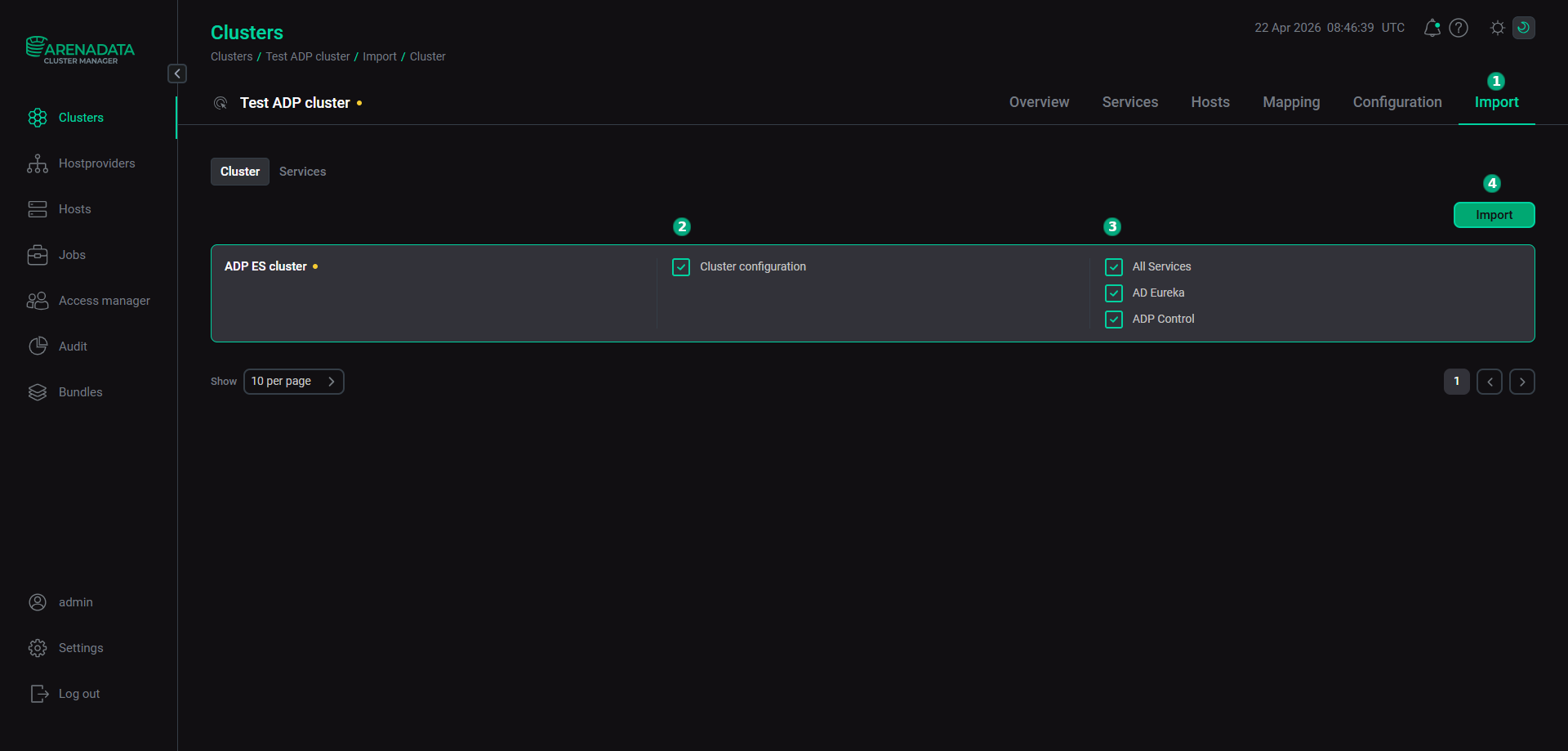
Import of the ADP ES services
CAUTION

If you need to register your ADP cluster in a new ADP ES cluster, follow the steps below:

  1. Uninstall the ADP ES Agents service in your ADP cluster using the Uninstall action to break relation with the current ADP ES.

  2. Add the ADP ES Agents service to your ADP cluster once again.

  3. Import new ADP ES cluster services on the Import tab to connect your ADP with a new ADP ES cluster.

  4. Run the Install action of the ADP ES Agents service.

Found a mistake? Seleсt text and press Ctrl+Enter to report it