

Use pg_duckdb
- Overview
- Installation
- Supported types
- Transactions in pg_duckdb
- Preinstalled DuckDB extensions
- Examples
Overview
ADP/PostgreSQL handles transactional workloads (OLTP) well, but it is inferior to specialized solutions when processing heavy analytical queries (OLAP). The pg_duckdb extension integrates the DuckDB columnar-vectorized analytical engine into ADP/PostgreSQL, enabling high-performance analytics and support for resource-intensive applications. It allows you to run analytical SQL queries on ADP/PostgreSQL data with high performance, without rewriting code or exporting data to a separate format. The extension is available in the ADP Enterprise Edition.
The pg_duckdb extension includes a set of functions that allow you to read external files (Parquet, CSV, JSON), work with data lakes (Iceberg, Delta), manage the DuckDB cache and secrets, and use DuckDB-native SQL functions directly from ADP/PostgreSQL. This article contains several examples of using pg_duckdb functions. For the full and up-to-date list of functions, refer to the official documentation: Functions.
Installation
The package required for the pg_duckdb installation is shipped with ADP. To use pg_duckdb, perform the following steps:
-
On the Primary Configuration tab of the ADPG service, add
pg_duckdbto theshared_preload_librariesparameter value in the postgresql.conf field of the ADPG configurations section (see Configure services).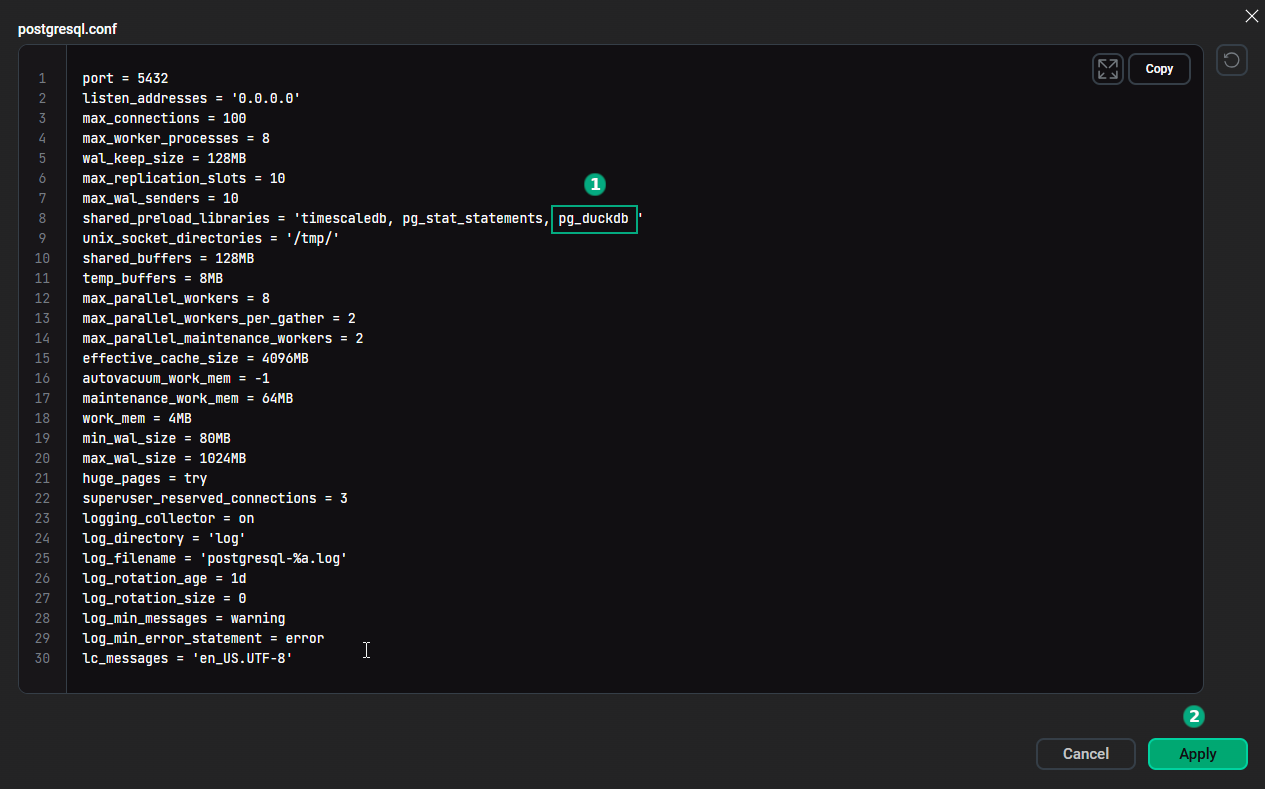 Set the "shared_preload_libraries" parameter
After modifying postgresql.conf, click Save and execute the Reconfigure & Restart action to apply changes.
-
Run the CREATE EXTENSION command in the database where you want to install the extension (you can use psql or any other tool to connect to the database):
CREATE EXTENSION pg_duckdb;
|
NOTE
If the pg_duckdb extension is created in the template1 database used as the default template, all subsequently created databases will have this extension installed.
|
ADP uses the pg_duckdb version
1.1.0
. To check it, execute the following query:
SELECT extversion FROM pg_extension
    WHERE extname = 'pg_duckdb';
extversion ------------ 1.1.0
Once you create the pg_duckdb extension, its functionality is available in the current database. You only need to set duckdb.force_execution to true to use the DuckDB SQL engine when executing queries:
SET duckdb.force_execution = true;Supported types
The pg_duckdb extension supports the following data types for use in queries:
-
integer types (
integer,bigint, and others); -
floating-point types (
real,double precision); -
numeric(might be converted todouble precisionifpg_duckdbdoes not support the required precision); -
text,varchar,bpchar; -
bittypes, including both fixed- and variable-size bit arrays; -
bytea,blob; -
timestamp,timestamptz,date,interval,timestamp_ns,timestamp_ms,timestamp_s; -
boolean; -
uuid; -
json, jsonb; -
domain; -
arrays for all the aforementioned types, with some limitations for multidimensional arrays (see Known limitations).
Special types
The pg_duckdb extension introduces a few special PostgreSQL types. You do not need to use these types explicitly, but they can be mentioned in ADP/PostgreSQL error messages.
duckdb.row
The duckdb.row type is returned by the read_parquet, read_csv, scan_iceberg, and similar functions. Such functions can return rows with different columns and types depending on their arguments. Specify a column name in square brackets to get a particular column value:
SELECT t['name'], t['description'] FROM read_parquet('parquet_file') t WHERE t['price'] < 100;If you use the SELECT * statement, the query result will never have a column that has duckdb.row as its type. All columns will get their real types:
SELECT * FROM read_parquet('parquet_file');duckdb.unresolved_type
The pg_duckdb extension uses the duckdb.unresolved_type type to make ADP/PostgreSQL understand an expression for which the type is not known at query parse time. Once pg_duckdb executes the query, the actual type will be filled in by the DuckDB engine. So, a query result will never contain a column that has duckdb.unresolved_type as its type.
You can get errors informing you that a function or an operator does not exist for duckdb.unresolved_type. For example:
ERROR: function my_function(duckdb.unresolved_type) does not exist
LINE 13: my_function(t['column1']) as column1
In this case, explicitly cast the argument to the type that the function accepts: my_function(t['column1']::text) as column1.
If you need to insert the result of the SELECT statement into a table (the INSERT INTO statement), explicitly cast a column extracted with the t['column_name'] syntax:
INSERT INTO table1 SELECT t['height']::float FROM read_csv('buildings.csv') t;The expression returned by the t['column_name'] syntax is of the duckdb.unresolved_type type. Its actual type is only known once pg_duckdb executes the query, but ADP/PostgreSQL needs to know the type when it parses the INSERT statement, so you will get an error without a cast.
duckdb.json
The pg_duckdb extension uses the duckdb.json type as the argument of pg_duckdb JSON functions. This type allows these functions to take values of JSON, JSONB, and duckdb.unresolved_type.
For more information on the types that pg_duckdb supports and the limitations of their usage, refer to Types.
Transactions in pg_duckdb
The pg_duckdb extension supports multi-statement transactions, but it has an important restriction: it is not recommended to write to both an ADP/PostgreSQL table and a DuckDB table in the same transaction. You can perform DDL operations (for example, CREATE TABLE, DROP TABLE) on DuckDB tables inside a transaction, but it is not allowed to combine such statements with DDL involving ADP/PostgreSQL objects.
To disable this restriction and allow writing to both DuckDB and ADP/PostgreSQL in the same transaction, set duckdb.unsafe_allow_mixed_transactions to true. It can result in the transaction being committed only in DuckDB but not in ADP/PostgreSQL and can lead to inconsistencies and data loss. For example, the following code might result in deleting the duckdb_table table without copying its contents to pg_table:
BEGIN;
SET LOCAL duckdb.unsafe_allow_mixed_transactions TO true;
CREATE TABLE pg_table AS SELECT * FROM duckdb_table;
DROP TABLE duckdb_table;
COMMIT;
Preinstalled DuckDB extensions
pg_duckdb supports a large number of DuckDB extensions that extend pg_duckdb functionality for various use cases.
By default, the following extensions are preinstalled and loaded:
-
httpfs— implements HTTP/S3 file system support to allow reading and writing remote files; -
json— allows using JSON functions and operators.
Examples
This section contains several examples illustrating common scenarios for pg_duckdb.
Use pg_duckdb to query ADP/PostgreSQL tables
Create a table and populate it with data:
CREATE TABLE books (
    id SERIAL PRIMARY KEY,
    title VARCHAR(255) NOT NULL,
    genre VARCHAR(50),
    price NUMERIC(10, 2),
    total_sales BIGINT);

INSERT INTO books (title, genre, price, total_sales)
VALUES
    ('Mrs. Dalloway', 'novel', 360, 6212880),
    ('To the Lighthouse', 'novel', 440, 7216000),
    ('To Kill a Mockingbird', 'novel', 750, 11574000),
    ('The Great Gatsby', 'novel', 900, 11110500),
    ('The Lord of the Rings', 'fantasy', 1200, 5472000),
    ('1984', 'sci-fi', 520, 9642880),
    ('The Hobbit, or There and Back Again', 'fantasy', 1100, 19679000),
    ('War and Peace', 'novel', 1500, 32548500),
    ('Hyperion', 'sci-fi', 610, 8411290),
    ('The Time Machine', 'sci-fi', 450, 6444450);

SET duckdb.force_execution = true;
Run the EXPLAIN ANALYZE statement to display a query plan:
EXPLAIN ANALYZE SELECT genre, AVG(price) AS average_price, COUNT(*) AS books_count
    FROM books GROUP BY genre ORDER BY average_price DESC;
The output shows that the DuckDB engine executes the query:
                                                QUERY PLAN
-----------------------------------------------------------------------------------------------------------------
 Custom Scan (DuckDBScan) (cost=0.00..0.00 rows=0 width=0) (actual time=0.001..0.002 rows=0 loops=1)
   DuckDB Execution Plan:

 ┌─────────────────────────────────────┐
 │┌───────────────────────────────────┐│
 ││    Query Profiling Information    ││
 │└───────────────────────────────────┘│
 └─────────────────────────────────────┘
 EXPLAIN ANALYZE SELECT genre, avg(price) AS average_price, count(*) AS books_count FROM pgduckdb.public.books
    GROUP BY genre ORDER BY (avg(price)) DESC
 ┌────────────────────────────────────────────────┐
 │┌──────────────────────────────────────────────┐│
 ││              Total Time: 0.0093s             ││
 │└──────────────────────────────────────────────┘│
 └────────────────────────────────────────────────┘
 ┌───────────────────────────┐
 │           QUERY           │
 └─────────────┬─────────────┘
 ┌─────────────┴─────────────┐
 │      EXPLAIN_ANALYZE      │
 │    ────────────────────   │
 │           0 rows          │
 │          (0.00s)          │
 └─────────────┬─────────────┘
 ┌─────────────┴─────────────┐
 │          ORDER_BY         │
 │    ────────────────────   │
 │   avg(books.price) DESC   │
 │                           │
 │           3 rows          │
 │          (0.00s)          │
 └─────────────┬─────────────┘
 ┌─────────────┴─────────────┐
 │       HASH_GROUP_BY       │
 │    ────────────────────   │
 │         Groups: #0        │
 │                           │
 │        Aggregates:        │
 │          avg(#1)          │
 │        count_star()       │
 │                           │
 │           3 rows          │
 │          (0.00s)          │
 └─────────────┬─────────────┘
 ┌─────────────┴─────────────┐
 │         PROJECTION        │
 │    ────────────────────   │
 │           genre           │
 │           price           │
 │                           │
 │          10 rows          │
 │          (0.00s)          │
 └─────────────┬─────────────┘
 ┌─────────────┴─────────────┐
 │         TABLE_SCAN        │
 │    ────────────────────   │
 │        Table: books       │
 │                           │
 │        Projections:       │
 │           genre           │
 │           price           │
 │                           │
 │          10 rows          │
 │          (0.01s)          │
 └───────────────────────────┘

 Planning Time: 0.521 ms
 Execution Time: 0.421 ms
Execute the query and view the result to verify that the DuckDB engine is working correctly:
SELECT genre, AVG(price) AS average_price, COUNT(*) AS books_count
FROM books GROUP BY genre ORDER BY average_price DESC;
genre | average_price | books_count ---------+-------------------+------------- fantasy | 1150 | 2 novel | 790 | 5 sci-fi | 526.6666666666666 | 3
Read data from a CSV file
The pg_duckdb extension includes the read_csv function that allows you to retrieve data from CSV files.
For example, there is a CSV file located at tmp/books.csv:
id,title,author_id,public_year,genre
1,Mrs. Dalloway,1,1925,novel
2,To the Lighthouse,1,1927,novel
3,To Kill a Mockingbird,2,1960,novel
4,The Lord of the Rings,4,1955,fantasy
5,1984,5,1949,sci-fi
Execute the following query to display the title and public_year field values:
SELECT t['title'], t['public_year']
     FROM read_csv('file:///tmp/books.csv') t;
title | public_year -----------------------+------------- Mrs. Dalloway | 1925 To the Lighthouse | 1927 To Kill a Mockingbird | 1960 The Lord of the Rings | 1955 1984 | 1949
You can combine data from CSV files and database tables in a single query. Create the authors table to demonstrate this functionality:
CREATE TABLE authors (
    id SERIAL PRIMARY KEY,
    author_name VARCHAR(100) NOT NULL,
    country VARCHAR(20)
);

INSERT INTO authors (author_name, country) VALUES
    ('Virginia Woolf', 'Great Britain'),
    ('Harper Lee', 'USA'),
    ('F. Scott Fitzgerald', 'USA'),
    ('J.R.R. Tolkien', 'Great Britain'),
    ('George Orwell', 'Great Britain');
The following query displays a list of books from the books.csv file along with their author names from the authors table:
SELECT t1['title'], t1['public_year'], t2.author_name FROM read_csv('file:///tmp/books.csv') t1
    INNER JOIN authors t2
    ON t1['author_id'] = t2.id;
title | public_year | author_name -----------------------+-------------+---------------- To the Lighthouse | 1927 | Virginia Woolf To Kill a Mockingbird | 1960 | Harper Lee The Lord of the Rings | 1955 | J.R.R. Tolkien 1984 | 1949 | George Orwell Mrs. Dalloway | 1925 | Virginia Woolf
The read_csv function also allows you to retrieve data from CSV files stored in S3 storages. To do this, create a secret as shown in the Read files from S3 storage example.
Read data from a JSON file
The read_json function allows you to retrieve data from JSON files.
For example, there is a JSON file located at tmp/orders.json:
[{"customer": "Jacob Johnson",
  "book": "Hyperion",
  "qty": 3
},
{"customer": "Adam Brown",
  "book": "War and Peace",
  "qty": 2
},

{"customer": "Andrew Nelson",
  "book": "1984",
  "qty": 4
}]
Call the read_json function and pass the file path as a parameter:
SELECT * FROM read_json('file:///tmp/orders.json');customer | book | qty ---------------+---------------+----- Jacob Johnson | Hyperion | 3 Adam Brown | War and Peace | 2 Andrew Nelson | 1984 | 4
The read_json function also allows you to retrieve data from JSON files stored in S3 storages. To do this, create a secret as shown in the Read files from S3 storage example.
Operations with Parquet files
The pg_duckdb extension allows you to run queries on Parquet files and export data to this format.
Export data from an ADP/PostgreSQL table to Parquet format
pg_duckdb can export data from ADP/PostgreSQL tables to Parquet files located in various storages, including clouds, data lakes, and the local disk. The code below creates a Parquet file with books of the novel genre on the local disk at tmp/output_file.parquet:
COPY (SELECT * FROM books WHERE genre = 'novel')
    TO 'file:///tmp/output_file.parquet'
    (FORMAT 'parquet');
Query Parquet files
The code below uses the read_parquet function to display the contents of the output_file.parquet file created in the previous example (t is an alias for the extracted table):
SELECT t['title'], t['price']
     FROM read_parquet('file:///tmp/output_file.parquet') t;
title | price -----------------------+--------- Mrs. Dalloway | 360.00 To the Lighthouse | 440.00 To Kill a Mockingbird | 750.00 The Great Gatsby | 900.00 War and Peace | 1500.00
Combine ADP/PostgreSQL and Parquet data in a single query
You can access ADP/PostgreSQL tables and external data sources within a single query. The following code outputs rows from the books table that are missing from the Parquet file:
SELECT t1.* FROM books t1
    LEFT JOIN read_parquet('file:///tmp/output_file.parquet') t2 ON t1.id = t2['id']
    WHERE t2['id'] IS NULL;
id | title | genre | price | total_sales ----+-------------------------------------+---------+---------+------------- 5 | The Lord of the Rings | fantasy | 1200.00 | 5472000 6 | 1984 | sci-fi | 520.00 | 9642880 7 | The Hobbit, or There and Back Again | fantasy | 1100.00 | 19679000 9 | Hyperion | sci-fi | 610.00 | 8411290 10 | The Time Machine | sci-fi | 450.00 | 6444450
Read files from S3 storage
DuckDB uses secrets to store credentials (such as access keys, tokens, passwords, and others). Secrets allow a database to connect to protected external storages or remote servers without entering keys in each query.
To connect to S3 storage, first create a secret using the duckdb.create_simple_secret function:
SELECT duckdb.create_simple_secret(
      type      := 'S3',
      key_id    := 'Access_key',
      secret    := 'Secret_key',
      region    := 'ru-central1',
      endpoint  := 'storage.yandexcloud.net',
      use_ssl   := 'false'
);
The S3 storage contains a test.parquet file with PassengerId and Name columns. Execute the following query to display data from this file:
SELECT t['PassengerId'] AS id, t['Name'] AS name
    FROM read_parquet('s3://test-bucket/test/test.parquet') t;
where test-bucket is the bucket name, and test/test.parquet is the path to the file in the bucket.
 id  |       name
-----+---------------------
 1   | Jacques Heath
 2   | Timothy McCarthy
 3   | Laina Heikkinen
 4   | Jacques Futrelle
 5   | William Allen
 6   | James Moran
 7   | Elisabeth Walton
 8   | Kornelia Theodosia
 9   | Oscar Johnson
 10  | Madeleine Talmage
Convert a CSV file to Parquet format
pg_duckdb can convert CSV files to the Parquet format without creating PostgreSQL tables. Convert the books.csv file mentioned above to a Parquet file using the following query:
COPY (SELECT t['id']::integer,
             t['title']::text,
             t['author_id']::integer,
             t['public_year']::integer,
             t['genre']::text FROM read_csv('file:///tmp/books.csv') t)
    TO 'file:///tmp/books.parquet' (FORMAT 'parquet');
Note that for successful conversion, you should explicitly specify column types. Otherwise, the ADP/PostgreSQL parser will not be able to parse the data to pass it to the COPY command, since the read_csv function returns the duckdb.row type.
Create high-performance temporary tables
The pg_duckdb extension allows you to create high-performance temporary tables using the USING duckdb clause. In this case, pg_duckdb executes and stores the temporary table in the DuckDB in-memory columnar engine, entirely bypassing PostgreSQL’s slower row-oriented heap and WAL.
The USING duckdb clause for persistent tables is disabled locally and requires integration with MotherDuck. However, there are no restrictions for temporary tables: they are created directly within the DuckDB engine.
Create a temporary table using data from the books table:
CREATE TEMP TABLE temp_books USING duckdb AS
    SELECT id, title, genre, price, total_sales
    FROM books;
Execute the \dt+ command:
\dt+List of relations Schema | Name | Type | Owner | Persistence | Access method | Size | Description -----------+------------+-------+----------+-------------+---------------+------------+------------- pg_temp_6 | temp_books | table | postgres | temporary | duckdb | 0 bytes | public | books | table | postgres | permanent | heap | 8192 bytes |
You can see in the output that the access method of the temp_books table is duckdb.
Any aggregations, groupings, and scans on a temporary table created with USING duckdb are performed by DuckDB at the speed of an OLAP database.