

Migration of ADB Control and ADBM metadata during ADB ES installation
Starting with version 6.30.0.1 (in ADB 6) and 7.5.0 (in ADB 7), ADB Control and ADBM come with a separate ADB Enterprise Services (ADB ES) bundle. On the ADB side, only agents are left: ADBM agents and ADBC agents. During initial ADB ES cluster installation, you should perform the following steps for a proper upgrade of ADB 6 (to version 6.30.0.1) or ADB 7 (to version 7.5.0), including ADB Control and ADBM metadata migration from ADB to ADB ES.
|
IMPORTANT
|
Prerequisites
Names of the external PostgreSQL databases for ADB Control and ADBM services in the ADB ES cluster (regardless of whether these databases were added earlier or will be created when you follow the steps listed below) should be generated according to the following pattern:
-
ADB Control —
<prefix>_adcc -
ADBM —
<prefix>_adbm
The <prefix> value should be equal for both services. Subsequently, that value should be specified in the Database service parameter External PostgreSQL database → Database name prefix. Examples of valid database names: external_adcc and external_adbm (where external is a prefix).
If external databases were previously created with names that do not meet the above-mentioned pattern, perform renaming after ADB upgrade before ADB ES installation (see Step 3. Rename external PostgreSQL databases).
Step 1. Migrate metadata stored in PostgreSQL
|
IMPORTANT
|
-
Depending on which PostgreSQL target databases you plan to use in ADB ES, perform the following:
-
External PostgreSQL databases: perform steps 1 — 3 from the PostgreSQL section of the Configure external databases for ADB Control and ADBM article.
-
Internal ADPG databases that come with an ADB ES bundle:
-
Add the Database service and the services required for it: ADB Control, AD Eureka, and Clickhouse.
-
Configure the Database service parameters: in the Database type list, keep the default value (
Internal PostgreSQL database), and in the Postgres user password field, set up a password for thepostgresuser. -
Install only the Database service. During the Database service installation, the required internal databases (
adccandadbm) and theadccrole will be automatically created by the bundle.To keep the target databases empty, do not install other services. You will install them later, after restoring metadata.
-
-
-
Migrate metadata from previously used databases to the new ones. For this, you can use the pg_dump utility on the host where target databases are deployed. Example:
$ sudo -u postgres pg_dump -h <host> -p <port> --format=custom --no-owner --no-privileges -U <user> -f /tmp/<dump>.dump <database_name>where:
-
-h <host>— IP address of the host where the internal database is deployed (from which you perform metadata migration). -
-p <port>— port number for connection to the internal database (by default,5432). -
--format=custom— specifies creation of a compressed dump suitable for the pg_restore utility. -
--no-owner— excludes owner information from a dump (owners will be set during restore). -
--no-privileges— excludes privilege information from a dump (can be restored separately if needed). -
-U <user>— username to connect to the internal database (by default,postgres). -
-f /tmp/<dump>.dump— path to a dump. Replace<dump>by the target file name. -
<database_name>— name of the internal database (by default,adbmfor ADBM andadccfor ADB Control).IMPORTANT-
You need to create separate dumps for ADB Control and ADBM since their metadata is stored in different databases.
-
When running the utility, you will be asked for a password to connect to the internal database. The default password is
123(however, in your environment it may be different — see a note below). -
In the example, the default credentials are used. However, for ADB Control, you should replace them with those you specified when configuring this service in your ADB cluster (in the previous versions of ADB, they were configured in ADB Control → Database parameters). For ADBM, use the default values listed above.
-
-
-
Restore data from each dump you created. For this, on the host where target databases are deployed, run the pg_restore utility:
$ sudo -u postgres pg_restore -p <target_port> -d <target_db> --clean --no-owner /tmp/<dump>.dumpwhere:
-
-p <target_port>— port number for connection to the target database. In case you use the internal database that comes with ADB ES, port number is5433. -
-d <target_db>— name of the target database. In case you use the internal database that comes with ADB ES, database name isadccfor ADB Control andadbmfor ADBM. -
--clean— drop existing database objects before restoring. -
--no-owner— do not restore information on database object ownership (owners will be set manually in the next step).
-
-
Ensure that metadata is loaded to the target database. You can do this by comparing the number of rows in the key tables of the source and target databases:
SELECT count(*) FROM <schema>.<table>;Query example for ADBM:
SELECT count(*) FROM adbm.restore_point; -
Check that the correct owner is set for the
adcc(in case of ADB Control) andadbm(in case of ADBM) schemas in target databases. If needed, change the owner manually. Example foradbm:$ sudo -u postgres psql -p <target_port> -d <target_db> -c "ALTER SCHEMA adbm OWNER TO <target_owner>;"where
<target_owner>:-
For external databases — the
<user_name>value that you used when performing SQL commands from the Configure external databases for ADB Control and ADBM article. -
For internal ADPG databases that come with an ADB ES bundle —
postgres.
-
-
For the
quartzschema in ADBM, you should restore ownership for all its tables and sequences (if privileges were lost during migration).For tables:
DO $$ DECLARE r record;
BEGIN
    FOR r IN SELECT tablename FROM pg_tables WHERE schemaname = 'quartz' LOOP
        EXECUTE 'ALTER TABLE quartz.' || quote_ident(r.tablename) || ' OWNER TO <target_owner>;';
    END LOOP;
END $$;
For sequences:
DO $$ DECLARE r record;
BEGIN
    FOR r IN SELECT sequence_name FROM information_schema.sequences WHERE sequence_schema = 'quartz' LOOP
        EXECUTE 'ALTER SEQUENCE quartz.' || quote_ident(r.sequence_name) || ' OWNER TO <target_owner>;';
    END LOOP;
END $$;
where
<target_owner>is the same as in the previous step.
Step 2. Upgrade ADB clusters
For all ADB clusters that were monitored in the previous version of ADB Control (before upgrade):
Step 3. Rename external PostgreSQL databases
If external databases were previously created with names that do not meet the above-mentioned naming pattern, you should rename them before performing the next steps. However, renaming changes the Liquibase checksums, which can adversely affect future updates. To avoid this, after renaming databases, execute the following command in each external PostgreSQL database (ADB Control and ADBM) to reset checksums:
UPDATE DATABASECHANGELOG SET MD5SUM = NULL;Step 4. Attach external PostgreSQL databases to ADB ES
|
IMPORTANT
Perform step 4 only if you plan to use external PostgreSQL (not included in ADB ES). |
-
Add the Database service and the services required for it: ADB Control, AD Eureka, and Clickhouse.
-
Configure the Database service parameters: in the Database type list, select
External PostgreSQL databaseand fill in other parameters described in the Configuration parameters → Database → External PostgreSQL database section.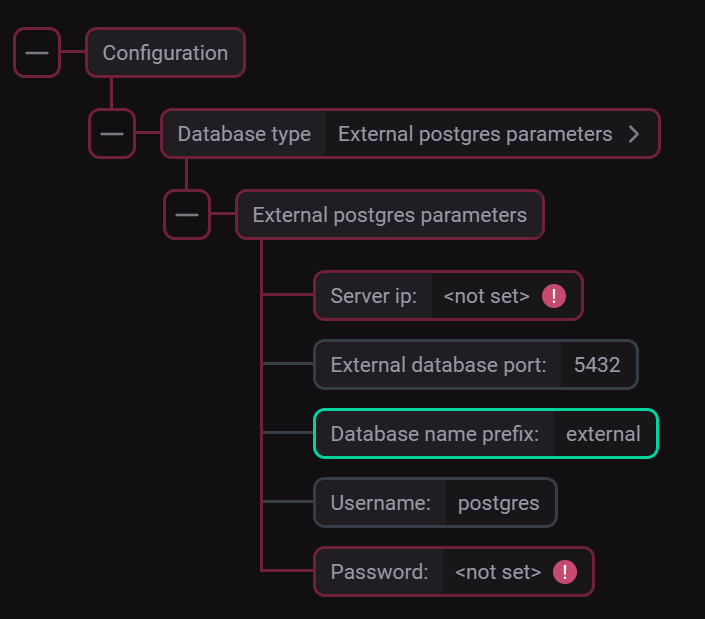 Parameters for connecting to the external PostgreSQL DB
 -
Click Save to save the Database configuration.
Step 5. Install ADB ES and agents in ADB
-
In the ADB Control database (the one where you migrated the metadata), run the following query to delete data about the existing ADB cluster (needed to prevent conflicts in the future):
DELETE FROM adcc.system_user WHERE cluster_name = '<cluster_name>';where
<cluster_name>is an ADB cluster name. -
Perform ADB ES installation using the Install cluster action.
-
Add the ADBC agents and ADBM agents services to all ADB clusters that were monitored in the previous version of ADB Control.
-
Import ADB ES configuration to ADB clusters.
-
Install ADBC agents and ADBM agents in ADB clusters.
Step 6. Perform post-installation actions
-
In case of errors with GUC management in the ADB Control web interface after upgrade — on the host with ADB Control UI, add the following record to /etc/hosts:
<master_IP> <master_hostname>
Since the master ADB Control agent is registered in Eureka using the ADB master hostname, there can be resolution errors when ADB Control UI tries to reach the agent to manage GUC settings.
-
On the ADB master host, run the following command to remove all existing configuration files of the pgbackrest utility:
$ gpssh -f arenadata_configs/arenadata_all_hosts.hosts -v -e 'rm -rf /home/gpadmin/arenadata_configs/pgbackrest/*' -
Using the web interface of the ADBM service (installed in ADB ES), run the Verify action to recreate configuration files.
-
Using the web interface of the ADBM service (installed in ADB ES), run the Create configuration action to reapply the current backup configuration.
Step 7. Check results
As a successful result of the previous steps, all ADB clusters registered for monitoring in the previous version of ADB Control (before upgrade) should be displayed on the Configuration → Clusters page of the ADB Control web interface.