

LDAP authentication
ADB Control supports Lightweight Directory Access Protocol (LDAP) user authentication. Unlike basic authentication, you do not need to add users manually via ADB Control when using LDAP. User accounts and passwords are checked on the selected LDAP server.
To configure LDAP authentication, follow the steps:
-
Ensure the target LDAP server is configured and available. ADB Control supports two LDAP implementations: Microsoft Active Directory (MS AD) and 389 Directory server as a part of FreeIPA.
-
Open the ADB Control service configuration page in ADCM.
-
Activate the UI LDAP authentication switcher.
-
Fill in the following fields.
Field Description Example in MS AD LDAP type
A type of the LDAP server. Possible values:
-
MSAD— Microsoft Active Directory; -
FreeIPA— 389 Directory server as a part of FreeIPA.
MSAD
LDAP URI
A URI for connecting to the LDAP server. Requires the following format:
<scheme>://<host>:<port>. For example,ldap://example.com:389,ldaps://example.com:636. If a port number is not specified, the standard ports are used:389for LDAP and636for LDAPSldap://10.92.2.66:389
Users baseDN
A limitation of the search scope of objects in the LDAP directory that is used in users search requests
dc=ad,dc=ranger-test
Groups baseDN
A limitation of the search scope of objects in the LDAP directory that is used in groups search requests
dc=ad,dc=ranger-test
Users OUs
A list of OUs for user search. If the option is set, users will be searched only in the specified OUs, otherwise — within full search scope specified in Users baseDN. Enter each
OUvalue on a separate line using theou=<name>format (e.g.ou=users1)ou=Peoples
Groups OUs
A list of
OUfor group search. If the option is set, groups will be searched only in the specified OUs, otherwise — within full search scope specified in Groups baseDN. Enter eachOUvalue on a separate line using theou=<name>format (e.g.ou=groups1)ou=Groups
Group
A group name that is used for service requests to the LDAP server
—
Login
A user name that is used for service requests to the LDAP server
cn=admin,dc=ad,dc=ranger-test
Password
A user password that is used for service requests to the LDAP server
A password of the
adminuserSize limit
A maximum number of records that can be returned by the LDAP server
1000
Lowercase login
Whether to convert user names to lowercase
false
IMPORTANT-
Different LDAP implementations use different names for object types and identifiers. For the exact parameter format for your LDAP implementation, consult your LDAP server administrator.
-
To use LDAP over SSL (LDAPS), specify the
ldapsscheme in the LDAP URI field (for example,ldaps://example.com:636). -
When ADB Control was part of the ADB bundle, the CA certificate of the LDAP server was set using the Internal CA certificate in PEM format (optional) parameter and automatically imported into the truststore of the ADB Control service. In ADB ES, this parameter was removed. If you use LDAPS, you must manually import the CA certificate of the LDAP server into the truststore of the ADB Control service.
-
-
Click Save. Then apply the Reconfigure & Restart action to the ADB Control service.
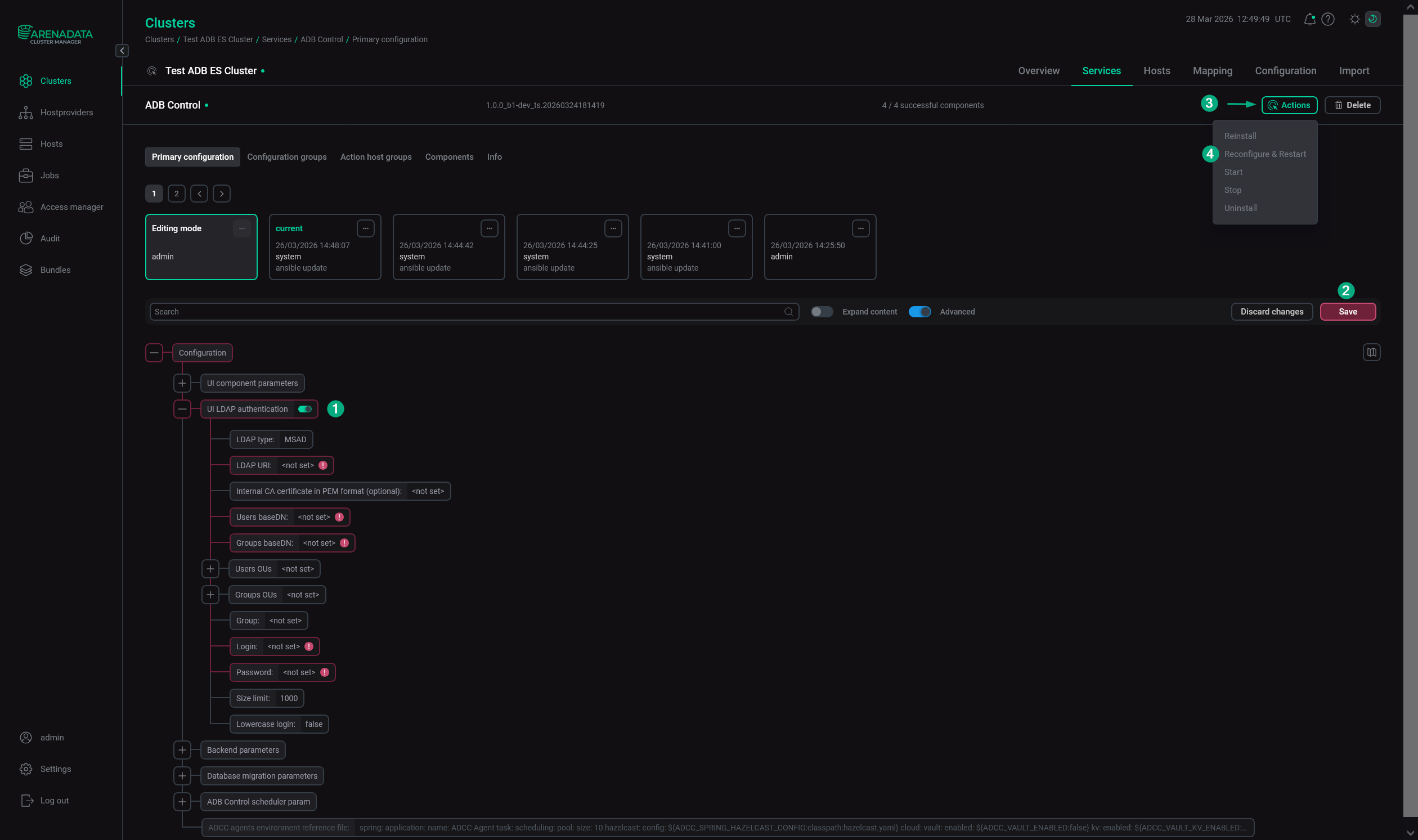 Configure LDAP authentication for ADB Control via ADCM
 -
In the ADB Control web interface, map LDAP user groups to ADB Control roles. This is necessary for LDAP users to get the appropriate permissions to work in ADB Control. For more information, see Authorization.
If all steps are completed successfully, users can connect to ADB Control using the accounts registered for them on the LDAP server.