

Configure external databases for ADB Control and ADBM
For production environments, it is recommended to configure external PostgreSQL and ClickHouse databases to store data of ADB Control (see Query DB and Metrics DB in Arenadata DB Control overview) and ADBM (see PostgreSQL in Arenadata DB Backup Manager overview) for a number of reasons:
-
You will be able to set up external storages on hosts of required size for desired performance and configure high availability for them.
-
The ADB Control recovery process will be easier and consist mainly of the service configuration steps.
To configure external databases in ADB ES (starting with ADB Control 4.16.0), you need to follow the steps that are described below. For information on how to set up external databases for the previous ADB Control and ADBM versions (delivered as ADB services), refer to the corresponding versions of the ADB documentation:
|
CAUTION
|
PostgreSQL
Step 1. Run SQL queries for the ADB Control database
-
Perform the following queries in PostgreSQL. The queries should be run under a superuser:
CREATE ROLE <user_name> LOGIN PASSWORD '<user_password>'; ALTER ROLE <user_name> SET search_path TO public, adcc; CREATE DATABASE <prefix>_adcc WITH owner <user_name>; -
Connect to the created database under a superuser and run:
CREATE SCHEMA adcc;
ALTER SCHEMA adcc OWNER TO <user_name>;

CREATE EXTENSION IF NOT EXISTS pgcrypto WITH schema public;
CREATE EXTENSION IF NOT EXISTS btree_gin WITH schema public;
CREATE EXTENSION IF NOT EXISTS pg_trgm WITH schema public;

GRANT SELECT ON ALL TABLES IN SCHEMA pg_catalog TO <user_name>;

CREATE OPERATOR adcc.^| (PROCEDURE = jsonb_exists_any, LEFTARG = jsonb, RIGHTARG = _text, RESTRICT = contsel, JOIN = contjoinsel);
ALTER OPERATOR adcc.^|(jsonb, text[]) OWNER TO <user_name>;
CREATE OPERATOR CLASS adcc.jsonb_ops_custom
FOR TYPE jsonb USING gin AS
OPERATOR 7 pg_catalog.@>(jsonb, jsonb),
OPERATOR 10 adcc.^| (jsonb, _text),
FUNCTION 1  gin_compare_jsonb(text, text),
FUNCTION 2  gin_extract_jsonb(jsonb, internal, internal),
FUNCTION 3  gin_extract_jsonb_query(jsonb, internal, smallint, internal, internal, internal, internal),
FUNCTION 4  gin_consistent_jsonb(internal, smallint, jsonb, integer, internal, internal, internal, internal),
FUNCTION 6  gin_triconsistent_jsonb(internal, smallint, jsonb, integer, internal, internal, internal);
ALTER OPERATOR CLASS adcc.jsonb_ops_custom USING GIN OWNER TO <user_name>;
where
<user_name>is a name of the previously created user. -
Optionally, you can run the additional query to increase performance by disabling synchronous writes to WAL files:
ALTER DATABASE <prefix>_adcc SET synchronous_commit = OFF;
Step 2. Run SQL queries for the ADBM database
-
Perform the following queries in PostgreSQL. The queries should be run under the default user
postgreswith thesuperuserrights:ALTER ROLE <user_name> SET search_path TO public, adcc, adbm; (1) CREATE DATABASE <prefix>_adbm WITH owner <user_name>; (2)1 Grant the <user_name>user (previously created for ADB Control) appropriate rights for connecting to the external ADBM database.2 Create the database for ADBM data migration. -
Connect to the created database under a superuser and run:
CREATE SCHEMA adbm; (1)
GRANT USAGE, CREATE ON SCHEMA adbm TO <user_name>; (2)
ALTER DEFAULT PRIVILEGES IN SCHEMA adbm GRANT UPDATE, INSERT, SELECT, DELETE ON TABLES TO <user_name>;
CREATE EXTENSION btree_gin WITH schema adbm;
CREATE EXTENSION pg_trgm WITH schema adbm;
GRANT SELECT ON pg_extension TO <user_name>;
1 Create the adbmschema in the database for ADBM data migration.2 Create extensions in the adbmschema and grant their usage to the<user_name>user.
Step 3. Configure pg_hba.conf on the PostgreSQL server
Provide the ADB Control access to the external PostgreSQL databases by adding the following records to the pg_hba.conf file on the PostgreSQL server.
host    <prefix>_adcc  <user_name>       <adbc_address>      trust
host    <prefix>_adbm  <user_name>       <adbm_address>      trust
where:
-
<prefix>_adcc,<prefix>_adbm— names of the created databases. -
<user_name>— a name of the created user. -
<adbc_address>— an IP address of ADB Control with a subnet number. -
<adbm_address>— an IP address of ADBM with a subnet number.
hostssl all all 0.0.0.0/0 md5Step 4. Configure the Database service in ADB ES
-
On the Database service configuration page, select
External postgres parameterin the Database type field and fill in all parameters in the list that opens. The assignment of parameters is described in the Configuration parameters → Database → External PostgreSQL database section.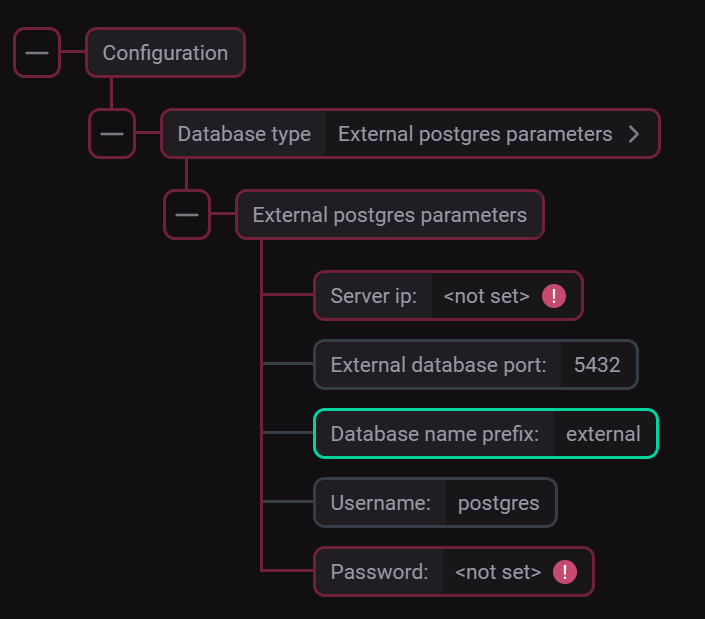 Parameters for connecting to the external PostgreSQL DB
 -
Click Save to save the Database configuration.
-
Install the Database service using the Install service action or apply the Reinstall action to the Database service if it is already installed.
ClickHouse
|
IMPORTANT
|
-
Run the following queries to create a user with appropriate permissions in ClickHouse:
CREATE USER <user_name> NOT IDENTIFIED; GRANT SELECT, INSERT, ALTER, CREATE, DROP, TRUNCATE ON *.* TO <user_name> -
On the Clickhouse service configuration page, select
External Clickhouse parametersin the Database type field and fill in all parameters in the list that opens. The assignment of parameters is described in the Configuration parameters → Clickhouse → External Clickhouse parameters section.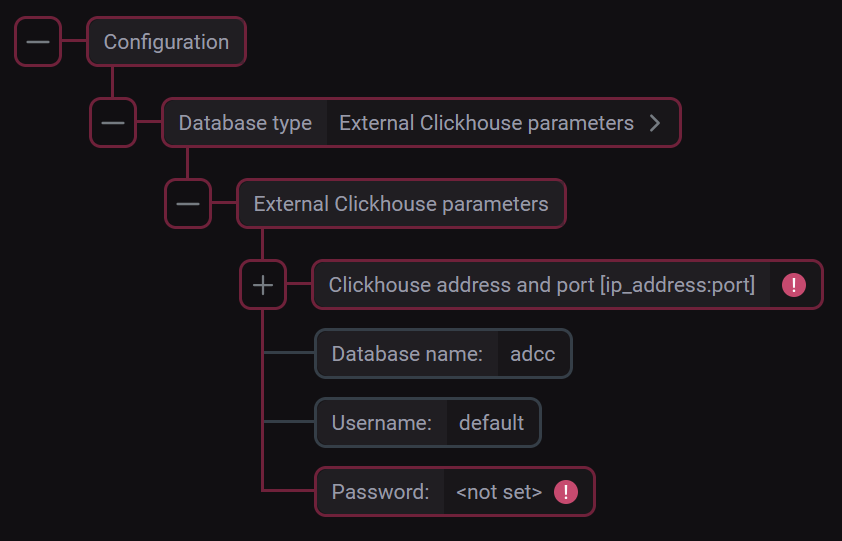 Parameters for connecting to the external ClickHouse DB
 -
Click Save to save the Clickhouse configuration.
-
Install the Clickhouse service using the Install service action or apply the Reinstall action to the Clickhouse service if it is already installed.