

Configure a cluster
|
IMPORTANT
There is usually no need to change cluster configuration parameters. You can leave all parameters at the default values.
|
After creation a new cluster, you can configure it by performing the following steps:
-
Select a cluster on the Clusters page. To do this, click a cluster name in the Name column.
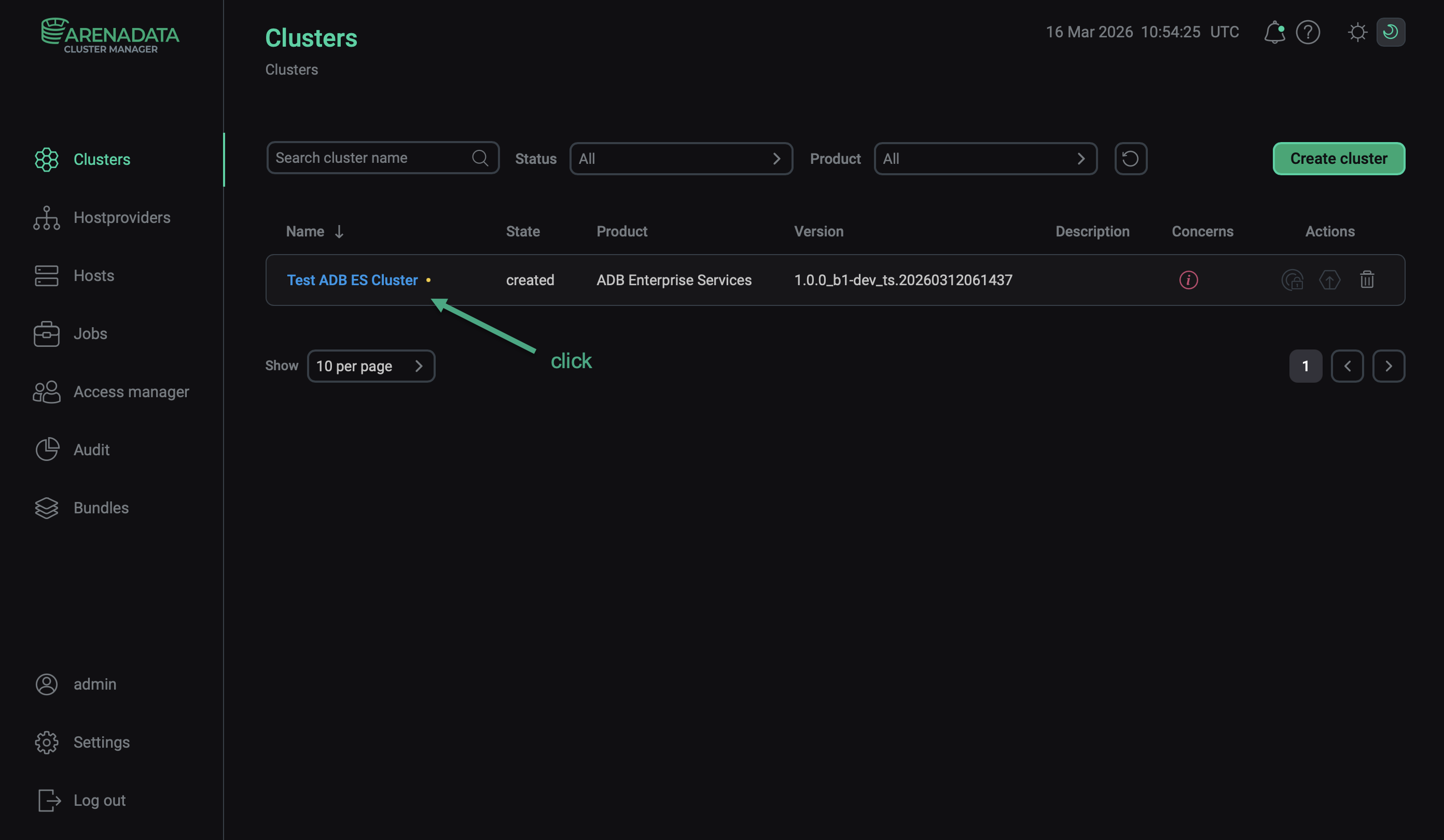 Select a cluster
 -
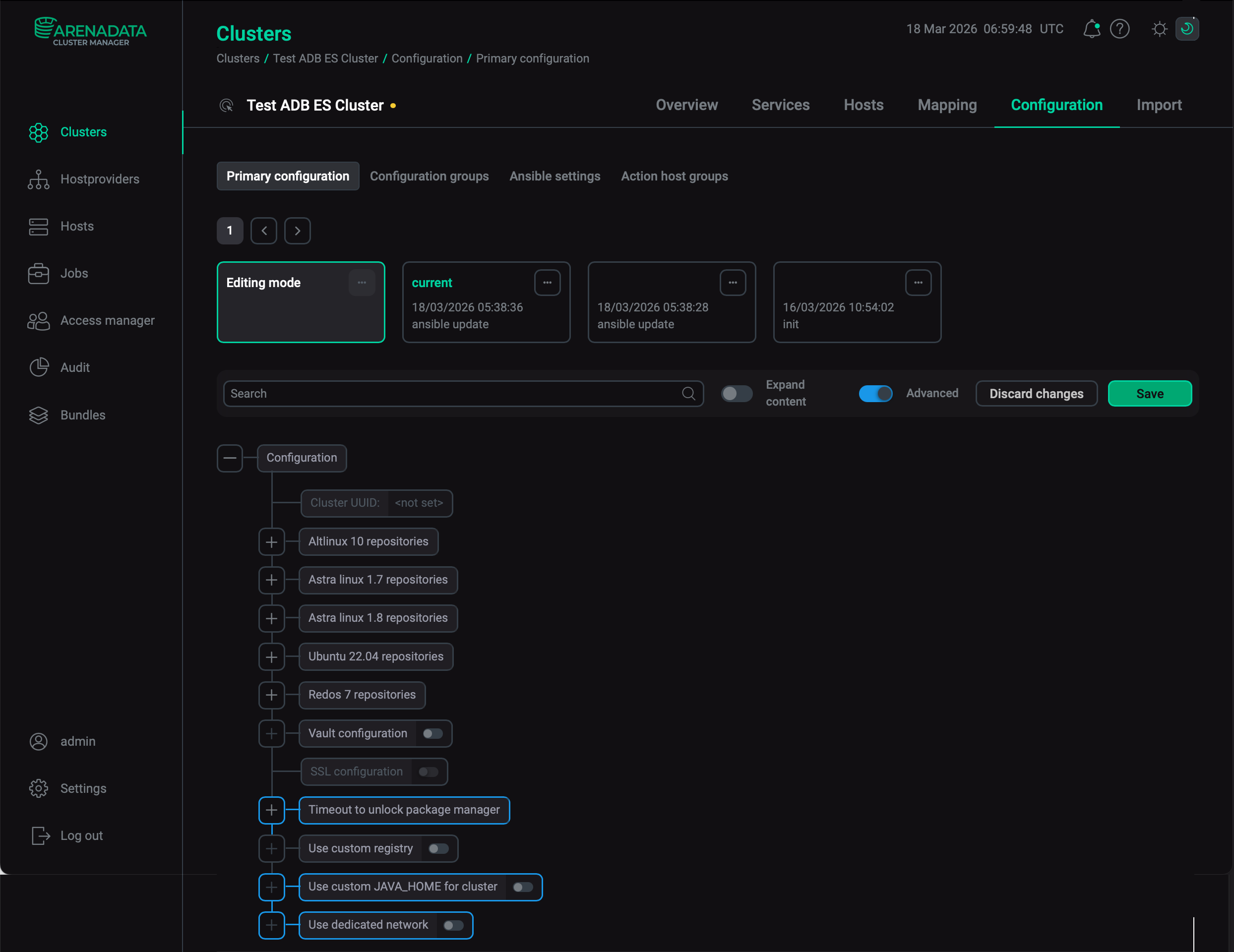
Open the Configuration tab on the cluster page. The Configuration tab includes the following sections: Primary configuration, Configuration groups, Ansible settings.
-
Fill in all necessary parameters on the selected tab and click Save.
Primary configuration
The Configuration → Primary configuration tab allows you to configure the general cluster settings.
|
CAUTION
Fill the Use custom JAVA_HOME for cluster field at your own risk. |
Available configuration parameters are listed below:
-
Paths to the repositories that are used during the installation process — depending on the cluster operating system (ALT Linux, Ubuntu, Astra Linux, RED OS, or RHEL):
-
Set up Monitoring repo — use the repository that is described in the Monitoring repo url field.
-
Monitoring repo url — the repository that is required to install monitoring.
-
-
Vault configuration — a switcher that determines whether to use HashiCorp Vault to store secrets of ADB ES services. When the switcher is activated, the following parameters become available.
Name Description Default Address of the Vault server
The Vault server address (e.g.
192.168.1.120orvault.domain.com)—
Port of the Vault server
The Vault server port. Should be specified if the service is published on a port other than HTTPS (443)
443
CA certificate in PEM format
The internal CA certificate in PEM format that signed the Vault server’s certificate
—
Vault namespace (optional)
The Vault namespace
—
Writer authentication method for the Vault server
The authentication method that is used to connect to the Vault server with write access.
Possible values:
-
token -
approle
approle
Writer Vault token
The application token that is used to connect to the Vault server with write access. Required only if the Writer authentication method for the Vault server parameter is set to
token—
Writer Vault role ID
The role identifier provided for applications to connect to the Vault server with write access. Required only if the Writer authentication method for the Vault server parameter is set to
approle—
Writer Vault secret ID
The secret identifier associated with the Writer Vault role ID role that is used by applications to connect to the Vault server with write access. Required only if the Writer authentication method for the Vault server parameter is set to
approle—
Reader authentication method for the Vault server
The authentication method that is used to connect to the Vault server with read access.
Possible values:
-
token -
approle
approle
Reader Vault token
The application token that is used to connect to the Vault server with read access. Required only if the Reader authentication method for the Vault server parameter is set to
token—
Reader Vault role ID
The role identifier provided for applications to connect to the Vault server with read access. Required only if the Reader authentication method for the Vault server parameter is set to
approle—
Reader Vault secret ID
The secret identifier associated with the Reader Vault role ID role that is used by applications to connect to the Vault server with read access. Required only if the Reader authentication method for the Vault server parameter is set to
approle—
Mount point for ADB ES cluster secrets
A mount point that is accessible for read/write operations with the provided ADB ES cluster authentication parameters. Each service will store secrets on the Vault server at the following path: <Mount point for ADB ES cluster secrets>/adbes/<cluster_name>/service/<service_name>/<component>
—
Login mount point
A custom authentication mount point. If empty, equals to the authentication method selected in the Writer authentication method for the Vault server (write) or Reader authentication method for the Vault server (read) field
—
-
|
IMPORTANT
|
-
SSL configuration — this section is read-only: you can use it to check whether SSL is enabled and configured. To enable and configure SSL in the ADB ES cluster, use the Manage SSL cluster action, which is available after the cluster is installed.
-
Timeout to unlock package manager — parameters of this section are intended to set the timeout of the DNF software package manager unlocking wait. Displayed if the Advanced flag is enabled. In Ubuntu, after the host reboot, automatic update starts, which locks DNF.
Name Description Default retries
The maximum number of retries
3
delay
The time delay between retries (in seconds)
10
-
Use custom JAVA_HOME for cluster — a switcher that determines whether to use a custom Java path for ADB ES services that use Java (for example, AD Eureka, ADB Control, and ADBM). Displayed if the Advanced flag is enabled. When the switcher is activated, the JAVA_HOME field becomes available. Enter a valid Java path in that field. The selected location should contain a bin folder with a Java binary file, for example, /usr/lib/jvm/java-17-openjdk-amd64. Installation will fail if there is no Java at the specified path.
If the JAVA_HOME value is empty, one of the following default paths is used (depending on the operating system).
|
IMPORTANT
|
-
Use dedicated network — a switcher that determines whether to use a dedicated network for interconnection of ADB ES components. Displayed if the Advanced flag is enabled. When the switcher is activated, the Dedicated network field becomes available. The field requires the
<subnet>/<netmask>notation, for example192.168.1.0/24. If this parameter is not set, then ADCM uses addresses with the default route. A host must have exactly one address in the range. Run the Reconfigure & Restart ADB Control action to apply changes.If you use SSL certificates with an IP address in the
SANsection, the IP addresses of the ADB ES components can change in the dedicated network. In this case, you will need to issue a new certificate specifying the new IP address. -
ADB ES group GID — an identifier of the automatically created
adbesgroup. The Manage SSL cluster action checks that the files specified in Server truststore path and Server keystore path are owned by this group. The default value is3033.
Configuration groups
The Configuration → Configuration groups tab is designed to set cluster configuration groups.
Ansible settings
The Configuration → Ansible settings tab allows you to set Ansible configuration options at the cluster level. The tab is available starting with ADCM 2.2.0.
| Name | Description | Default |
|---|---|---|
forks |
The number of parallel processes to spawn when communicating with remote hosts |
5 |