

Resource Mapping Manager overview
It is common to have different workloads that use the same data — some require authorization at the table or DB level (Hive queries) and others — at the underlying files (Spark jobs). It means that a user can access the same data in completely different ways, and to secure that data, there would have to be a mechanism to create and maintain separate Ranger policies for all services that can manipulate it (e.g. Hive and HDFS).
As a result, whenever a change is made on a Hive table policy, the data admin should make a consistent change in the corresponding HDFS policy. Failure to do so could result in security and/or data exposure issues. The data admin would set a single table policy, and the corresponding file access policies would automatically be kept in sync along with access audits referring to the table policy that enforced it.
To handle these issues, the Ranger Resource Mapping mechanism was implemented in ADPS 2.0.0. Currently, it supports the Hive-HDFS and Hive-Ozone resource mappings.
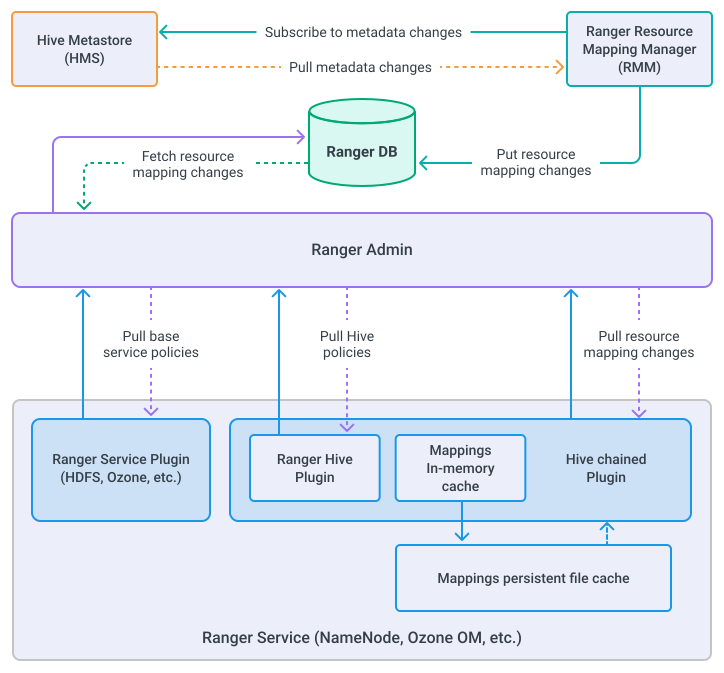

Ranger Resource Mapping Manager (RMM) is responsible for fetching resource mapping changes from external services (like Hive Metastore), filtering them, and saving appropriate events to the x_resource_mapping_diff table in the Ranger DB. In the current version of RMM, only Hive Metastore is supported as a source of mapping change events.
Hive chained plugin
Ranger allows basic plugins to optionally delegate authorization request to a list of so-called chained plugins. If the base plugin allows access and one of the chained plugins doesn’t, then the access will be denied.
As part of this feature, Hive chained plugin is implemented to add additional authorization layer to the HDFS and Ozone plugins:
-
When the base plugin is triggered and access is allowed, it calls one of the Hive chained plugin methods.
-
The Hive chained plugin specific implementation (HDFS or Ozone) extracts the requested path from a request and transforms the base service access type to the Hive access type.
-
The Hive chained plugin maps the path to a Hive entity (DB or table) and constructs a Hive access request from it.
-
The Hive chained plugin calls the corresponding Hive Ranger plugin method with the constructed access request.
Hive metadata fetcher
RMM Hive Metastore event fetcher uses a composite metadata extraction mechanism that consists of the optional snapshot and mandatory event listening phases.
Snapshot phase
If RMM is started for the first time for corresponding Metastore or restarted with the ranger.rmm.hms.sync.full option set to true, then RMM does the following:
-
Clears the
x_resource_mapping_difftable. -
Snapshots the current state of Metastore.
-
Saves existing databases and tables to the resource mappings table.
Event listening phase
The fetcher enters the event listening phase on one of the following conditions:
-
If there are existing diffs in the
x_resource_mapping_difftable andranger.rmm.hms.sync.fullis not set or set tofalse -
When the snapshot step described above is finished.
Hive provides an API for listening to various events that happened in Metastore. Notification events contain a unique monotonically increasing field eventId, that is used as a mapping diff external ID by RMM. Hive allows fetching either all events or only events that happened after the last consumed event by a client. Storing eventId of the last consumed event, effectively means subscription only on the new metastore events. Hive fetcher stores ID of the last consumed event in memory. Therefore, after restart, RMM fetches the greatest ID of Hive resource mapping from the x_resource_mapping_diff table and treats it as the ID of the last consumed Hive event.
Hive fetcher handles only the following event types for both databases and tables:
-
create entity;
-
drop entity;
-
rename entity;
-
change the location of entity.
Other events are ignored.