

DuckDB extension for HDFS/Ozone/Hive Metastore
ADO provides a DuckDB extension that enables access to distributed file systems and table catalogs. The extension supports reading and writing data in HDFS and Apache Ozone, querying tables registered in Hive Metastore, and working with supported Parquet, CSV, Apache Iceberg, and Apache Paimon tables.
The extension is distributed with the DuckDB service and managed through ADCM. You do not need to install it separately.
The extension provides the following capabilities:
-
Read and write files in HDFS using the
hdfs://scheme. -
Read and write files in Ozone using the
ofs://ando3fs://schemes. -
List files and directories, use glob patterns, inspect Parquet schemas, and perform file operations.
-
Access secured Hadoop clusters using Kerberos and Hadoop configuration files.
-
Attach Hive Metastore catalogs and query registered tables.
-
Read and write supported table formats through Hive Metastore.
-
Reuse filesystem and Metastore connections and recover from failures.
Enable or disable the extension
The extension is disabled by default. To enable or disable it through ADCM:
-
On the Clusters page, select the required cluster.
-
Open the Services tab and select DuckDB.
-
In the ADO extensions configuration section, enable or disable the HDFS/Ozone/Hive Metastore extension using the corresponding switch. Configure the parameters if necessary.
-
Click Save.
-
In the Actions drop-down menu, select Restart. Make sure that the Apply configs from ADCM option is set to
true, and click Run.
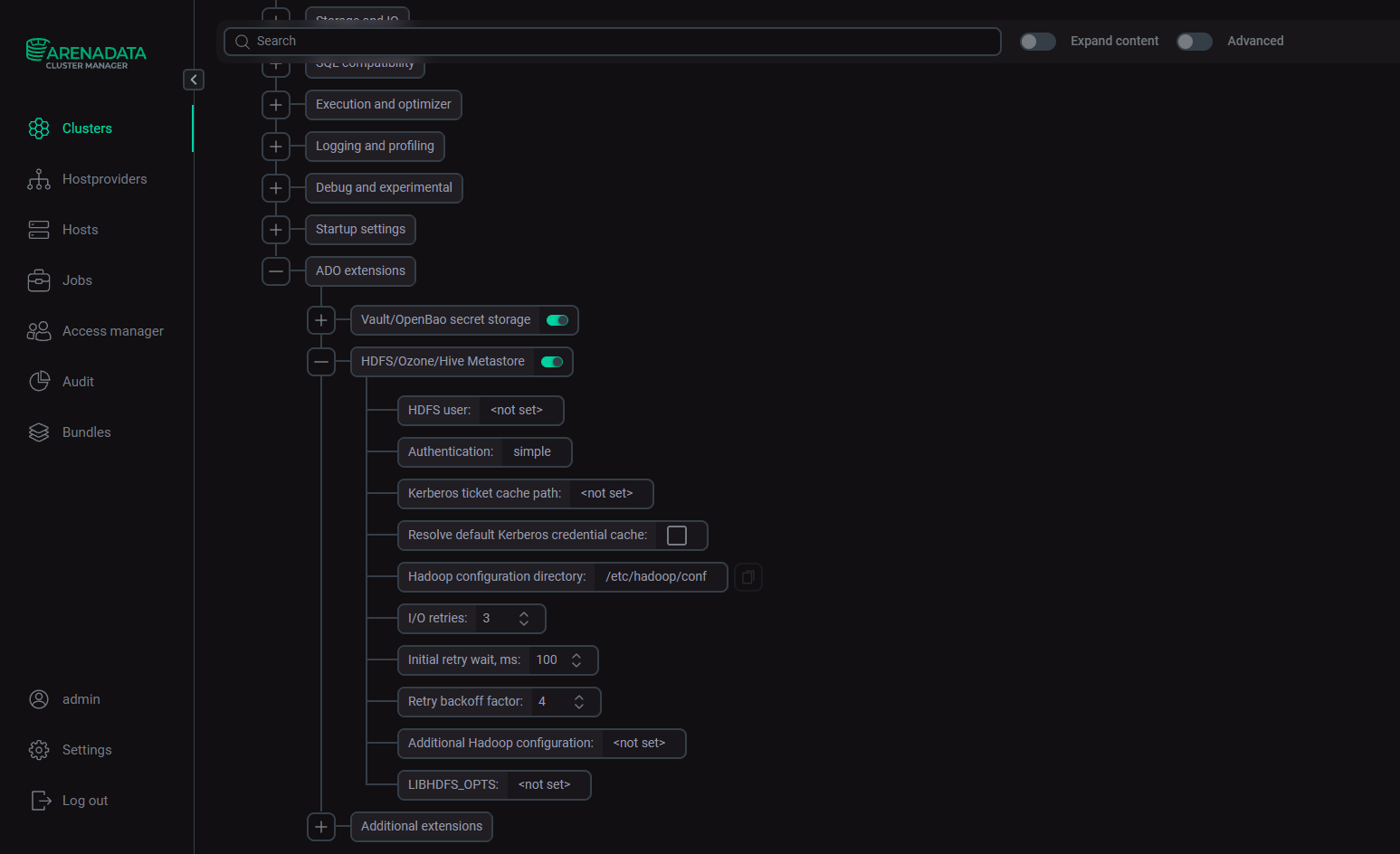
After the service restarts, DuckDB uses the updated configuration.
ADCM manages the extension at the service level. Filesystem connection settings, authentication parameters, and catalog options can also be specified through DuckDB SQL statements or DAG code, depending on the use case. These settings do not replace the service-level configuration.
Configuration
The extension can be configured at several levels:
-
ADCM enables or disables the extension and configures the shared runtime environment. See DuckDB configuration parameters for the available DuckDB configuration parameters.
-
DuckDB SQL settings configure filesystem access and runtime behavior for the current DuckDB process.
-
DuckDB secrets store connection parameters for a specific filesystem or cluster, including the username, authentication method, Kerberos ticket cache path, and Hadoop configuration.
-
Catalog attachment options configure access to a Hive Metastore catalog, including the Metastore endpoint, warehouse location, and Metastore-specific properties.
ADCM settings are applied when the service starts. SQL settings and secrets are supplied through SQL statements or DAG code. Catalog options are specified when attaching the catalog.
Minimal configuration
For an unsecured HDFS cluster, enable the extension and specify the HDFS endpoint in the file URL:
LOAD hdfs;

SELECT *
FROM read_parquet('hdfs://<namenode.example.com:8020>/warehouse/events/*.parquet')
LIMIT 10;
where namenode.example.com:8020 — the NameNode host and port. For an HA cluster, you can use the configured nameservice instead of an individual NameNode address.
For a secured cluster, configure the required authentication settings and provide the Hadoop configuration files.
Hadoop configuration
The extension uses the Hadoop configuration files core-site.xml and hdfs-site.xml. Ozone access may also require ozone-site.xml. Hive Metastore integration may require hive-site.xml and metastore-site.xml.
Specify the directory containing these files via ADCM, in the Hadoop configuration directory configuration option, or through hdfs_config_dir or the HADOOP_CONF_DIR environment variable:
SET hdfs_config_dir = '/etc/hadoop/conf';The directory must contain the configuration required to connect to the target cluster.
The extension bundles the Hadoop client libraries, the Java runtime, and the required filesystem libraries. The DuckDB service configures the runtime environment for these components. A separate Hadoop installation and a manually configured Java classpath are not normally required.
To pass additional Hadoop properties, use the Additional Hadoop configuration parameter in ADCM. Alternatively, you can pass hdfs_conf or the conf property of an HDFS secret. Specify the properties as semicolon-separated key=value pairs.
SET hdfs_conf = 'dfs.client.read.shortcircuit=true;dfs.domain.socket.path=/var/run/hdfs/dn._PORT';This example enables short-circuit reads on the client side. The DataNode must also have short-circuit reads enabled, and the DuckDB process must have operating-system access to the configured domain socket. The socket path must match the DataNode configuration.
The embedded JVM is initialized once per DuckDB process. Set the Hadoop configuration before the first query that uses the relevant filesystem. Changing configuration afterward does not reinitialize the JVM.
Kerberos authentication
The extension supports Hadoop authentication settings, including Kerberos. Authentication information can be provided through ADCM, SQL settings, or an HDFS secret.
For Kerberos authentication, the extension uses an existing Kerberos credential cache. It does not authenticate directly from a keytab.
Obtain a Kerberos ticket before querying the cluster:
$ kinitConfigure the authentication method and the path to the ticket cache:
SET hdfs_authentication = 'kerberos';
SET hdfs_kerberos_ticket_cache_path = '/tmp/krb5cc_1000';
SET hdfs_config_dir = '/etc/hadoop/conf';
To configure default values via ADCM:
-
On the Clusters page, select the required cluster.
-
Open the Services tab and select DuckDB.
-
In the ADO extensions configuration section, unfold the HDFS/Ozone/Hive Metastore extension section and fill in the following:
-
HDFS user
-
Authentication
-
Kerberos ticket cache path
-
-
Click Save.
-
In the Actions drop-down menu, select Restart. Make sure that the Apply configs from ADCM option is set to
true, and click Run.
The ticket cache must remain valid while queries are running. For long-running workflows, arrange for the credentials to be renewed externally, for example, by a scheduled process.
If a pooled connection fails because a Kerberos ticket is missing or expired, the extension can discard the connection and reconnect once, rereading the ticket cache. This recovery applies to ticket-cache authentication. It does not perform an in-process keytab login.
For multiple clusters, use a separate secret for each cluster when their connection settings differ. DuckDB resolves authentication information in the following order:
-
A matching HDFS secret scoped to the URL.
-
An explicitly configured SQL setting.
-
The default value.
The following SQL statement creates a named HDFS secret in DuckDB for Kerberos authentication:
CREATE SECRET prod_hdfs (
    TYPE hdfs,
    SCOPE 'hdfs://nameservice1',
    user 'analytics',
    authentication 'kerberos',
    kerberos_ticket_cache_path '/tmp/krb5cc_1000'
);
The secret applies to URLs matching its scope. Use the appropriate scope for each cluster.
Connection retries and recovery
The extension pools filesystem connections by authority, user, authentication method, ticket cache, and Hadoop configuration. Reusing connections reduces the overhead of repeated operations.
Selected read-side operations support recovery from transient failures. These include connecting, checking file metadata, listing directories, resolving glob patterns, opening files, and reading data.
Configure the retry behavior via ADCM or using SQL settings:
SET hdfs_retries = 3;
SET hdfs_retry_wait_ms = 100;
SET hdfs_retry_backoff = 4.0;
The hdfs_retries option specifies the number of retries after transient I/O failures. Set it to 0 to disable retries. hdfs_retry_wait_ms specifies the initial wait between retries in milliseconds, and hdfs_retry_backoff specifies the multiplier applied after each retry.
The extension retries selected transient errors, such as temporary connection refusals, socket timeouts, and NameNode failover interruptions. Mutating operations, including file creation, deletion, renaming, and writing, are not retried automatically.
To clear the filesystem connection pool after an external Kerberos ticket renewal, a configuration change, or a connection problem, execute:
SELECT success
FROM clear_hdfs_connection_cache();
This function clears cached connections without restarting DuckDB or the JVM. It does not reinitialize the JVM or reload its startup configuration.
Environment variables and memory
The embedded JVM runs inside the DuckDB process. Its memory consumption is separate from the memory used by DuckDB’s query execution and external file cache.
Embedded JVM memory
The JVM heap can be limited through the LIBHDFS_OPTS environment variable. Set this variable before the first HDFS or Ozone query because the JVM is initialized once per process.
$ export LIBHDFS_OPTS="-Xmx1g"This example limits the JVM heap to 1 GB. Choose a suitable value for the workload and available host memory.
DuckDB memory and external file cache
DuckDB’s memory limit can be configured separately from the JVM heap:
SET memory_limit = '8GB';
SET enable_external_file_cache = false;
The memory_limit option limits memory available to DuckDB, including query operators and relevant buffers. DuckDB also uses an external file cache to cache remote file ranges in memory.
Setting enable_external_file_cache to false disables this cache. This can reduce memory consumption during repeated scans but may increase I/O because data must be read from the source again.
These DuckDB memory settings are not specific to HDFS, they also affect other supported file systems.
Ozone access
The extension supports Apache Ozone through the ofs:// and o3fs:// filesystem schemes. The bundled Ozone filesystem client allows the embedded JVM to resolve these schemes without a separate Ozone client installation.
The recommended scheme is ofs://. The URL authority identifies the Ozone Manager host and port or a configured HA service ID. The path contains the volume, bucket, and object key.
For example:
SELECT count(*)
FROM 'ofs://om.example.com:9862/vol1/warehouse/events/*.parquet';
Ozone uses the same authentication settings and connection configuration as HDFS. Set hdfs_config_dir or HADOOP_CONF_DIR to the directory containing the required Hadoop and Ozone configuration files, including ozone-site.xml.
Set the configuration before the first Ozone query because the JVM is initialized once per process.
When writing to Ozone, the target volume and bucket must already exist. DuckDB writes object keys but does not create volumes or buckets. The configured identity must have the required permissions.
Note that hdfs_read_stats() reports HDFS-specific stream statistics and remains zero for Ozone. To inspect extension-level byte and operation counts for Ozone queries, use the HDFS Stats information displayed by EXPLAIN ANALYZE.
Hive Metastore integration
The extension can attach a Hive Metastore catalog to DuckDB. The catalog resolves table names, schemas, storage formats, and data locations through the Metastore. DuckDB then reads or writes the underlying data using the configured filesystem.
The Metastore endpoint can be a single Thrift URL, a comma-separated list of endpoints for HA, or a ZooKeeper discovery quorum, depending on the cluster configuration.
ATTACH 'thrift://hms.example.com:9083' AS hms (
    TYPE hive_metastore,
    WAREHOUSE_LOCATION 'hdfs://nameservice1/warehouse'
);
The WAREHOUSE_LOCATION parameter is optional. It specifies the default location for tables created without an explicit location.
When a table is created without a location option and the WAREHOUSE_LOCATION option was specified when attaching the catalog, the default location is <WAREHOUSE_LOCATION>/<database>/<table>. Otherwise, the location is derived from the database’s default location in Hive Metastore.
The Metastore client uses the same embedded JVM as the filesystem extension. In Kerberos-secured environments, the existing ticket cache can be reused for both Metastore and data access.
Additional Hadoop and Metastore properties can be passed through the conf attachment option. Specify the properties as semicolon-separated key=value pairs.
ATTACH 'thrift://hms.example.com:9083' AS hms (
    TYPE hive_metastore,
    WAREHOUSE_LOCATION 'hdfs://nameservice1/warehouse',
    conf 'metastore.client.socket.timeout=120s;metastore.failure.retries=5;metastore.client.connect.retry.delay=5s'
);
These properties are applied to the Metastore client’s configuration before it connects. They can be used to adjust socket timeouts, connection retries, and other supported Hadoop or Hive settings.
For Kerberos-secured Metastore access, the relevant SASL and Kerberos settings must be present in the Hadoop configuration or supplied through conf. The Metastore and filesystem access reuse the existing Kerberos credential cache.
Each catalog attachment retains a Metastore client for reuse. The client supports recovery from selected connection and authentication failures. To clear the cached Metastore client and catalog entries, execute:
SELECT success
FROM hms_clear_cache();
The next operation can then establish a fresh connection without detaching and attaching the catalog again.
Supported table formats and limitations
The extension supports the following table formats through Hive Metastore.
| Format | Read | Write | Limitations |
|---|---|---|---|
Parquet |
Supported |
Supported |
Partitioned tables are supported. When creating a partitioned table, partition columns must be the trailing columns in the table definition |
CSV |
Supported |
Supported |
Requires specifying the format when creating a table |
Apache Paimon |
Supported |
Supported |
Writes are append-only. Inserts into primary-key tables are not supported. Table locations must follow the Paimon warehouse layout. Each insert commits a new snapshot |
Apache Iceberg |
Supported |
Supported |
Writes are append-only. Format versions 1 and 2 are supported; version 3 row-lineage tables are rejected. Sorted tables are rejected unless |
Avro |
Supported |
Not supported |
Read-only |
There are several limitations when working with Hive:
-
Iceberg and Avro support is compiled into the ADO extension. No separate installation or loading of these extensions is required. Do not load the stock DuckDB Iceberg extension in the same process because its registrations conflict with the bundled implementation.
-
The extension does not support reading transactional (ACID) Hive tables. It rejects these tables rather than interpreting their base and delta files as a complete dataset.
-
All tables created through the Hive Metastore catalog are external tables. The extension does not write Hive ACID managed tables.
-
When dropping a table, DuckDB always removes the Metastore entry. Storage files are deleted only if the table has
external.table.purge=true. -
By default,
external.table.purgeis enabled for a location selected by the catalog and disabled for an explicitly specifiedlocation. Consequently, dropping a table with an explicit location normally leaves the data files intact. Setexternal.table.purgeexplicitly when creating a table if different behavior is required.
Apache Paimon
Paimon tables registered in Hive Metastore can be queried and appended to through the catalog. The extension detects Paimon tables using the storage handler registered in the Metastore.
The writer is append-only. Inserts into primary-key tables are not supported, although those tables can be read. Table locations must follow the Paimon warehouse layout: <warehouse>/<database>.db/<table>.
For example:
SELECT count(*)
FROM hms.default.orders;

CREATE TABLE hms.default.events (
    id INTEGER,
    dt VARCHAR,
    v BIGINT
)
PARTITIONED BY (dt)
WITH (
    format = 'paimon',
    location = 'hdfs://nameservice1/warehouse/default.db/events'
);

INSERT INTO hms.default.events
SELECT range, '2026-07-15', range * 2
FROM range(1000);
Each insert commits a new snapshot.
Apache Iceberg
Iceberg tables registered in Hive Metastore can be queried and appended to through the catalog. Writes are append-only. DELETE, UPDATE, and MERGE are not supported.
The extension supports Iceberg format versions 1 and 2. Version 3 row-lineage tables are rejected. Sorted tables are rejected unless unsafe_iceberg_ignore_sort_order is enabled.
The extension uses the Metastore’s current metadata_location to resolve Iceberg metadata. It updates this pointer during commits using an optimistic check under the Hive Metastore exclusive table lock. If another writer changes the metadata pointer concurrently, the commit can fail rather than overwrite the other writer’s changes.
Partitioned Iceberg tables support identity partitions and transforms, including bucket(N, col), truncate(W, col), year(col), month(col), day(col), and hour(col).
For example:
SELECT count(*)
FROM hms.default.orders;

CREATE TABLE hms.default.events (
    id INTEGER,
    dt VARCHAR,
    v BIGINT
)
PARTITIONED BY (dt)
WITH (
    format = 'iceberg',
    location = 'hdfs://nameservice1/warehouse/events'
);

INSERT INTO hms.default.events
SELECT range, '2026-07-16', range * 2
FROM range(1000);
Usage examples
Read and write data in HDFS
The following example reads a Parquet file from HDFS, performs an aggregation, and writes the result back to HDFS:
SELECT cat,
       count(*) AS n,
       round(avg(r), 3) AS avg_r,
       max(id) AS max_id
FROM 'hdfs://nameservice1/user/analytics/events.parquet'
GROUP BY cat
ORDER BY cat;
DuckDB reads the columns required by the aggregation. It can also push projections and filters down to the file scan where supported.
To inspect a Parquet schema without scanning the full dataset, execute:
SELECT name, type
FROM parquet_schema(
    'hdfs://nameservice1/user/analytics/events.parquet'
);
To read multiple files, use a glob pattern:
SELECT count(*)
FROM 'hdfs://nameservice1/data/year=2026/*.parquet';
Recursive glob patterns are also supported:
SELECT count(*)
FROM 'hdfs://nameservice1/data/year=2026/**/*.parquet';
To write an aggregation result back to HDFS, execute:
COPY (
    SELECT cat,
           count(*) AS n,
           round(avg(r), 3) AS avg_r
    FROM 'hdfs://nameservice1/user/analytics/events.parquet'
    GROUP BY cat
)
TO 'hdfs://nameservice1/user/analytics/summary.parquet'
(FORMAT parquet);
The configured Hadoop identity must have permission to write to the target location. The same SQL patterns can be used with CSV files and other supported DuckDB file readers.
Read and write data in Ozone
The following example queries Parquet files stored in an Ozone bucket:
SELECT cat, count(*) AS n
FROM 'ofs://om.example.com:9862/vol1/warehouse/**/*.parquet'
GROUP BY cat;
To write a query result to Ozone:
COPY (
    SELECT 42 AS x
)
TO 'ofs://om.example.com:9862/vol1/warehouse/result.parquet'
(FORMAT parquet);
The Ozone volume and bucket must already exist, and the configured identity must have the required permissions.
If DuckDB cannot resolve the ofs:// scheme or connect to the Ozone Manager, check the Ozone configuration files and make sure the Hadoop configuration was set before the first filesystem query.
Attach and query a Hive Metastore catalog
Attach the Metastore catalog and query a registered table:
ATTACH 'thrift://hms.example.com:9083' AS hms (
    TYPE hive_metastore,
    WAREHOUSE_LOCATION 'hdfs://nameservice1/warehouse'
);

SELECT *
FROM hms.default.events
LIMIT 10;
The catalog resolves the table metadata through Hive Metastore and reads the underlying files using the configured filesystem.
To create a table, insert data, and query the result, execute:
CREATE TABLE hms.default.trips (
    id INTEGER,
    fare BIGINT
)
WITH (
    format = 'parquet',
    location = 'hdfs://nameservice1/warehouse/trips'
);

INSERT INTO hms.default.trips
SELECT range, range * 2
FROM range(1000);

SELECT count(*), sum(fare)
FROM hms.default.trips;
The table is registered in Hive Metastore, and its data is written to the specified location. Other engines that support the corresponding table format and location can access the data through the catalog.
To create a partitioned Parquet table, use PARTITIONED BY. Partition columns must appear at the end of the table definition:
CREATE TABLE hms.default.events (
    id INTEGER,
    payload VARCHAR,
    day INTEGER
)
PARTITIONED BY (day)
WITH (
    format = 'parquet',
    location = 'hdfs://nameservice1/warehouse/events'
);

INSERT INTO hms.default.events
SELECT range, 'event_' || range, range % 7
FROM range(1000);
The extension writes the partitioned directory structure and registers the written partitions in the Metastore. Other engines, including Spark and Hive, can access the data through the catalog.
When inserting into an existing partitioned Parquet table, the extension appends data to the corresponding partitions. Partition values are stored in directory names rather than in the Parquet files themselves.