

Integration with HashiCorp Vault to store secrets
Overview
In Airflow, secret backend is a mechanism of securely storing and retrieving sensitive information such as passwords, API keys, etc. Airflow can be configured to use various types of secret backends (environment variables, metastore database, local filesystem, etc.), but it’s strongly recommended to use HashiCorp Vault due to enhanced security.
Prerequisites
Before configuring the secret backend in ADCM, have a Vault instance configured, running, and available (see Vault installation).
Follow these steps to prepare for the ADO integration:
-
Create a mount point for Airflow:
$ vault secret enable -path=airflow -version=2 kv -
Generate credentials for authentication (here, an authentication token is used):
$ vault token create -period=30m
Save the generated token or copy it as you will need it later on.
Configuration in ADCM
To configure ADO integration with HashiCorp Vault, follow the steps below:
-
In ADCM, select your ADO cluster and click Services → Airflow.
-
Activate the Show advanced switch.
-
Activate the Use secret backend with Vault switch and fill the parameters inside (see Airflow configuration parameters):
 Vault settings in ADCMNOTEWhen the Manage sensitive configuration data parameter is enabled, the product takes over the creation of secrets (transferring them from configurations to Vault) as well as updating them. As a limitation, this requires the appropriate rights to create secrets in Vault.
 -
Save the configuration and restart Airflow.
To manually generate the airflow.cfg[secrets] block, you have to add the necessary data in the Custom airflow.cfg parameter.
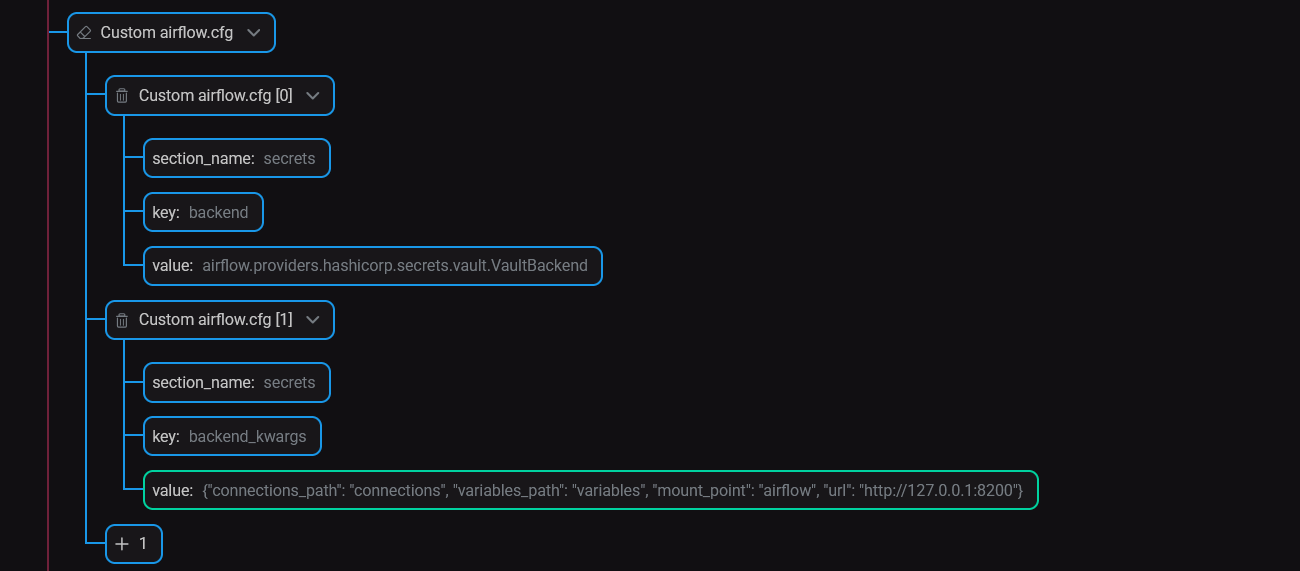
Custom parameter values overwrite the values specified in the Use secret backend with Vault section.
Fernet key rotation
With the HashiCorp Vault integration enabled, the behavior of the Rotate fernet key action differs.
| Autogenerate new fernet key enabled | Autogenerate new fernet key disabled | |
|---|---|---|
Manage sensitive configuration data enabled |
The fernet key will get changed in Vault and no value will be kept on a host |
With an empty value provided as a custom fernet key, the action succeeds, but no changes are made to Vault and no value is kept on a host |
Manage sensitive configuration data disabled |
The fernet key will get changed a host and no updates will happen in Vault |
With an empty value provided as a custom fernet key, the action fails as it cannot rotate a key with an empty value |
In all the other cases (e.g. with a non-empty valid/invalid custom fernet key), the action behaves the same way regardless of the parameters mentioned above.