

Synchronize DBT projects on ADO hosts using GitSync
In ADO, GitSync’s main purpose is to deliver Airflow DAGs, but it can also be used to synchronize DBT projects as well. Although, this is not a primary or fully validated use case, it can be possible with a specific configuration.
To make this possible, some configuration options must be used in a non-standard way. The synchronization behavior may vary depending on DBT execution specifics.
Step 1. Configure DBT
Before configuring DBT, ensure that the service is installed and operational.
During execution, DBT creates additional directories inside the project directory, for example: target/ or logs/. These directories contain runtime-generated artifacts and are not part of the Git repository. Consider storing them outside the synchronized project directory, if possible.
ADCM provides the following options for DBT files:
-
DBT_PROFILES_DIR— path to the profiles.yml configuration file. -
DBT_LOG_PATH— directory for logs. -
DBT_TARGET— specifies the default--target-pathparameter. Defines the directory where DBT stores compiled SQL files, logs, manifests, and execution artifacts (by default, the target/ directory in the project root).
To configure these settings via ADCM:
-
On the Clusters page, select the desired cluster.
-
Go to the Services tab and click on DBT.
-
Unfold the dbt-env.sh parameter section, select the required parameter, and make the necessary changes.
-
Confirm changes by clicking Save.
-
In the Actions drop-down menu, select Restart, make sure the Apply configs from ADCM option is set to
true, and click Run.
DBT projects should be synchronized as complete directory structures rather than as collections of selected files.
Recommended configuration:
{
  "directory": "./"
}
If the repository contains multiple components, specify the path to the DBT project directory instead.
Consider the following recommendations when deploying DBT projects with GitSync:
-
Use a dedicated
target_folderfor each DBT project. -
Do not store Airflow DAGs and DBT projects in the same target directory.
-
Ensure that synchronized files are accessible by the DBT service.
Step 2. Configure GitSync
Before configuring GitSync, ensure that the service is installed and that the key to the repository with DBT projects is added via the Upload private key action.
File preservation
GitSync removes files from the target directory when delete_old_files is enabled. For DBT projects, this behavior may lead to the deletion of runtime-generated artifacts, including the target/ and logs/ directories.
To preserve these directories, add the following option to the GitSync configuration:
{
  "delete_old_files": false
}|
NOTE
delete_old_files is intended to remove files that no longer exist in the source repository. In this scenario, the option is used to preserve runtime-generated artifacts and therefore does not match its original semantic purpose.
|
File filtering
GitSync commonly synchronizes DAGs using file filters such as *.py.
This approach is not suitable for DBT projects because it requires multiple file types, including:
-
*.sql -
*.yml -
*.yaml -
*.json
To synchronize the complete project, use the following mask:
{
  "files": "*"
}
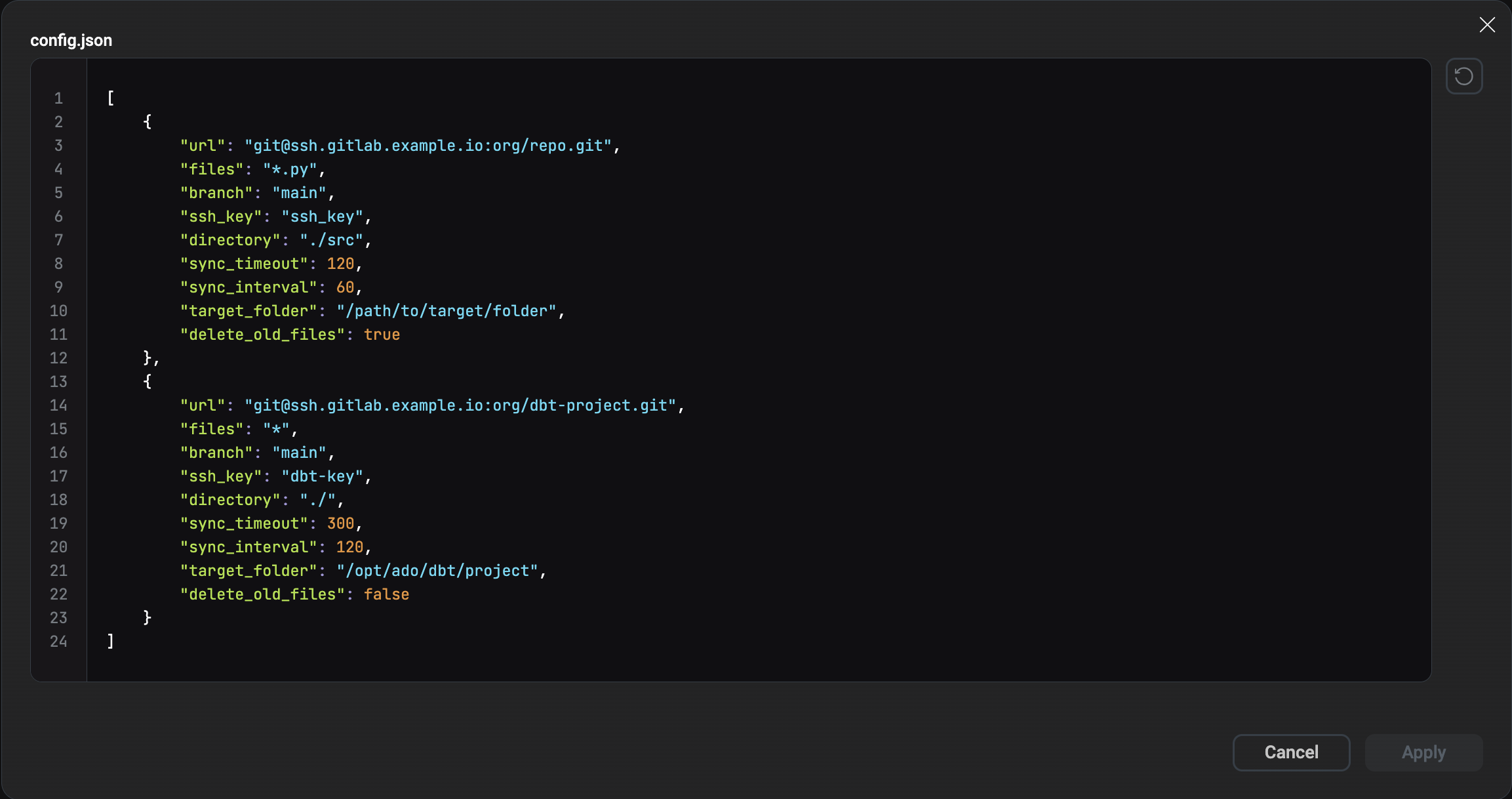
Example GitSync configuration for a DBT project:
{
        "url": "git@ssh.gitlab.example.io:org/dbt-project.git",
        "files": "*",
        "branch": "main",
        "ssh_key": "dbt-key",
        "directory": "./",
        "sync_timeout": 300,
        "sync_interval": 120,
        "target_folder": "/opt/ado/dbt/project",
        "delete_old_files": false
}
To configure these settings via ADCM:
-
On the Clusters page, select the desired cluster.
-
Go to the Services tab and click on GitSync.
-
Open the config.json parameter window and make the necessary changes.
-
Confirm changes by clicking Save.
-
In the Actions drop-down menu, select Restart, make sure the Apply configs from ADCM option is set to
true, and click Run.
Step 3. Verify DBT execution
After GitSync synchronization is configured, verify that DBT can successfully use the synchronized project and that runtime-generated artifacts are preserved between synchronization cycles.
To validate the correct execution of a DBT project:
-
Wait for the first synchronization cycle to complete. The synchronization interval is defined by the sync_interval parameter. For example, if sync_interval is set to
120, GitSync checks the repository and updates files every 120 seconds. -
Confirm that the project files are available in the configured
target_folder. Connect to the host where GitSync is running and inspect the synchronized project directory:$ ls -la /opt/ado/dbt/projectExample output:
drwxr-xr-x  models/
drwxr-xr-x  macros/
drwxr-xr-x  seeds/
-rw-r--r--  dbt_project.yml
-rw-r--r--  packages.yml
-rw-r--r--  profiles.yml
Verify that the project structure matches the contents of the source Git repository.
-
Execute a test DBT command. The command can be executed manually on the host, via an ADCM action, or from an Airflow DAG. For example, to validate project parsing, run:
$ cd /opt/ado/dbt/project
$ dbt run
Example output:
12:35:10  Running with dbt=1.9.0
12:35:11  Found 8 models, 3 tests, 1 source
12:35:20  1 of 8 OK created model analytics.orders
12:35:21  2 of 8 OK created model analytics.customers
...
12:35:35  Finished running 8 models in 25 seconds
Alternatively, DBT commands can be executed from an Airflow DAG using
BashOperator. For example:from airflow.operators.bash import BashOperator run_dbt = BashOperator( task_id="run_dbt", bash_command=""" cd /opt/ado/dbt/project && dbt run """ ) -
Verify that DBT created runtime-generated artifacts. After execution, the project directory should contain the target/ and logs/ directories.
Example
lsoutput:drwxr-xr-x logs/ drwxr-xr-x target/ drwxr-xr-x models/ -rw-r--r-- dbt_project.yml
The target/ directory contains compiled SQL files, manifests, and execution metadata. The logs/ directory stores DBT execution logs.
-
After the next synchronization cycle, ensure that the target/ and logs/ directories and other files still exist:
$ ls -la /opt/ado/dbt/projectIf
delete_old_filesis set tofalse, GitSync should preserve these directories and their contents. If the directories are removed after synchronization, verify that:-
delete_old_filesis set tofalse; -
the DBT project uses a dedicated
target_folder; -
external cleanup mechanisms are not removing runtime-generated artifacts.
-