SMT for Iceberg Sink Connector
Overview of SMT
Single Message Transform (SMT) — a ready-made component with simple logic for a single message transformation.
SMT transformations are part of the Kafka Connect architecture, used to modify data before writing it to Kafka and to modify data read from Kafka, simplifying event processing and routing.
SMT transformations are not mandatory.
The configuration of transformations is performed as part of the instance configuration of the connector via the following parameters:
{
"transforms": "<alias>",
"transforms.<alias>.type": "<alias.type>",
"transforms.<alias>.<transformConfig>": "<valueTransformConfig>"
}
where:
-
<alias>— the name of the transformation; names can be listed separated by commas in the order the transformations are applied. -
<alias.type>— the full class name for the transformation. -
<transformConfig>— the configuration parameter for a specific transformation. Some transformations may not have parameters. -
<valueTransformConfig>— the value of the transformation’s configuration parameter.
Starting with ADS 3.9.1.1.b1, in ADS Control, several types (classes) of SMT are available for configuration by default for the Iceberg Sink Connector:
CopyValue
CopyValue copies a value from one field to a new field.
The configuration parameters for the CopyValue transformation are described below.
| Parameter | Description |
|---|---|
source.field |
Name of the field from which the value is copied |
target.field |
Name of the field into which the value is copied |
DmsTransform
DmsTransform converts a message into the format used in AWS Database Migration Service (AWS DMS) for migrating data to a target store using the CDC feature. Applying the transformation promotes the data fields to the top level and adds metadata fields: _cdc.op, _cdc.ts, and _cdc.source.
There are no configuration parameters for the DmsTransform transformation.
DebeziumTransform
DebeziumTransform converts a message into the format used in the Debezium platform for migrating data to the target storage using the CDC function.
The application of the transformation performs:
-
moving
beforeorafterfields associated with data collections to the top level (if they were previously added using the partition.payload.field parameter); -
adding metadata fields:
_cdc.op,_cdc.ts,_cdc.offset,_cdc.source,_cdc.target, and_cdc.key.
The configuration parameters for `DebeziumTransform `are described below.
| Parameter | Description | Default value |
|---|---|---|
cdc.target.pattern |
Template used to set the value of the CDC target field |
<db>.<table> |
JsonToMapTransform
JsonToMapTransform converts data of type String into JSON objects for schema creation.
Iceberg Sink Connector can be used to transform data with a Map structure without a schema into Iceberg structures.
For poorly structured JSON objects with dynamically changing keys, using the Iceberg Sink Connector can lead to an unlimited increase in the number of columns in an Iceberg table due to schema evolution. In such a situation, JsonToMapTransform can be used so that data can be loaded into Iceberg and then processed with queries.
Using the JsonToMapTransform transformation provides:
-
Conversion of nested objects into a Map and inclusion in a Map-type schema.
-
Creation of Iceberg tables with Iceberg Map (String) columns for JSON objects according to the schema.
|
NOTE
|
The configuration parameters for JsonToMapTransform are described below.
| Parameter | Description | Default value |
|---|---|---|
json.root |
Specifies the type of structure being created:
|
false |
KafkaMetadataTransform
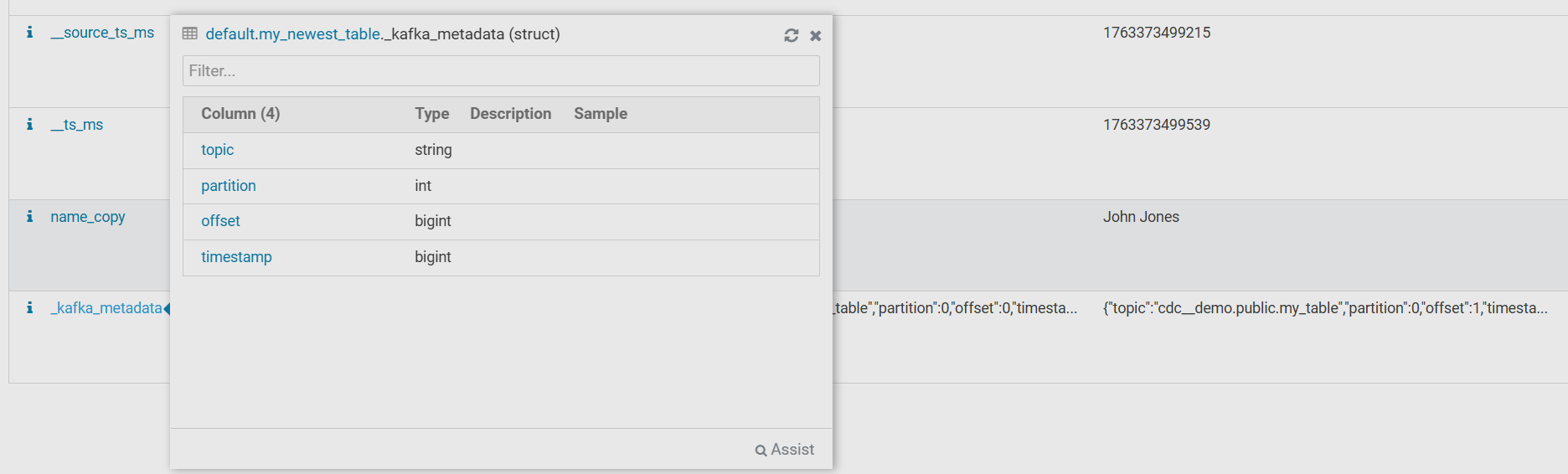
KafkaMetadataTransform adds Kafka message metadata fields: topic, partition, offset, timestamp.
The configuration parameters for the KafkaMetadataTransform transformation are described below.
| Parameter | Description | Default value |
|---|---|---|
field_name |
Prefix for fields |
_kafka_metadata |
nested |
Determines the level for adding metadata:
|
false |
external_field |
Adds a permanent key/value pair to the metadata (for example, the cluster name) |
— |
MongoDebeziumTransform
MongoDebeziumTransform transforms a message received via the connector Mongo Debezium from the format used in the MongoDB database (with BSON strings and before or after fields) into typed before or after structures, which can then be modified using the DebeziumTransform transformation.
The configuration parameters for MongoDebeziumTransform are described below.
| Parameter | Description |
|---|---|
array_handling_mode |
An array or a BSON document for setting the array processing mode |
Example of SMT
|
NOTE
The example provided in the article is based on the pipeline described in the Iceberg connector article. |
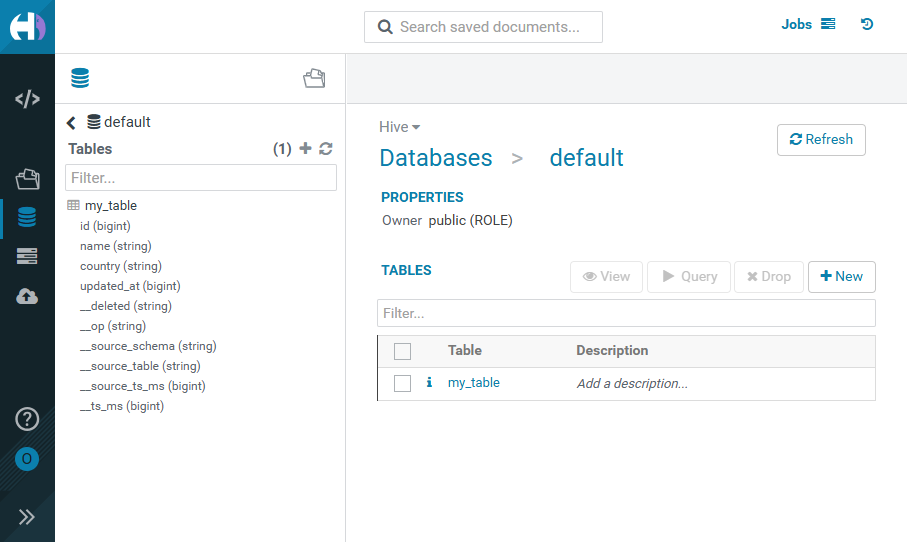
Below is the my_table Iceberg table, displayed in the HUE interface as a result of running the Iceberg Sink Connector without using SMT transformations. The table shows only the fields contained in the cdc__demo.public.my_table topic .

To implement SMT transformations, create the my_newest_table Iceberg table for the cdc__demo.public.my_table topic .
When creating a new table in the connector configuration, add parameters for implementing the CopyValue and KafkaMetadataTransform transformations.
The new parameters are shown below.
{
"transforms": [
    "copyName",
    "kafkaMetadata"
  ],
"transforms.copyName.type": "io.tabular.iceberg.connect.transforms.CopyValue",
"transforms.copyName.source.field": "name",
"transforms.copyName.target.field": "name_copy",
"transforms.kafkaMetadata.type": "io.tabular.iceberg.connect.transforms.KafkaMetadataTransform",
"transforms.kafkaMetadata.nested": "true"
}
where:
-
the
copyNametransformation creates aname_copyfield, which fully copies thenamefield; -
the
kafkaMetadatatransformation creates a_kafka_metadatametadata group.
Below is an example of a connector configuration JSON file using the new parameters.
{
  "connector.class": "org.apache.iceberg.connect.IcebergSinkConnector",
  "iceberg.tables.cdc-field": "__op",
  "tasks.max": 1,
  "transforms": [
    "copyName",
    "kafkaMetadata"
  ],
  "iceberg.tables.upsert-mode-enabled": true,
  "iceberg.tables.auto-create-enabled": true,
  "transforms.copyName.type": "io.tabular.iceberg.connect.transforms.CopyValue",
  "iceberg.tables": [
    "default.my_newest_table"
  ],
  "transforms.kafkaMetadata.type": "io.tabular.iceberg.connect.transforms.KafkaMetadataTransform",
  "value.converter": "io.confluent.connect.avro.AvroConverter",
  "key.converter": "io.confluent.connect.avro.AvroConverter",
  "transforms.copyName.target.field": "name_copy",
  "topics": [
    "cdc__demo.public.my_table"
  ],
  "iceberg.control.commit.interval-ms": 30000,
  "iceberg.catalog.uri": "thrift://10.92.40.102:9083",
  "value.converter.schema.registry.url": "http://10.92.42.153:8081",
  "transforms.kafkaMetadata.nested": "true",
  "transforms.copyName.source.field": "name",
  "name": "iceberg-sink-cdc-newestconnector",
  "iceberg.tables.schema-case-insensitive": true,
  "iceberg.catalog.warehouse": "hdfs://adh/apps/hive/warehouse",
  "iceberg.tables.default-id-columns": "id",
  "iceberg.catalog.type": "hive",
  "key.converter.schema.registry.url": "http://10.92.42.153:8081",
  "iceberg.write.format.default": "parquet",
  "iceberg.hadoop-conf-dir": "/usr/lib/kafka/config/"
}
As a result of running iceberg-sink-cdc-newestconnector, the created my_newest_table table displays the name_copy and _kafka_metadata fields in the HUE interface.
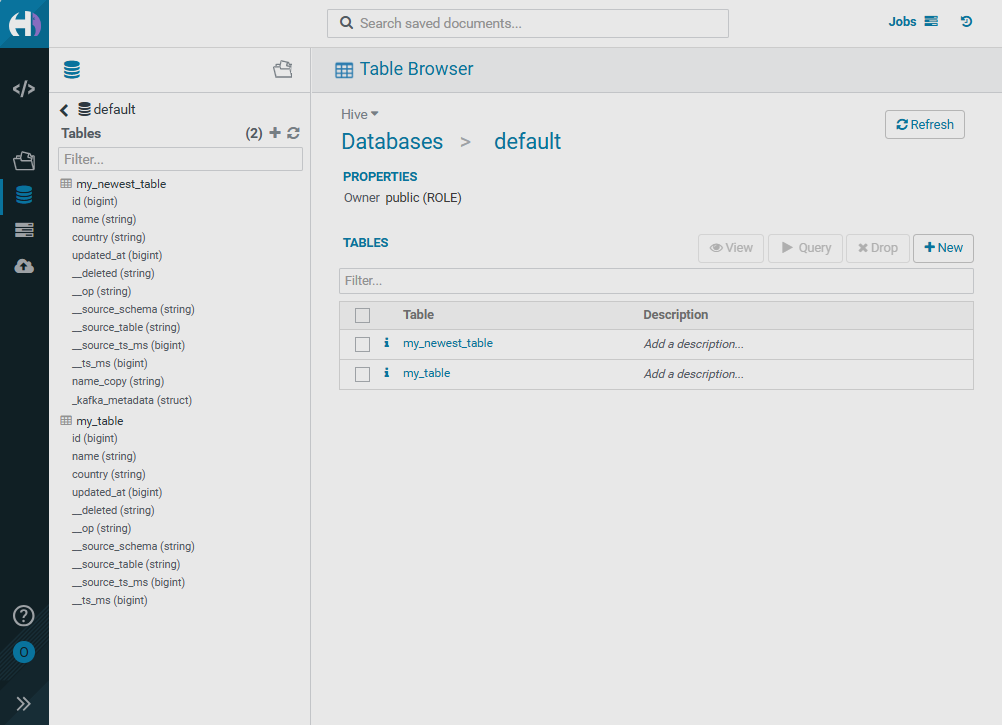
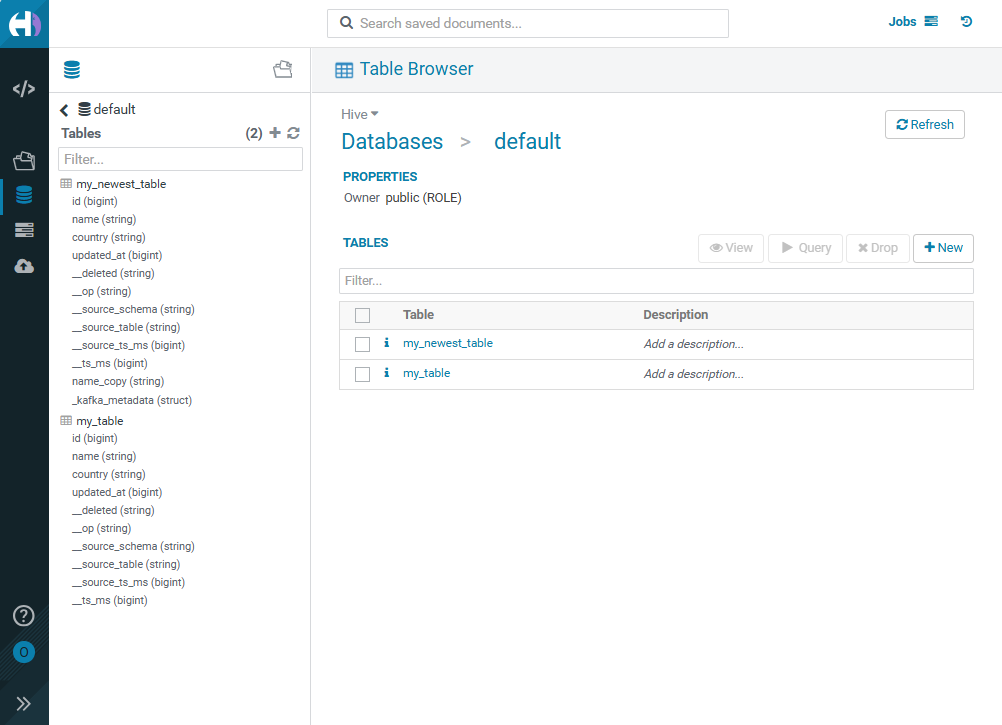
On the Table Browser → Databases → default → my_newest_table → Overview HUE page, there is a table schema containing the new fields.
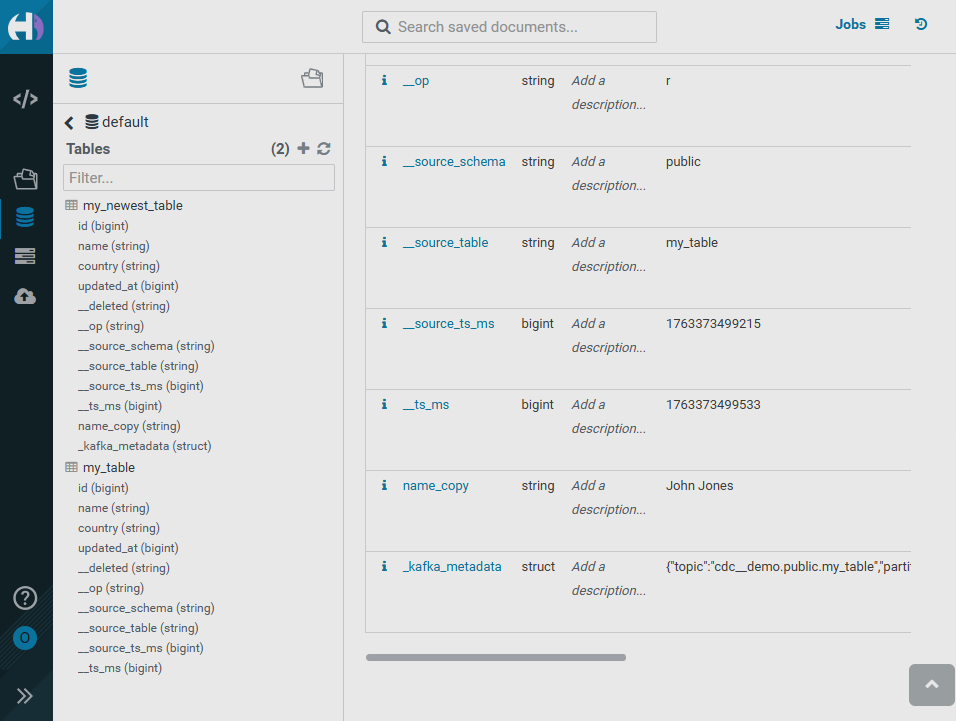
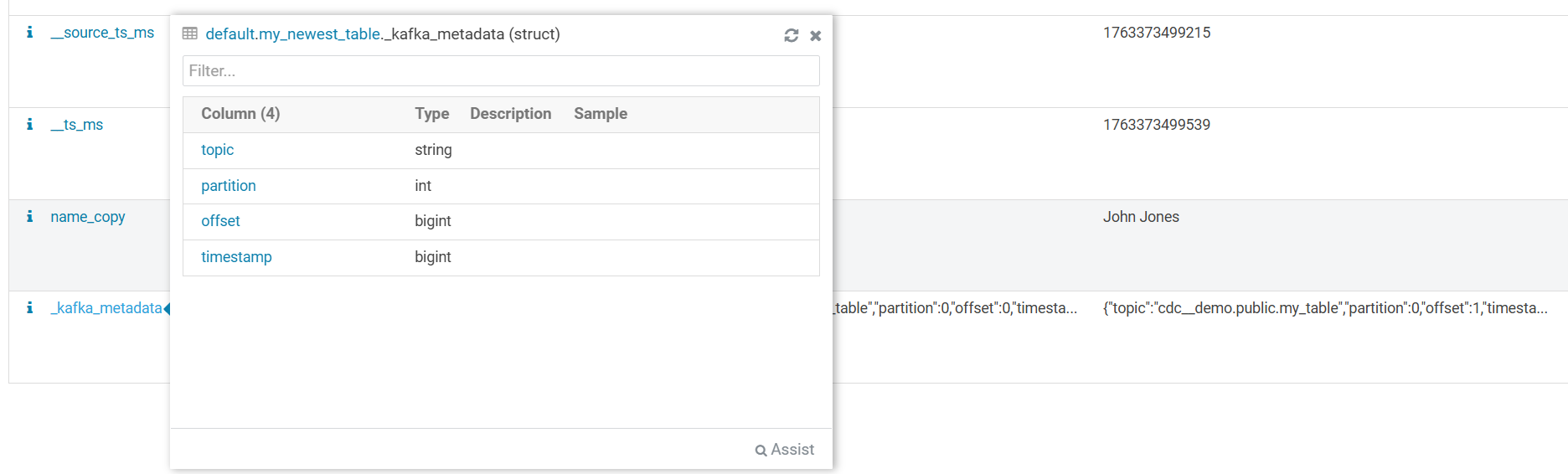
Hovering over the _kafka_metadata field opens a structure that contains the record’s metadata fields.