

Configure an external database
For production environments, it is recommended to use an external PostgreSQL database as ADQM Control data storage for high performance and fault tolerance.
|
TIP
The recommended external service for ADQM Control is Arenadata Postgres (ADPG).
|
To configure an external database, follow the steps described below:
-
In PostgreSQL, run the following queries to create a user for ADQM Control to connect to an external database and a database owned by that user for use by ADQM Control services (the queries should be run under the default
postgresuser withsuperuserprivileges):CREATE ROLE <user_name> LOGIN PASSWORD '<user_password>'; CREATE DATABASE <database_name> OWNER <user_name>; -
Connect to the created database under a superuser and load the following extensions:
CREATE EXTENSION IF NOT EXISTS timescaledb; CREATE EXTENSION IF NOT EXISTS timescaledb_toolkit; CREATE EXTENSION IF NOT EXISTS pgcrypto; CREATE EXTENSION IF NOT EXISTS pg_trgm;NOTERecommended extension versions:
-
timescaledb— 2.15.0 -
timescaledb_toolkit— 1.19.0 -
pgcrypto— 1.3 -
pg_trgm— 1.6
When using higher versions, compatibility testing is required to ensure correct system operation.
-
-
To enable access to the
<database_name>database from an ADQM Control host as the<user_name>user, add an entry like the following to the pg_hba.conf file on the PostgreSQL server side:host <database_name> <user_name> <adqmc_host_address> trustwhere
<adqmc_host_address>is an address of the ADQM Control host (for example, if an IPv4 address of the ADQM Control host is10.92.41.87, replace<adqmc_host_address>with10.92.41.87/32). You can find description of theaddressfield and other fields of records in the pg_hba.conf file in the article The pg_hba.conf File. -
On the configuration page of the ADQM Control service, activate the Use external PostgreSQL server toggle and fill in parameters in the list that opens. The assignment of parameters is described in the Configuration parameters → ADQM Control → External PostgreSQL server section.
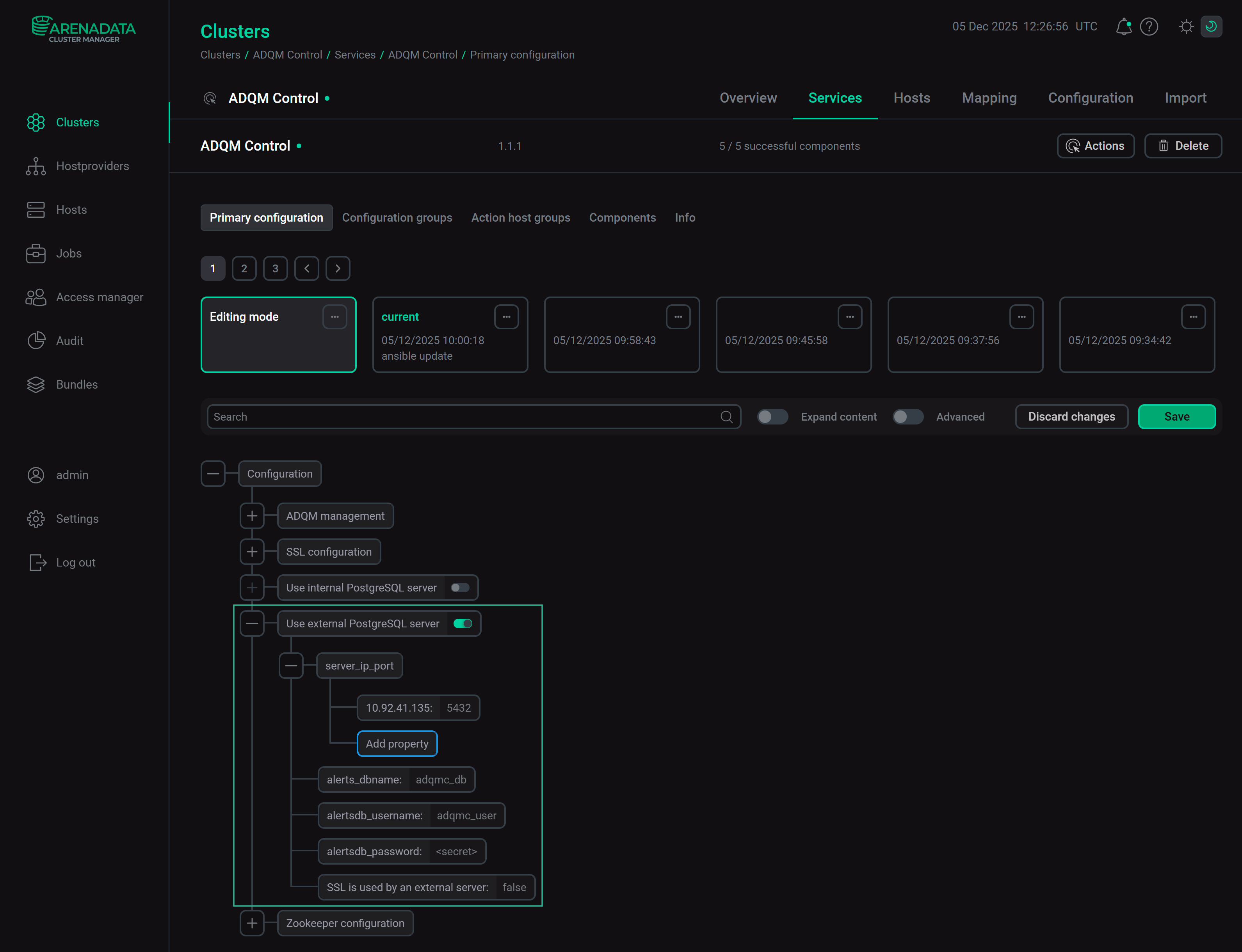 ADQM Control parameters for connecting to an external PostgreSQL database
 -
Click Save to save the ADQM Control configuration.
-
Install the ADQM Control service using the Install service action or execute the Reconfigure and restart action for the ADQM Control service if it is already installed.