

Data cleanup
On the Settings → Cleanup page in the ADQM Control web interface, a system owner (user with the Owner role) can enable automatic deletion of historical data (for example, outdated data stored for a long time) from ADQM Control in accordance with the specified retention period.
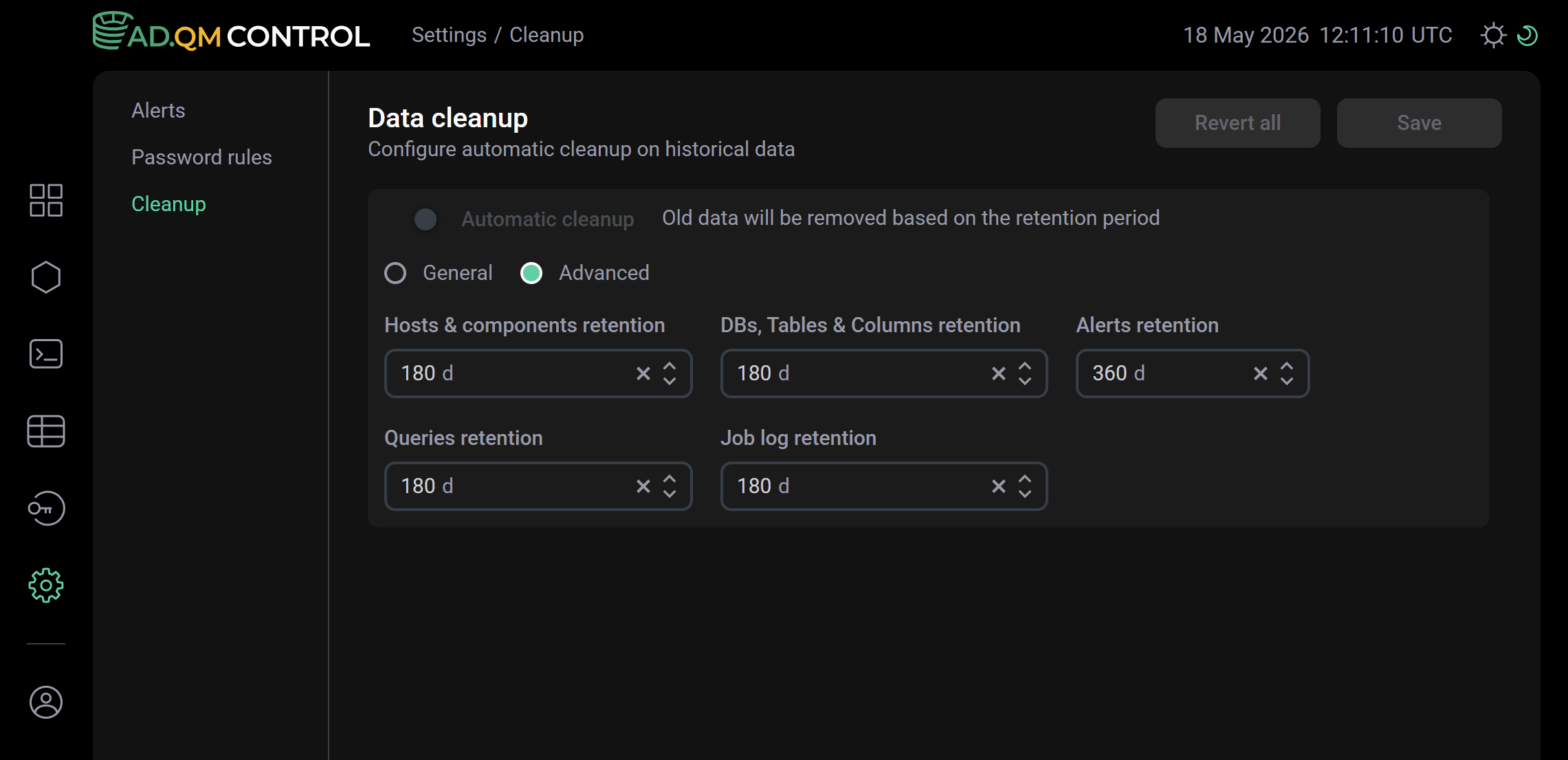
The 
 Automatic cleanup switch enables/disables the data cleanup job.
A retention period, after which data will be automatically deleted from ADQM Control, can be configured in two ways:
-
Enable the General option and set a retention period common to all data types (information on ADQM tables/queries/hosts, alerts, etc.) using the Common retention parameter.
-
Enable the Advanced option and configure the storage time separately for each data type using the following parameters:
-
Hosts & components retention — information on ADQM cluster hosts and components;
-
Queries retention — information on SQL queries run in the ADQM cluster;
-
DBs, Tables & Columns retention — information on ADQM cluster databases and tables;
-
Job log retention — logs of system jobs performed in ADQM Control;
-
Alerts retention — alerts about problems detected in the ADQM cluster.
-
Parameter values that configure the data storage time are specified in days, in the range from 1 to 365, inclusive.
Once all parameters have been configured, click Save to save the settings. The Revert all button discards all changes made (not yet saved by clicking Save).