

Configure a cluster
|
IMPORTANT
There is usually no need to change cluster configuration parameters. You can leave all parameters at the default values.
|
After creation a new cluster, you can configure it by performing the following steps:
-
Select a cluster on the Clusters page. To do this, click a cluster name in the Name column.
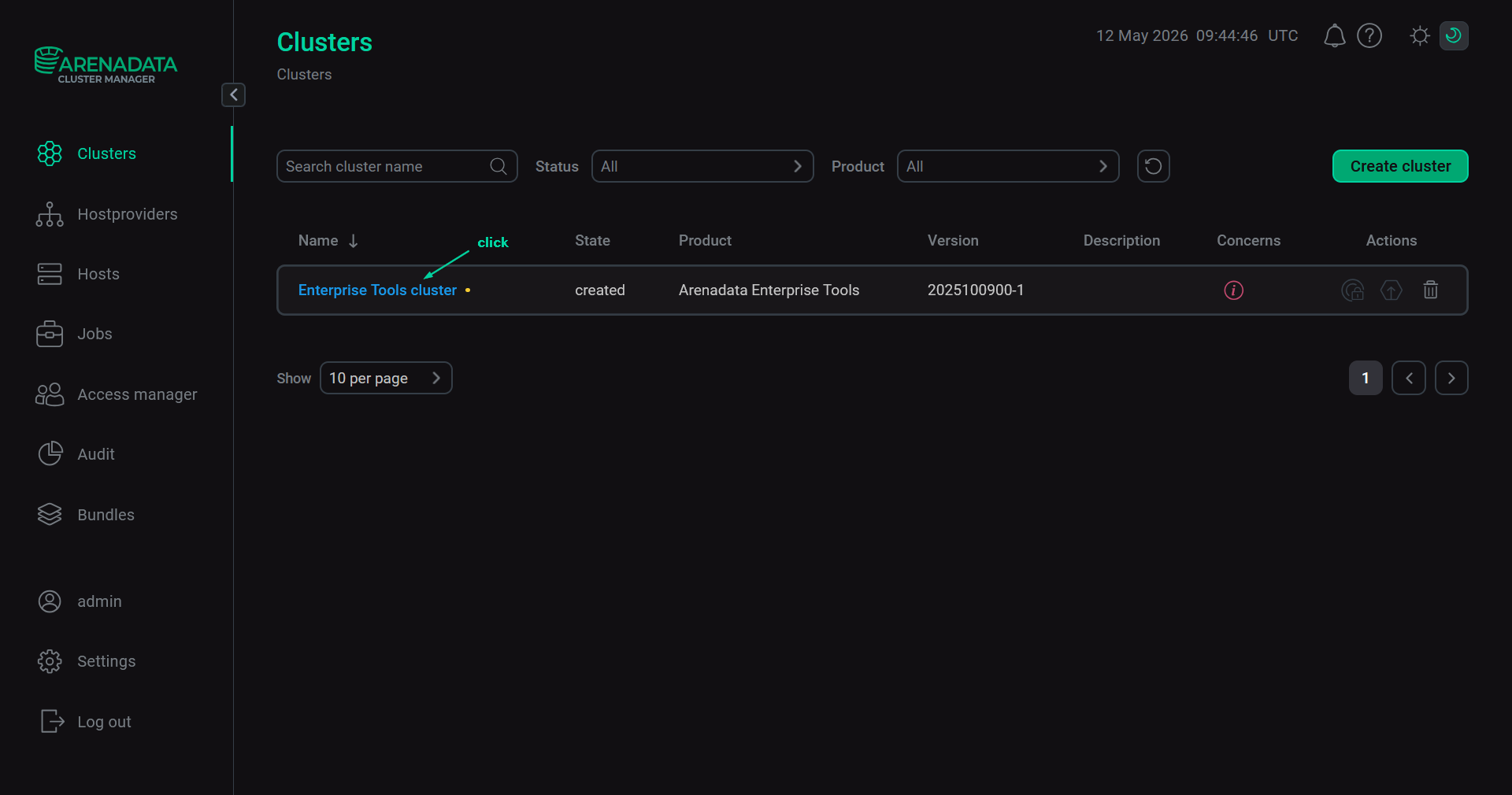 Select a cluster
-
Open the Configuration tab on the cluster page. The Configuration tab includes the following sections: Primary configuration, Configuration groups, Ansible settings.
-
Fill in all necessary parameters on the selected tab and click Save.
Primary configuration
The Configuration → Primary configuration tab allows you to configure the general cluster settings.
Parameters
Available configuration parameters are listed below:
-
The Timeout to unlock package manager section. It is displayed if the Show advanced switch is activated. The section contains the following parameters:
-
retries — the number of retries for cluster operations (
3by default). -
delay — the delay between retries in seconds (
10by default).
-
-
Use custom registry section. Using this parameter group is generally not recommended. Enable this parameter group only if you need to install an ADET cluster from a custom Docker Registry. Before starting the installation, the required ADET images, such as
et-registryandet-http-mirror, must be uploaded to the custom Docker Registry. For a standard offline ADET installation, using a custom Docker Registry is not required, because after installation ADET provides Docker Registry and HTTP Mirror services on its own. The section contains the following parameters:-
registry — network address of the custom Docker Registry in the
<host>:<port>format, for exampleregistry.company.local:8443. During ADET cluster installation, ADCM tries to pull the required ADET service images from this registry. Custom registries that require authentication with a login and password are not supported. ADCM checks the registry address during cluster deployment, not when the configuration form is saved. -
prefix — repository path within the custom Docker Registry where the Arenadata images are stored. Nested paths are supported, for example dataplane/subfolder.
-
Use self-signed certificate — flag that defines the trust policy for the Docker registry’s TLS certificate:
-
false— allows only a certificate issued by a trusted Certificate Authority (CA). -
true— allows using a self-signed certificate. Set this flag totrueif your Docker Registry uses an internal or manually generated certificate; otherwise, Docker will block the connection.NOTECurrently, the self-signed certificate specified in the Self-signed certificate field is not automatically added to the trusted certificate storage on cluster nodes. So before deploying the cluster, manually place the certificate on each node in the directory used by Docker for certificates of the custom registry.
For example, on Ubuntu, save the certificate as /etc/docker/certs.d/<host>:<port>/registry_ca.crt, where
<host>:<port>is the registry address (for exampleregistry.company.local:8443).If the certificate is not added manually, pulling images from the custom registry may fail with a TLS verification error, for example:
tls: failed to verify certificate: x509: certificate signed by unknown authority.
-
-
Self-signed certificate — full content of the self-signed certificate file in PEM format, including the opening and closing lines:
-----BEGIN CERTIFICATE-----and-----END CERTIFICATE-----.
-
-
The Use existing docker section. This parameter defines whether ADCM installs and manages Docker on cluster hosts or uses an existing Docker-compatible environment. Possible values:
-
false(recommended) — ADCM fully controls the container environment. During cluster deployment, ADCM automatically installs, configures, and starts a validated version of Docker. -
true— ADCM skips the Docker installation step and connects to an existing Docker-compatible container engine on ADET hosts. If you use this option, verify the existing Docker engine as described in Prerequisites for "Use existing docker".
-
-
The read-only SSL section. The parameters in this section can be changed via the Manage SSL ADET cluster action.
Prerequisites for "Use existing docker"
If Use existing docker is set to true, verify one of the following Docker-compatible environments on each ADET host.
Docker
Use this scenario if Docker is installed on ADET hosts.
-
Check that the Docker CLI is installed and available as
docker:$ docker --versionSample result:
Docker version 29.1.3, build f415da8
-
Check that the Docker socket and service are active:
$ systemctl is-active docker.socket
$ systemctl is-active docker.service
Sample result:
active
active
-
Check that the Docker CLI can connect to the Docker engine:
$ sudo docker infoSample resultClient: Version: 29.1.3 Context: default Debug Mode: false Plugins: trust: Manage trust on Docker images (Docker Inc.) Version: 29.1.3 Path: /usr/libexec/docker/cli-plugins/docker-trust Server: Containers: 4 Running: 4 Paused: 0 Stopped: 0 Images: 4 Server Version: 29.1.3 Storage Driver: overlayfs driver-type: io.containerd.snapshotter.v1 Logging Driver: json-file Cgroup Driver: systemd Cgroup Version: 2 Plugins: Volume: local Network: bridge host ipvlan macvlan null overlay Log: awslogs fluentd gcplogs gelf journald json-file local splunk syslog CDI spec directories: /etc/cdi /var/run/cdi Swarm: inactive Runtimes: io.containerd.runc.v2 runc Default Runtime: runc Init Binary: docker-init containerd version: runc version: init version: Security Options: apparmor seccomp Profile: builtin cgroupns Kernel Version: 5.15.0-185-generic Operating System: Ubuntu 22.04.5 LTS OSType: linux Architecture: x86_64 CPUs: 2 Total Memory: 7.752GiB Name: vea-et-x ID: 5ee23023-ee2d-40e3-b53b-98f5ef184449 Docker Root Dir: /var/lib/docker Debug Mode: false Experimental: false Insecure Registries: ::1/128 127.0.0.0/8 Live Restore Enabled: false Firewall Backend: iptables
Podman with Docker compatibility
Use this scenario if you want to use Podman as the container engine on ADET hosts.
|
NOTE
ADET does not currently support calling For distributions with Podman, install the |
-
Check that the Docker-compatible CLI is installed and available as
docker:$ docker --versionSample result:
Emulate Docker CLI using podman. Create /etc/containers/nodocker to quiet msg.
podman version 4.9.3
-
Check that the Podman socket is active:
$ systemctl is-active podman.socketSample result:
active
-
Check that the Docker-compatible CLI can connect to Podman:
$ sudo docker infoSample resultEmulate Docker CLI using podman. Create /etc/containers/nodocker to quiet msg. host: arch: amd64 buildahVersion: 1.33.7 cgroupControllers: - cpuset - cpu - io - memory - hugetlb - pids - rdma - misc cgroupManager: systemd cgroupVersion: v2 conmon: package: conmon_2.1.10+ds1-1build2_amd64 path: /usr/bin/conmon version: 'conmon version 2.1.10, commit: unknown' cpuUtilization: idlePercent: 89.94 systemPercent: 3.2 userPercent: 6.86 cpus: 2 databaseBackend: sqlite distribution: codename: noble distribution: ubuntu version: "24.04" eventLogger: journald freeLocks: 2048 hostname: vea-podman-test idMappings: gidmap: null uidmap: null kernel: 6.8.0-134-generic linkmode: dynamic logDriver: journald memFree: 3094835200 memTotal: 4106100736 networkBackend: netavark networkBackendInfo: backend: netavark dns: package: aardvark-dns_1.4.0-5_amd64 path: /usr/lib/podman/aardvark-dns version: aardvark-dns 1.4.0 package: netavark_1.4.0-4_amd64 path: /usr/lib/podman/netavark version: netavark 1.4.0 ociRuntime: name: crun package: crun_1.14.1-1_amd64 path: /usr/bin/crun version: |- crun version 1.14.1 commit: de537a7965bfbe9992e2cfae0baeb56a08128171 rundir: /run/crun spec: 1.0.0 +SYSTEMD +SELINUX +APPARMOR +CAP +SECCOMP +EBPF +WASM:wasmedge +YAJL os: linux pasta: executable: /usr/bin/pasta package: passt_0.0~git20240220.1e6f92b-1_amd64 version: | pasta unknown version Copyright Red Hat GNU General Public License, version 2 or later <https://www.gnu.org/licenses/old-licenses/gpl-2.0.html> This is free software: you are free to change and redistribute it. There is NO WARRANTY, to the extent permitted by law. remoteSocket: exists: true path: /run/podman/podman.sock security: apparmorEnabled: true capabilities: CAP_CHOWN,CAP_DAC_OVERRIDE,CAP_FOWNER,CAP_FSETID,CAP_KILL,CAP_ NET_BIND_SERVICE,CAP_SETFCAP,CAP_SETGID,CAP_SETPCAP,CAP_SETUID,CAP_SYS_CHROOT rootless: false seccompEnabled: true seccompProfilePath: /usr/share/containers/seccomp.json selinuxEnabled: false serviceIsRemote: false slirp4netns: executable: /usr/bin/slirp4netns package: slirp4netns_1.2.1-1build2_amd64 version: |- slirp4netns version 1.2.1 commit: 09e31e92fa3d2a1d3ca261adaeb012c8d75a8194 libslirp: 4.7.0 SLIRP_CONFIG_VERSION_MAX: 4 libseccomp: 2.5.5 swapFree: 0 swapTotal: 0 uptime: 0h 3m 59.00s variant: "" plugins: authorization: null log: - k8s-file - none - passthrough - journald network: - bridge - macvlan - ipvlan volume: - local registries: {} store: configFile: /usr/share/containers/storage.conf containerStore: number: 0 paused: 0 running: 0 stopped: 0 graphDriverName: overlay graphOptions: {} graphRoot: /var/lib/containers/storage graphRootAllocated: 19682557952 graphRootUsed: 1690624000 graphStatus: Backing Filesystem: extfs Native Overlay Diff: "true" Supports d_type: "true" Supports shifting: "true" Supports volatile: "true" Using metacopy: "false" imageCopyTmpDir: /var/tmp imageStore: number: 0 runRoot: /run/containers/storage transientStore: false volumePath: /var/lib/containers/storage/volumes version: APIVersion: 4.9.3 Built: 0 BuiltTime: Thu Jan 1 00:00:00 1970 GitCommit: "" GoVersion: go1.22.2 Os: linux OsArch: linux/amd64 Version: 4.9.3
Configuration groups
The Configuration → Configuration groups tab is designed to set cluster configuration groups.
Ansible settings
The Configuration → Ansible settings tab allows you to set Ansible configuration options at the cluster level. The tab is available starting with ADCM 2.2.0.
| Name | Description | Default |
|---|---|---|
forks |
The number of parallel processes to spawn when communicating with remote hosts |
5 |