

Uninstall
The Uninstall action stops and then uninstalls all cluster services, their components, and mapping.
-
To run the action, go to Clusters page, click

 in the Actions column, and select the action in the drop-down list.
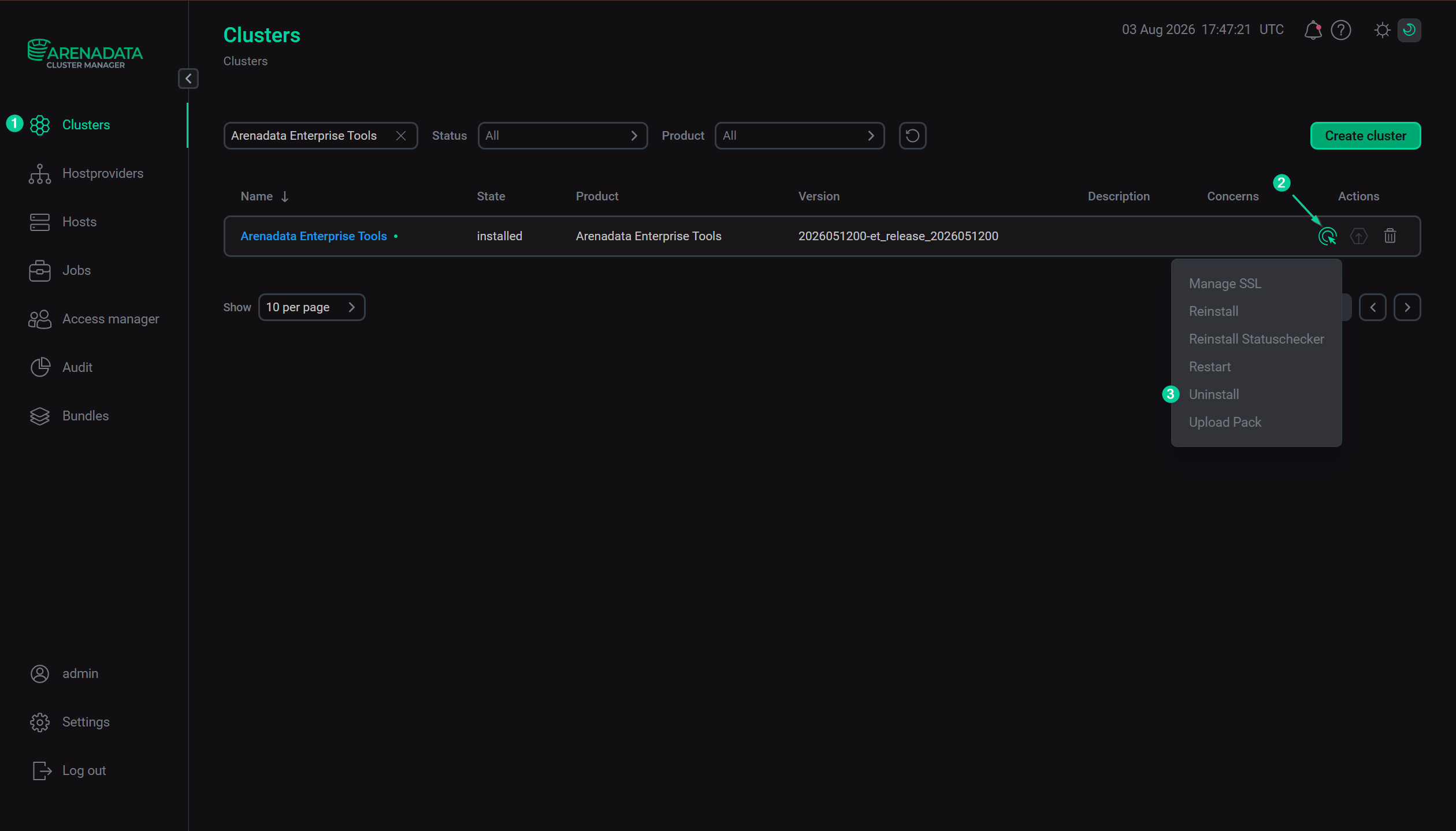 Execute the "Uninstall" action
-
On the Raising concerns tab:
-
If necessary, enable the Raise non-blocking concern toggle to run the action without blocking the cluster during action execution.
-
Click Next.
-
-
On the Confirmation tab:
-
Add a comment with a brief description of the changes.
-
Select the Verbose checkbox to display additional information about the action execution on the Jobs page.
-
Click Run.
-
-
Wait until the uninstallation process is complete.
-
You can find the execution process, logs, and result of the action on the Jobs page. On this page, you can view action execution details, including verbose Ansible STDOUT/STDERR outputs.
|
IMPORTANT
The Uninstall action removes Enterprise Tools from the hosts where it was installed. This action should not be considered a procedure for preparing the hosts for secure reuse. If completely clean hosts are required, reinstall their operating systems to remove possible leftover artifacts.
|